
HR AI use cases: automate and scale HR workflows
Explore HR AI use cases that automate onboarding, payroll, and benefits. Learn how to implement end-to-end workflows and scale HR operations faster.


TL;DR
AI in HR use cases focuses on completing workflows end to end, not just responding to employee queries.

AI agents replace manual steps by orchestrating knowledge, systems, and actions in a single flow.
Common use cases include onboarding, payroll support, benefits updates, and employee profile management.
Real impact comes from faster resolution, reduced workload, and scalable HR operations without added headcount.
HR teams spend nearly 70% of their time on administrative work payroll, compliance, policy queries, and repetitive employee requests. It’s not just a workload issue; it’s how most HR functions are structured today. As noted by Gartner, a significant portion of HR effort still goes into operational tasks that don’t directly drive business outcomes.
For lean teams, this quickly becomes unmanageable. Without dedicated HR support, even simple requests start piling up, slowing everything down and affecting employee experience. For SMBs and enterprises, the scale is different, but the pressure is the same—more requests, more dependencies, and increasing operational cost.
By introducing AI into HR workflows, organizations can streamline operations, reduce manual effort, and free up teams to focus on strategic initiatives. More importantly, modern HR automation use cases go beyond task automation they enable end-to-end resolution, where employee requests are not just answered, but fully executed through intelligent workflows.
However, traditional HR tools fall short. They lack native AI capabilities, struggle with integrations, and require complex workflow configurations that limit real scalability. Most organizations recognize this gap but continue operating within these constraints.
What’s changing now is the rise of AI agent orchestration.
Platforms like Workativ introduce an orchestration layer that connects intent understanding, knowledge retrieval, and real system actions into a single flow. The result is not just automation, but autonomous HR operations in which requests are resolved without manual intervention.
In this blog, we’ll explore key AI-in-HR use cases, how to orchestrate them effectively, and how platforms like Workativ enable a shift from fragmented automation to fully autonomous HR workflows.
What are HR AI use cases today?
HR AI use cases refer to the application of AI to automate, assist, and increasingly execute HR workflows—from answering employee queries to completing tasks like onboarding, payroll support, and benefits management.
These use cases haven’t appeared overnight. They’ve evolved over time:
Early HR automation focused on rule-based workflows
Then came chatbots that could handle basic queries
Now, AI agents are starting to handle both understanding and execution
Despite this progress, most HR systems still fall short of completing workflows end-to-end.
Some of the common limitations include:
Fragmented tools that don’t communicate seamlessly
Manual approvals and handoffs that slow down resolution
Lack of an execution layer, where tasks actually get completed
As a result, many HR automation use cases still rely on human intervention at critical steps. The system may guide the process, but it doesn’t finish it.
This is why organizations are moving toward more connected, execution-driven workflows—where understanding a request is only the first step, and completing it becomes the real outcome.
Here’s a clean, natural, and LLM-friendly version of your section with a sharper comparison and no forced phrasing:
From HR automation to AI agents: what actually changes
The difference isn’t just better responses it’s what happens after a request is understood.
Traditional HR automation helps manage workflows. AI agents are designed to complete them.
Here’s how that shift shows up in practice:
Capability | HR automation | AI agents (Workativ) |
|---|---|---|
Query handling | Responds to FAQs | Understands intent and takes action |
Workflow execution | Predefined, rule-based | Dynamic and context-aware |
Integrations | Limited triggers between systems | Deep orchestration across HR and IT tools |
Resolution | Partial, requires follow-up | End-to-end completion |
Learning | Static workflows | Improves continuously with usage and feedback |
Most HR automation systems stop at guidance they tell users what to do next. AI agents go further by handling the next step themselves, whether that’s updating a system, triggering an approval, or completing a request.
In practical terms, AI in HR use cases is moving from supporting tasks to owning outcomes.
Core HR AI use cases you can implement
Most HR teams don’t need more tools—they need fewer manual steps.
The real value of AI in HR shows up in everyday workflows that quietly consume hours: onboarding new hires, responding to payroll questions, updating employee records, or handling benefits requests. These are not complex problems, but they are constant—and that’s exactly why they matter.
What’s changing now is not what gets done, but how much of it gets completed without human involvement.
Let’s look at some of the most practical HR AI use cases you can start implementing.
1. Employee onboarding automation
Onboarding often looks simple on paper but becomes messy in execution. Documents are scattered, access requests get delayed, and follow-ups pile up.
With AI, onboarding becomes a coordinated flow rather than a checklist.
From the moment a new employee is added, the system can trigger onboarding steps, assign tasks across teams, provision tools and access, and keep track of what’s completed and what’s pending. Instead of HR chasing updates, the process moves forward on its own.
The result is not just faster onboarding—it’s a smoother first experience for the employee.
2. Employee offboarding automation
Offboarding carries more risk than onboarding. Missing a single step—like failing to revoke access—can create security and compliance issues.
AI helps standardize and enforce this process.
Once an exit request is initiated, approvals can be handled, access can be revoked across systems, and assets can be tracked without relying on manual coordination. Every step follows a defined flow, reducing the chances of something slipping through.
This turns offboarding from a reactive task into a controlled, consistent process.
3. Payroll enquiry resolution
Payroll questions are one of the most common—and repetitive—requests HR teams deal with.
Employees want clarity on salary breakdowns, deductions, or tax calculations. These questions are usually straightforward, but answering them repeatedly takes time.
AI can handle this instantly by pulling the relevant data, explaining it in context, and resolving the query without escalation. Instead of waiting for HR to respond, employees get immediate answers.
Over time, this significantly reduces the volume of support requests HR needs to manage.
4. Benefits management
Benefits are high-interest but often confusing. Employees don’t just want to read policies—they want to act on them.
Take a simple example: adding a family member to a dental plan.
Instead of going through forms, emails, and approvals, the process can happen in one continuous flow. The system checks eligibility, collects the required details, validates the information, updates the benefits system, and confirms the change.
What used to take multiple steps across systems becomes a single interaction.
This is where AI moves beyond assistance and starts completing the task itself.
5. HR policy and compliance queries
Policy-related questions are constant—leave rules, reimbursement limits, eligibility criteria. The challenge isn’t just answering them, but answering them consistently.
AI ensures that responses are pulled directly from the latest policies and presented in a way that’s easy to understand. More importantly, it can guide the employee on what to do next, whether that’s applying for leave or submitting a request.
This reduces ambiguity and keeps everyone aligned with the same source of truth.
6. Password reset and access-related workflows
Some of the most frequent employee issues sit between HR and IT—password resets, account access, and permissions.
These requests often get routed across teams, creating unnecessary delays.
With AI, the process becomes straightforward. The system verifies identity, triggers the required action through connected systems, and confirms completion—all without manual intervention.
It eliminates back-and-forth and gets employees back to work faster.
7. Employee profile updates
Updating personal information may seem simple, but it’s often handled via forms, emails, or tickets.
AI simplifies this by guiding employees through the required inputs, validating the data, and updating the system directly. There’s no need for HR to review every request manually unless something is flagged.
This keeps records accurate while reducing administrative overhead.
Across all these use cases, the pattern is the same.
The goal isn’t just to respond faster—it’s to complete the request without breaking the flow.
That’s what turns HR automation from a support function into something that actually scales with the organization.
Why most HR automation use cases fail
Most HR automation doesn’t fail because of intent, it fails because it can’t handle how work actually happens.
Static workflows break easily : They work for predictable scenarios, but real requests vary. One missing detail or exception, and the process falls back to manual handling.
Disconnected systems slow everything down : When tools don’t integrate deeply, automation stops midway. Tasks still require switching between systems to complete.
No execution layer : Many systems guide the process, but don’t finish it. Requests get routed, not resolved—leading to delays and follow-ups.
What actually fixes this : Automation needs to move beyond predefined steps.
Context awareness, so the system understands each request properly
Action execution so tasks are completed, not just suggested
Workflow orchestration so everything runs in one continuous flow
When these come together, HR workflows stop breaking midway and complete end to end.
How Workativ orchestrates HR AI workflows end-to-end
What makes modern HR AI use cases effective isn’t just automation—it’s how each step connects into a single flow. Instead of treating queries, data, and actions separately, everything works together from start to finish.
Here’s how that orchestration typically works:
Step 1: Understanding the request : An employee raises a request—whether it’s through Slack, Teams, or an internal portal. The system interprets the intent, not just the keywords.
Step 2: Grounding in the right context : Relevant information is pulled from policies, HR documents, benefits data, or payroll systems. This ensures the response is based on actual company data, not generic answers.
Step 3: Deciding what needs to happen next : At this point, the system determines the path forward. Some requests can be answered directly, while others require actions like updating records or routing approvals.
Step 4: Executing actions across systems : If an action is needed, it connects with the right tools—HRIS platforms, identity systems, or ticketing tools and carries out the task without switching contexts.
Step 5: Handling multi-step workflows : Many HR tasks aren’t single actions. They involve approvals, validations, and updates. These steps are managed within the same flow, without breaking the process.
Step 6: Closing the loop and improving over time : Once the request is completed, the system confirms the outcome and learns from the interaction, improving how similar requests are handled in the future.
When these steps are connected, HR automation use cases move beyond partial workflows.
This is where AI in HR use cases starts delivering complete, end-to-end resolution instead of just assisting along the way.
How to implement HR AI use cases with Workativ
Implementing HR AI use cases becomes much simpler when workflows, data, and systems are connected in one place. Instead of building everything from scratch, you configure, connect, and deploy.
Use AI agent studio to design your workflows
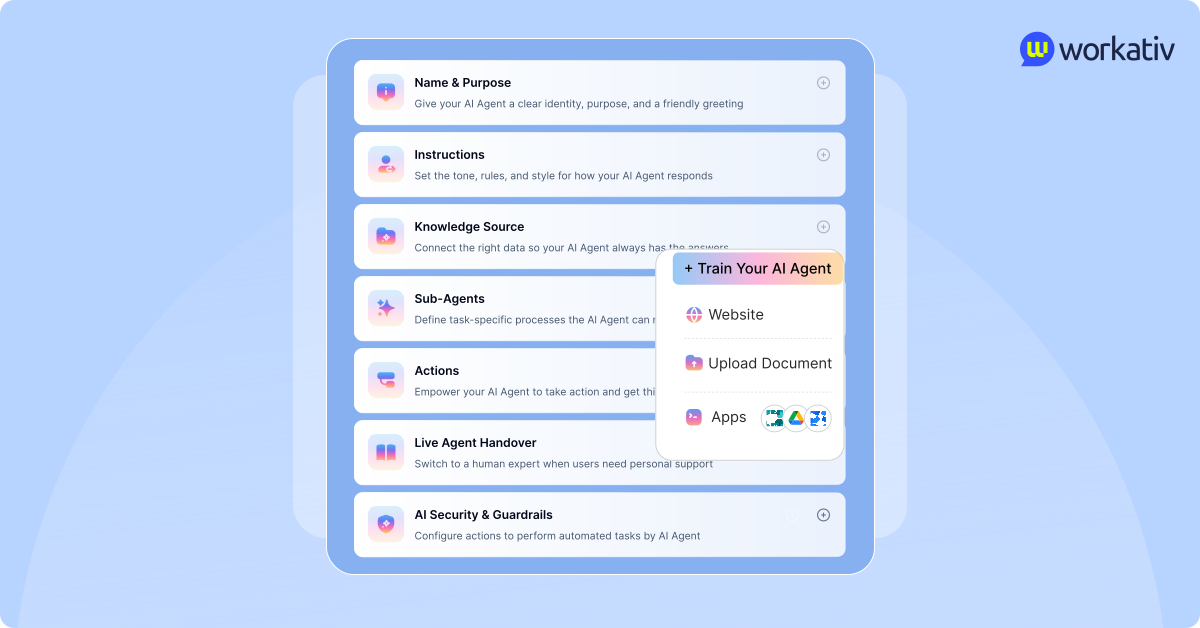
Everything starts in the agent studio. This is where you define the agent’s role, set instructions, connect knowledge, and configure actions. Instead of writing logic, you visually assemble how HR requests should be handled—from understanding the request to completing it.
Start with pre-built HR templates for faster time to market
You don’t begin with a blank canvas. Pre-built templates for onboarding, payroll support, leave requests, and benefits give you a ready starting point. You can quickly adapt them to your policies and go live faster without spending weeks designing workflows.
Connect knowledge with agentic RAG
Bring together your HR policies, employee handbooks, payroll data, and benefits documents. This ensures every response and action is grounded in real company data, not assumptions, making workflows accurate and reliable.
Integrate your HR systems

HR requests often require multiple systems to complete. By connecting tools like Workday, BambooHR, Okta, Azure AD, or ServiceNow, workflows can move seamlessly across systems without manual intervention.
Configure actions to complete tasks
This is where HR automation becomes execution. Actions allow the system to update employee records, process leave requests, trigger approvals, or reset access. Requests don’t stop at answers—they get completed.
Deploy across channels your employees already use
Make these workflows available on Slack, Microsoft Teams, intranet portals, or other channels. Employees can raise and resolve requests without switching tools, keeping everything in their natural flow of work.

Monitor performance with AI analytics
Once live, you get visibility into how workflows are performing. You can track resolution rates, response times, and common queries, then continuously refine and improve without rebuilding from scratch.

Go live in days, not months
Because everything is modular—templates, integrations, and actions—you can implement HR AI use cases quickly and start seeing value early, while improving over time.
The real impact of AI in HR use cases
The impact of AI in HR isn’t just about saving time—it’s about changing how HR operations function at scale.
One of the most immediate outcomes is a sharp reduction in HR tickets. Repetitive queries around payroll, policies, and benefits no longer require manual handling, often leading to a 60–80% drop in support volume. What used to flood HR queues gets resolved in real time.
Resolution speed improves just as noticeably. Employees don’t have to wait for responses or follow-ups—requests are handled instantly or completed within the same interaction. This naturally reduces backlogs and improves service quality.
There’s also a clear cost advantage. When workflows run end-to-end without human intervention, the cost per request drops—learn how to evaluate these savings in our guide on measuring AI ROI in HR.
Employee experience improves in more practical ways. Faster responses, consistent information, and the ability to complete tasks in one flow remove friction from everyday HR interactions.
What makes this sustainable is how operations scale. As request volumes grow, the system handles the load without putting additional pressure on HR teams, enabling scalable HR operations across regions and time zones.
A key part of this is visibility. With a shared live inbox, teams get a single place to manage all employee interactions—whether handled by AI or escalated to humans. This creates a single source of truth, reduces duplication, and makes handoffs smoother when human intervention is needed.
At the same time, intelligent triage ensures that requests are categorized and routed automatically. Instead of manually sorting tickets, HR teams focus only on what truly requires attention, which cuts down response time further.
What also stands out is how quickly these outcomes can be achieved. With pre-built templates and an intuitive no-code agent studio, teams don’t need long implementation cycles. Workflows can be set up, tested, and deployed much faster, allowing organizations to start seeing impact early and improve continuously over time.
Taken together, these changes don’t just optimize HR workflows—they redefine how HR teams operate on a day-to-day basis.
Conclusion: from HR support to HR execution
HR AI use cases are moving beyond handling requests—they’re starting to complete them.
What changes here isn’t just speed, but ownership. Workflows that once depended on multiple handoffs can now move from request to resolution in a single flow. Routine tasks no longer need constant oversight, and HR teams aren’t pulled into every step of the process.
This reduces friction across the board. Employees get faster outcomes, processes become more consistent, and operations don’t slow down as request volumes grow.
As organizations connect knowledge, systems, and actions more tightly, HR begins to operate with more structure and less manual effort. It becomes easier to scale without adding complexity or increasing headcount.
The real advantage goes to teams that adopt this approach early. They’re not just improving efficiency—they’re building HR operations that can keep up with growth without breaking under it.
Start building HR workflows that actually complete tasks—not just respond.
Book a demo with Workativ and see it in action.
FAQs
What is the difference between AI automation and AI orchestration in HR?
AI automation handles tasks individually, while orchestration connects multiple steps, systems, and decisions into a single end-to-end workflow.
Why do traditional HR automation tools fail to scale?
They rely on static workflows, limited integrations, and lack execution capabilities, causing processes to break and require manual intervention.
How do AI agents improve workflow accuracy in HR?
AI agents use real-time data and context-aware decision-making to ensure tasks follow policies and are executed consistently across systems.
Can AI in HR reduce cross-team dependencies?
Yes, by handling workflows across HR and IT systems, AI eliminates the need for manual coordination between teams.
What are HR AI use cases?
HR AI use cases refer to applying AI to automate and execute HR workflows such as onboarding, payroll queries, benefits management, and employee support.
How are AI agents different from HR chatbots?
HR chatbots primarily answer questions, while AI agents go further by executing tasks, updating systems, triggering workflows, and completing requests end-to-end.
What are the most common HR automation use cases?
Some of the most common use cases include employee onboarding and offboarding, payroll support, benefits updates, policy queries, password resets, and profile updates.
Can HR AI handle complex workflows like benefits updates?
Yes, AI can manage multi-step workflows such as eligibility checks, data collection, validation, and system updates within a single flow.
'%3e%3cpath%20d='M11.5732%2031.7068L19.2977%2022.7433L11.5732%2011.5366H17.4664L22.6245%2018.942L29.0522%2011.5366H30.7788L23.4029%2020.0985L31.4127%2031.7086H25.4997L20.1231%2023.9069L13.3197%2031.7068H11.5732ZM16.6519%2012.8366H13.9536L26.354%2030.4462H28.9926L28.8265%2030.1576L16.6519%2012.8366Z'%20fill='%230C0C0C'/%3e%3c/g%3e%3cdefs%3e%3cclipPath%20id='clip0_505_14364'%3e%3crect%20width='19.7681'%20height='20.2432'%20fill='white'%20transform='translate(11.573%2011.5365)'/%3e%3c/clipPath%3e%3c/defs%3e%3c/svg%3e)

'%3e%3cpath%20d='M25.2175%2011.7557L26.9132%2011.911V15.0496C26.0135%2015.1444%2024.1746%2014.7452%2023.5821%2015.5947C23.4908%2015.726%2023.3291%2016.1592%2023.3291%2016.3091V19.002H26.7392L26.3346%2022.5281H23.3291V31.5952H19.707V22.5863L19.649%2022.5281H16.6628V19.002H19.707C19.7813%2017.4024%2019.4664%2015.7042%2020.1132%2014.1986C20.6748%2012.8902%2021.7857%2012.0974%2023.1666%2011.8435L23.7151%2011.7557H25.2183H25.2175Z'%20fill='%230C0C0C'/%3e%3c/g%3e%3cdefs%3e%3cclipPath%20id='clip0_505_14375'%3e%3crect%20width='10.2695'%20height='19.8027'%20fill='white'%20transform='translate(16.658%2011.7567)'/%3e%3c/clipPath%3e%3c/defs%3e%3c/svg%3e)
About the Author
Deepa Majumder

Senior content writer
Deepa Majumder is a writer who nails the art of crafting bespoke thought leadership articles to help business leaders tap into rich insights in their journey of organization-wide digital transformation. Over the years, she has dedicatedly engaged herself in the process of continuous learning and development across business continuity management and organizational resilience.
Her pieces intricately highlight the best ways to transform employee and customer experience. When not writing, she spends time on leisure activities.
Auto-resolve 60% of Your Employee
Queries With AI Agents & Automation
- No credit card required
- Setup in minutes
- Cancel Anytime