

The chatbot should pull responses from verified HR policies, IT guides, helpdesk articles, payroll documents, and internal knowledge bases.
10 Ways to Use AI Chatbots for Internal IT and HR Support
AI chatbots for IT and HR support automate password resets, onboarding, and leave requests, cutting tickets by 75%. See real use cases. Start your free trial.

Deepa Majumder
Senior content writer
21 Jan 2025

TL;DR
AI chatbots automate high-volume IT and HR requests like password resets, leave queries, and onboarding, reducing manual workload and improving response speed.

Unlike rule-based bots, AI-driven chatbots understand intent, handle multi-step workflows, and execute actions directly across integrated systems.
Deploying chatbots in tools like Slack and Teams enables employees to resolve issues instantly without switching platforms or raising tickets.
Organizations adopting AI chatbots see faster resolution, improved employee experience, and scalable support without increasing headcount.
Employees do not wake up wanting to raise a ticket.
They just want their VPN to work, their access approved, their PTO balance clarified, or their payslip shared fast inside Slack or Microsoft Teams. But internal support teams still receive a high volume of repetitive questions and routine requests, creating long queues and slowing productivity.
Using AI chatbots for IT support helps teams automate high-volume service desk requests, such as password resets, VPN support, ticket updates, and software access. Using AI chatbots for HR support enables employees to self-service PTO, onboarding, payroll questions, and reimbursements without waiting for a human response.
In this blog, we will break down 10 practical ways to use AI chatbots for internal IT and HR support, with real workflows you can implement to reduce ticket volume and speed up resolutions.
Why internal IT and HR support needs more than a ticketing portal
Employees do not want to raise tickets for every small issue. They want fast answers, clear next steps, and support inside the tools they already use. That is why more teams are moving from static portals to an AI chatbot for internal IT and HR support.
An internal support chatbot acts as the first layer of employee help. It can answer policy questions, troubleshoot IT issues, create tickets, check request status, trigger approvals, and escalate complex cases to the right human team.
This is especially useful for companies handling repetitive requests across IT, HR, payroll, facilities, and finance. Instead of forcing employees to search for documents or wait in queues, an AI employee support chatbot provides them with instant help in Slack, Microsoft Teams, or an internal portal.
What is an AI chatbot for internal IT and HR support?
An AI chatbot for internal IT and HR support is a conversational assistant that helps employees get answers, complete routine requests, and connect with the right support team without navigating multiple portals.
For IT, it can help with password resets, VPN troubleshooting, software access, ticket creation, device requests, and service status updates. For HR, it can answer policy questions, check PTO balances, submit leave requests, explain payroll details, support onboarding, and trigger offboarding workflows.
The best internal support chatbots work like AI agents for internal support. They do not just respond with information. They retrieve approved knowledge, understand employee intent, ask follow-up questions, trigger workflows, update systems, and escalate complex cases with full conversation context.
What are the primary types of chatbots?
When organizations evaluate chatbots for internal IT and HR support, they typically encounter two primary models: rule-based and AI-driven. While both aim to reduce support workload, their operations and value differ fundamentally.
Rule-based chatbots (basic internal automation)
Rule-based chatbots operate using predefined decision trees and scripted logic. They follow structured workflows in which employees select options and progress step by step along a fixed path. This approach works well for predictable scenarios such as basic FAQs, policy navigation, or simple request routing.
For example, an employee might click through a sequence like “IT support” → “Password reset” → “Confirm username” → “Submit request.” As long as the query matches the expected pattern, the experience feels smooth.
The challenge appears when employees phrase questions differently or ask follow-up questions that fall outside the predefined script. If a request requires contextual understanding or multiple interconnected steps, rule-based bots often break down and escalate unnecessarily. They are reliable for simple automation, but limited in flexibility.
AI-driven chatbots (LLM + knowledge + actions)
AI-driven chatbots take a more dynamic approach. Powered by large language models and connected to internal knowledge systems and enterprise tools, they are designed to understand intent rather than rely on rigid flows.
Instead of forcing employees into decision trees, a conversational ai hr chatbot interprets natural language, maintains context across follow-ups, and retrieves accurate answers from internal documentation. More importantly, hr ai agent can trigger real actions, creating IT tickets, routing approvals, provisioning access, or updating HR systems directly from chat.
This shift from scripted responses to intelligent resolution is what enables AI-driven chatbots to handle complex, multi-step workflows. Rather than just guiding employees, they can complete requests end-to-end. For modern organizations looking to scale internal support without scaling headcount, this capability makes a meaningful difference.
Where AI chatbots create the most value in internal support
AI chatbots create the most value when employee requests are frequent, repetitive, and connected to a clear workflow. In internal IT and HR support, this usually includes password resets, software access requests, ticket updates, leave balance checks, payroll FAQs, onboarding steps, offboarding tasks, and policy questions.
This is where IT and HR support automation becomes useful. Instead of making employees search portals or wait for a response, an AI chatbot can understand the request, provide the right answer, trigger the next step, or route the issue to the right team.
AI chatbots are especially useful for:
High-volume employee questions
Repetitive IT service desk requests
HR policy and payroll FAQs
Approval-based workflows
Ticket creation and status updates
Onboarding and offboarding checklists
Slack and Microsoft Teams-based support
The goal is not to replace IT or HR teams. The goal is to remove repetitive work from their queue so they can focus on complex issues, employee experience, compliance, and strategic work.
For companies trying to reduce internal support tickets with AI, the best starting point is the most repeated employee requests. A strong AI helpdesk automation for employees setup should answer common questions, trigger workflows, and escalate complex cases without forcing every issue into a manual queue.
AI chatbot vs internal helpdesk portal: what is the difference?
Area | Internal helpdesk portal | AI chatbot for employee support |
|---|---|---|
Employee experience | Employees must log in and search | Employees ask questions in chat |
Speed | Depends on ticket queues | Instant first response |
Workflow support | Mostly form-based | Can trigger approvals and actions |
Adoption | Often low | Higher inside Slack and Teams |
Escalation | Manual routing | Context-aware human handoff |
Best use | Tracking complex cases | Resolving repetitive support requests |
A traditional helpdesk portal is useful for tracking complex issues, but it is not always the best front door for everyday employee support. An AI chatbot for employee support works best for repetitive questions, simple requests, and guided workflows, as employees can ask for help naturally and receive immediate responses.
The top 10 ways to use internal chatbots for employee support
AI chatbots are transforming how internal IT and HR teams operate. Instead of acting as a simple FAQ layer, modern AI-driven assistants resolve real employee requests, trigger workflows, and reduce repetitive manual work. Below are ten practical ways organizations use AI chatbots to streamline internal support.
1. AI chatbot for password reset and account unlock automation
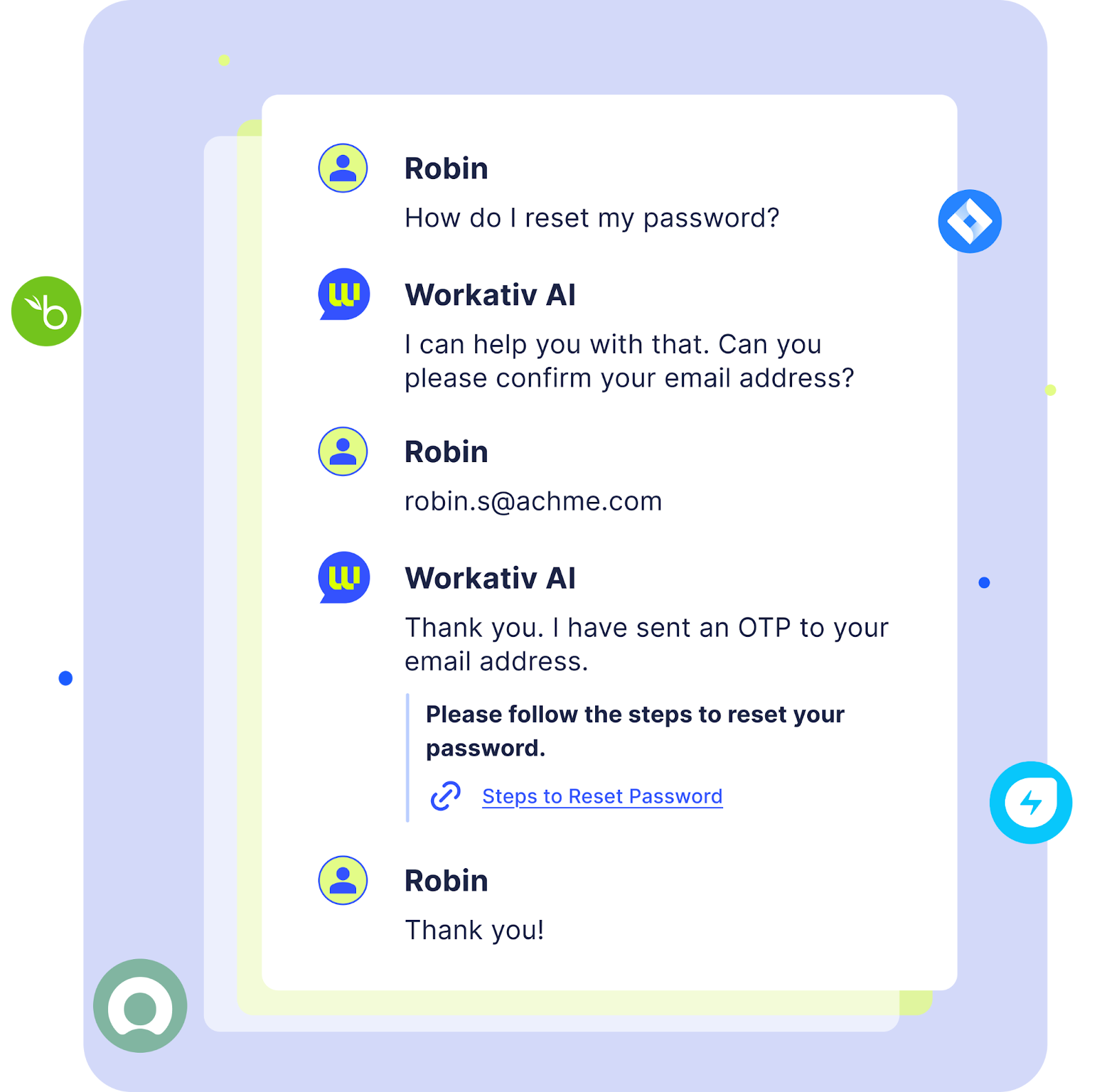
Password resets remain one of the most common internal IT requests. An AI chatbot can securely verify an employee’s identity and trigger automated password reset or account unlock workflows through integrated identity management systems.
For example, an employee might say, “I’m locked out of my email,” or “I forgot my VPN password.” The chatbot recognizes the intent, verifies credentials using predefined security checks, and initiates the reset process immediately.
The outcome is instant resolution without human intervention. IT teams see a sharp reduction in repetitive tickets, while employees regain access within minutes instead of waiting in a support queue.
2. AI chatbot for VPN troubleshooting and remote access support
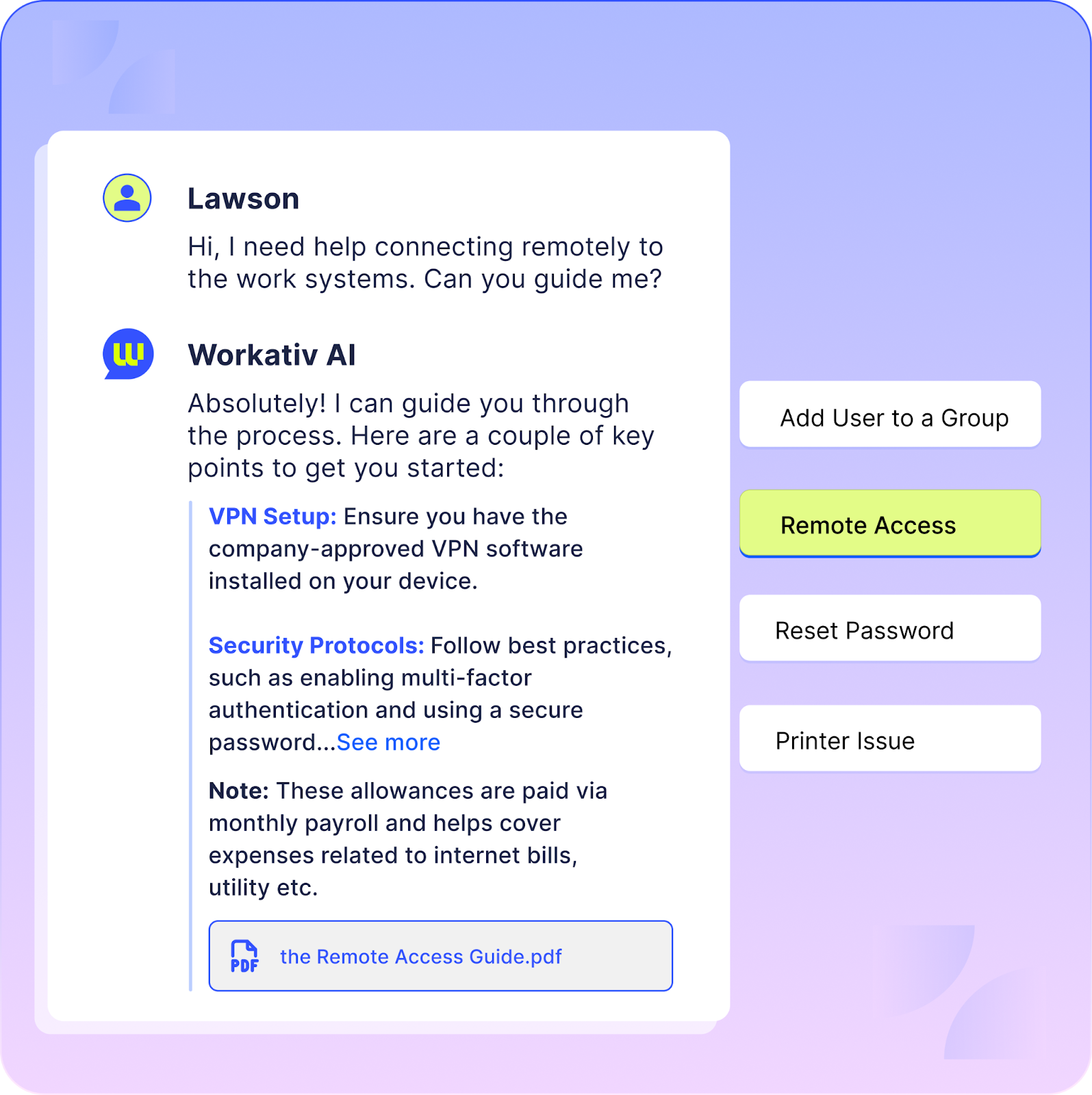
VPN issues are among the most frequent challenges for remote and hybrid teams. An AI chatbot can guide employees through VPN installation, configuration, and troubleshooting steps based on their device type, operating system, and error messages. By pulling from internal knowledge bases and known issue logs, it can provide tailored, step-by-step assistance instead of generic instructions.
For example, an employee might say, “My VPN is not connecting from home,” or “I’m getting an authentication error on the company VPN.” The chatbot can diagnose common causes, suggest corrective actions, check service status, and escalate to IT only if the issue remains unresolved.
The outcome is faster first-response times and fewer repetitive troubleshooting tickets. Employees resolve common connectivity issues independently, while IT teams focus on higher-priority technical problems.
AI chatbot for IT ticket creation and ServiceNow status updates
An AI chatbot acting as an ms teams bot for hrms removes that friction by allowing employees to create, update, and even close tickets directly within Microsoft Teams.
When integrated with ITSM tools, the chatbot captures relevant details, categorizes the issue, assigns priority, and generates a structured ticket automatically. It can also retrieve real-time status updates, add comments, or confirm resolution without requiring users to log into a separate portal.
For example, an employee might type, “Create a ticket for my Outlook crashing,” or “What’s the status of my laptop repair request?” The chatbot processes the request instantly and responds with the ticket ID, current status, or next steps.
The outcome is faster ticket submission, better data quality, and reduced back-and-forth between employees and IT. Support teams receive complete, properly categorized tickets, while employees enjoy a seamless, in-chat support experience.
4. AI chatbot for software access requests and approval workflows
Software access management is often slowed down by manual approvals, email threads, and unclear ownership. An AI chatbot streamlines the entire flow by handling the request, routing it for approval, and triggering provisioning automatically once approved.
When integrated with IAM and ITSM systems, the chatbot captures the access request, validates user role or eligibility, notifies the appropriate manager for approval, and provisions access upon confirmation. The process becomes structured and traceable instead of fragmented across tools.
For example, an employee might say, “I need access to Salesforce for the new project.” The chatbot checks role requirements, sends an approval request to the reporting manager, and once approved, initiates access provisioning without additional manual coordination.
The outcome is faster turnaround time for access requests, fewer email follow-ups, and improved governance through logged approvals and automated provisioning. IT teams maintain control while employees get timely access to the tools they need.
5. AI chatbot for onboarding IT setup, devices, tools, and accounts
Employee onboarding often requires coordination across multiple systems — device allocation, account provisioning, software setup, and access configuration. An AI chatbot can orchestrate this process by triggering predefined onboarding workflows the moment a new hire is registered in the system.
Instead of relying on email threads and manual checklists, the chatbot can create device requests, provision user accounts, assign software licenses, and notify relevant teams automatically. It can also track completion status and send reminders to ensure nothing is missed.
For example, a hiring manager might say, “We have a new marketing executive joining next Monday.” The chatbot gathers required details, initiates account creation, assigns necessary tools, and triggers laptop allocation workflows.
The outcome is a standardized, error-free onboarding experience. New hires receive timely access to devices and applications, while IT teams reduce manual coordination and last-minute setup delays.
BUILT FOR BOTH IT & HR
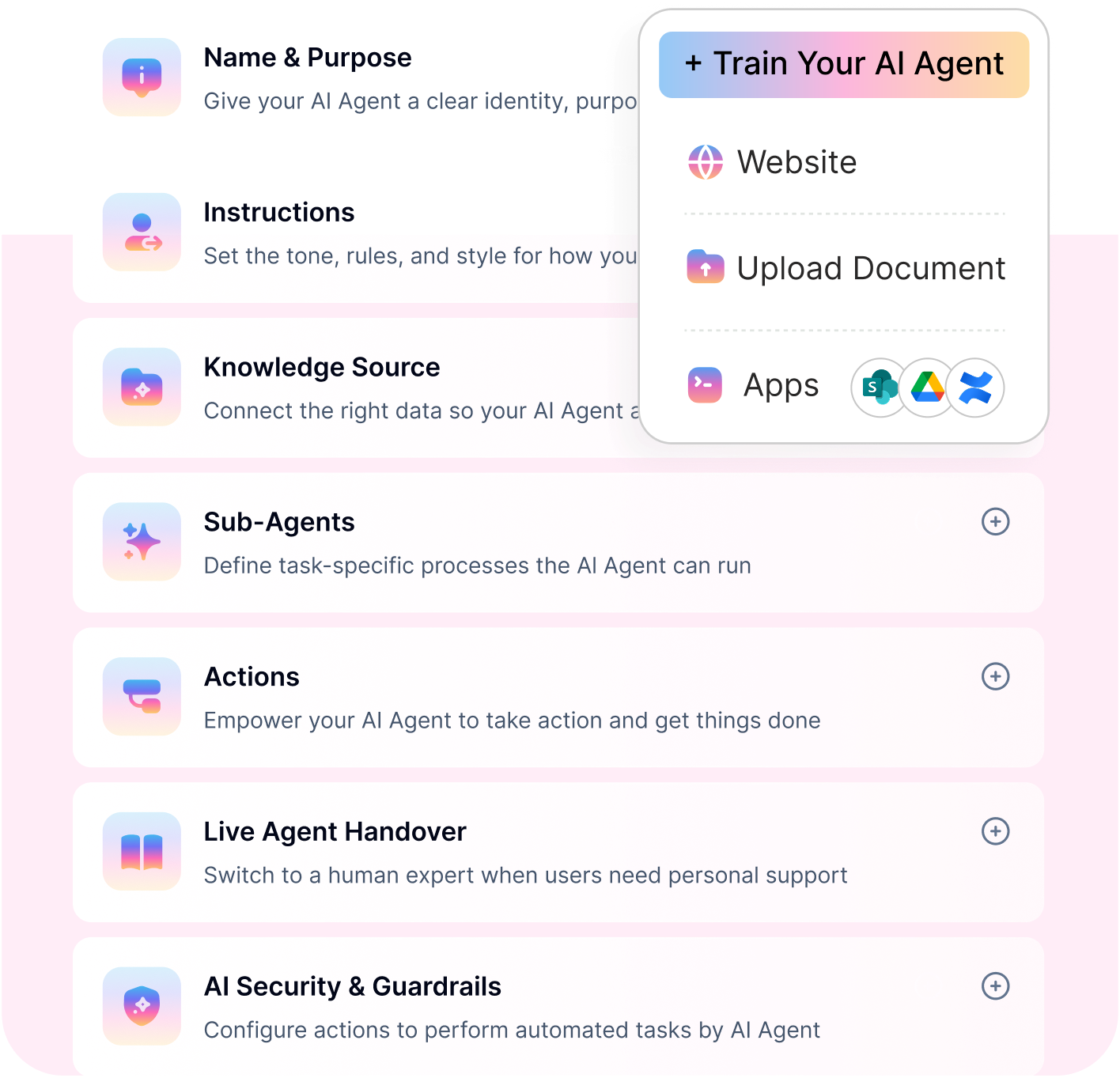
Workativ handles everything in this list, password resets, onboarding, payroll queries - all automated.
Slack & Teams native · No code · Single click training
See Workativ AI in action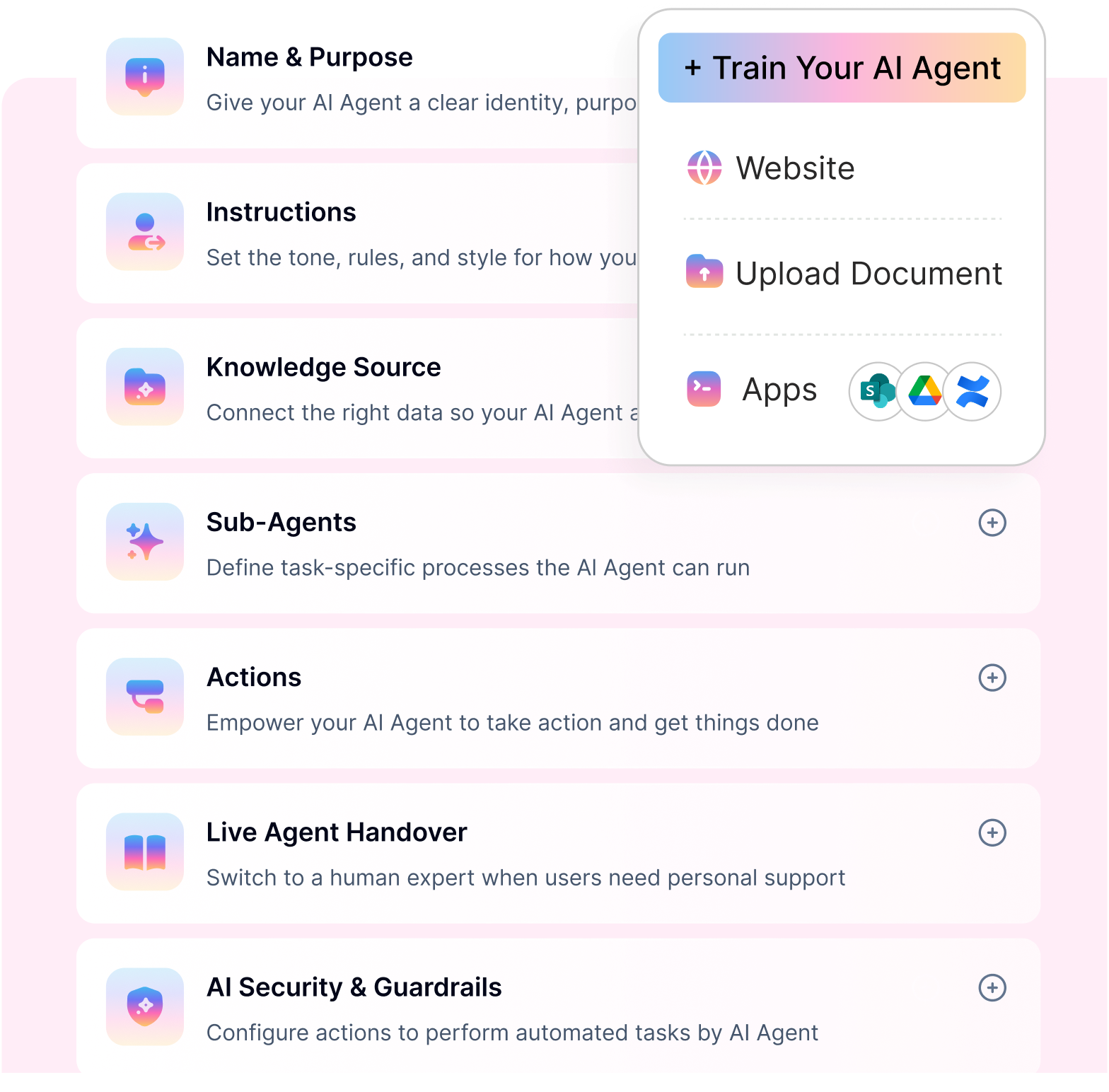
6. AI chatbot for PTO requests and leave management
These are among the most common hr chatbot use cases an AI chatbot can instantly answer policy-related questions, calculate leave balances, capture leave requests, and route them for approval.
Instead of employees searching through policy documents or logging into separate HR portals, the chatbot retrieves accurate leave policies, verifies available balance, and submits the request directly into the HRIS system. It can also provide real-time status updates after submission.
For example, an employee might ask, “How many vacation days do I have left?” followed by, “I’d like to apply for leave from March 12 to March 15.” The chatbot checks the balance, submits the request for manager approval, and confirms once it’s approved.
The outcome is faster leave processing, fewer repetitive HR emails, and a smoother self-service experience for employees.
7. AI chatbot for employee onboarding and HR workflows
HR onboarding involves multiple steps, sharing policies, collecting documents, completing compliance forms, and guiding new hires through required tasks. An AI chatbot can centralize this entire experience within a conversational interface.
Instead of sending long email checklists, the chatbot delivers the right documents at the right time, explains company policies in simple language, collects required forms, and tracks task completion. It can also send reminders to new hires or managers if certain steps are pending.
For example, a new employee might ask, “What documents do I need to submit for onboarding?” The chatbot provides the list, shares upload links, explains relevant policies such as code of conduct or benefits enrollment, and confirms once submissions are complete.
The outcome is a smoother, more structured onboarding journey. HR teams reduce manual follow-ups, and new hires experience a guided, organized start to their role.
8. AI chatbot for employee offboarding and access removal
Offboarding involves more than collecting an ID card or sending a farewell email. It requires coordinated action across HR, IT, payroll, and compliance to ensure that access is revoked, documentation is completed, and final settlements are processed correctly. An AI chatbot helps bring structure and visibility to this otherwise fragmented process.
Once a resignation or termination is recorded, the chatbot can automatically trigger an exit checklist, notify IT to deactivate accounts and recover devices, schedule exit interviews, and initiate final payroll workflows. It keeps track of pending tasks and sends reminders to the relevant stakeholders so that nothing slips through the cracks.
For instance, a manager might inform the system, “John’s last working day is March 31.” The chatbot gathers required details, activates the offboarding workflow, and updates each team as steps are completed. This structured approach reduces compliance risks, avoids security gaps, and ensures a smooth transition for both the organization and the departing employee.
9. AI chatbot for payroll questions and payslip support
Payroll-related questions are highly sensitive and time-critical. An hr helpdesk chatbot handles employee queries about payslip access, salary credit dates, tax deductions, bonus timelines, or reimbursement inclusions. An AI chatbot can securely retrieve payroll policies, guide employees to their payslips, and provide clear explanations based on company rules and payroll system data.
Instead of sending emails to HR or waiting for responses, employees can ask questions directly in chat. The chatbot verifies identity where required, pulls relevant information from the payroll or HRIS system, and explains details in simple terms.
For example, an employee might ask, “When will this month’s salary be credited?” or “Why is my tax deduction higher this month?” The chatbot can provide the salary timeline, link to the payslip, and explain deduction policies based on payroll data.
This reduces repetitive payroll queries in HR inboxes while giving employees faster, clearer answers to compensation-related questions.
10. AI chatbot for expense reimbursement and claim status updates
Expense and reimbursement queries often create back-and-forth between employees and finance or HR teams. Policies may vary by department, expense type, or approval thresholds, which can lead to confusion and incomplete submissions. An AI chatbot simplifies this process by explaining reimbursement policies, guiding employees through submission steps, and tracking approval status in real time.
Instead of searching through policy documents or emailing finance, employees can ask questions directly in chat. The chatbot can clarify eligible expense categories, required documentation, submission deadlines, and approval workflows. If integrated with expense management systems, it can also provide updates on claim progress.
For example, an employee might ask, “How do I claim travel reimbursement?” or “What’s the status of my expense submitted last week?” The chatbot walks them through the correct process, ensures they attach the necessary receipts, and shares the latest approval update.
This creates a more transparent and efficient reimbursement experience while reducing manual clarifications for HR and finance teams.
What systems should an internal support chatbot integrate with?
The value of an internal support chatbot depends on the systems it can connect to. A chatbot that only answers FAQs can reduce repetitive questions, but a chatbot connected to ITSM, HRIS, IAM, payroll, and collaboration tools can actually complete employee requests.
Here are the key systems to look for:
ITSM and helpdesk tools
An AI chatbot with ITSM integration should connect with platforms like ServiceNow, Jira Service Management, and other helpdesk systems.
This helps teams automate:
IT ticket creation
Ticket status updates
Incident routing
Request categorization
Escalations to the right support team
An AI chatbot with ServiceNow integration, for example, can let employees raise tickets, check request status, and update existing cases directly from chat.
Identity and access management tools
For IT support, the chatbot should connect with IAM tools such as Okta, Azure AD, and Google Workspace.
This helps automate:
Password reset support
Account unlock requests
Software access approvals
User verification
Access-related status updates
An AI chatbot with Okta integration can support access-related requests without forcing employees to wait for manual IT follow-ups.
HRIS and payroll systems
For HR support, an AI chatbot with HRIS integration should connect with tools such as Workday, BambooHR, SAP SuccessFactors, and payroll platforms.
This helps employees:
Check leave balances
Ask PTO questions
Access payroll information
Submit HR requests
Get policy-based answers
Track approval status
An AI chatbot with Workday integration or AI chatbot with BambooHR integration can help employees complete HR workflows without switching systems.
Collaboration tools
The chatbot should also work inside the channels employees already use, such as Slack, Microsoft Teams, or workplace portals.
This allows employees to:
Ask questions in chat
Submit requests from the same workspace
Receive real-time updates
Approve or respond to tasks faster
Avoid switching between multiple tools
Knowledge and document systems
An internal support chatbot should connect with approved knowledge sources such as policy documents, IT guides, HR handbooks, SharePoint, Confluence, Google Drive, or internal wikis.
This helps the chatbot give accurate answers based on company-approved information instead of generic responses.
When these systems are connected, the chatbot becomes more than a support assistant. It becomes an AI agent that creates IT tickets, triggers approvals, updates workflows, and gives employees real-time status updates from chat.
For buyers, the key question is simple: can the chatbot only answer questions, or can it also connect to the systems needed to resolve them?
How to keep internal AI chatbot answers accurate and secure
Internal IT and HR support involves sensitive employee information, company policies, access permissions, and compliance-related workflows. That is why an internal support chatbot should not rely on generic answers or guess when the policy is unclear.
A strong RAG chatbot for employee support should retrieve answers from approved internal knowledge sources, apply the right permissions, and escalate sensitive or low-confidence cases to a human support team.
To keep answers accurate and secure, look for an internal AI chatbot that includes:
RAG-based answers from approved knowledge
Role-based access control
An AI chatbot with role based access control ensures employees only see information they are allowed to access based on role, location, department, or policy eligibility.
Human handoff for sensitive cases
An AI chatbot with human handoff should escalate payroll issues, access exceptions, policy disputes, and complex employee cases to the right team with full context.
Audit logs for actions and approvals
Every important action, such as access approval, ticket creation, leave request, or payroll-related workflow, should be traceable.
Guardrails for HR and IT workflows
A secure AI chatbot for HR support should include guardrails for payroll questions, policy interpretation, access requests, and compliance-sensitive topics.
Source references for important answers
For policy, benefits, payroll, or IT process questions, the chatbot should be able to reference the approved source behind the answer.
Regular knowledge updates
HR policies, IT processes, and compliance rules change over time. The chatbot’s knowledge base should be reviewed and updated regularly.
This is especially important for HR policies, payroll questions, access provisioning, and compliance-related workflows. Employees need fast answers, but the organization also needs control, traceability, and accountability.
For companies evaluating an AI chatbot for HR compliance questions, accuracy and governance should be treated as core requirements rather than optional features.
How to choose the right AI chatbot for internal IT and HR support
Choosing the right AI chatbot for internal IT and HR is less about flashy AI claims and more about operational reliability. The platform should not only answer employee questions, but also execute workflows securely and at scale. Here are the key factors to evaluate.
Knowledge accuracy - Look for platforms that use RAG (retrieval-augmented generation) to pull answers from approved internal knowledge sources. Strong source controls and permission management ensure employees only see role-relevant information and reduce the risk of outdated responses.
Actionability - The chatbot should integrate with ITSM, HRIS, IAM, payroll, and other core systems. This allows it to move beyond answering questions and actually create tickets, trigger approvals, provision access, and update records directly in chat.
Governance and control - Enterprise use cases require RBAC, audit logs, and approval workflows. Every action should be traceable, especially for sensitive processes like payroll queries or access provisioning.
Omnichannel readiness - Employees operate across Slack, Microsoft Teams, and intranet portals. The chatbot should work consistently across channels while maintaining context and permissions.
AI agent templates and ready-to-use workflows - Prebuilt IT and HR agent templates accelerate deployment. Ready-made flows for password resets, leave requests, onboarding, or ticketing reduce implementation time and help teams launch faster without heavy customization.
Human handoff for edge cases - No AI resolves everything. Seamless escalation to human agents ensures complex, sensitive, or exception-based requests are handled without disrupting the employee experience. The right solution combines knowledge accuracy, workflow automation, governance, and speed to deploy — not just conversational capability.
Best practices to successfully roll out internal IT and HR chatbots
Deploying an internal AI chatbot is not just a technical implementation — it’s an operational shift. The most successful rollouts focus on high-impact use cases first, establish clear governance, and continuously measure performance.
Start with top intents - Begin with the most frequent IT tickets and HR queries. Analyze service desk data to identify the top 10 recurring requests — such as password resets, VPN issues, leave balance checks, and payroll questions. Automating high-volume, repetitive tasks delivers immediate impact and builds internal confidence in the system.
Use approval flows for sensitive actions - Not every action should be fully automated. Access provisioning, payroll changes, or role updates should include structured approval workflows. Adding human checkpoints ensures compliance while still reducing manual coordination.
Keep knowledge fresh - AI is only as good as its knowledge base. Assign clear owners for IT and HR documentation and establish a regular review cadence. Version control and periodic audits prevent outdated policies from being surfaced in conversations.
Design fallback and escalation paths - Even advanced AI cannot resolve every scenario. Build clear escalation rules so that ambiguous or high-risk queries are routed to human agents seamlessly. Employees should never feel stuck in automation loops.
Track meaningful KPIs - Measure performance from day one. Monitor deflection rate, time to first response, resolution rate, and CSAT to understand impact. Over time, these metrics help quantify ROI and identify opportunities for further automation. A structured rollout ensures the chatbot becomes a reliable support layer not just another tool employees hesitate to use.
SEEN ENOUGH TO GET STARTED?
Book a walkthrough and see Workativ automate your top IT and HR requests - live in your own Slack/Teams.
Personalized demo · No commitment · No code needed
Go live in daysWhy internal AI chatbots are becoming the default support layer?
Internal IT and HR teams are under constant pressure to deliver faster support without continuously increasing headcount. AI chatbots are emerging as the default support layer because they address the core operational challenges at scale.
For IT teams, they reduce repetitive tickets, accelerate resolution times, and standardize workflows like password resets, access provisioning, and ticket management. For HR teams, the hr help desk is streamlined across leave management, payroll queries, onboarding, offboarding, and reimbursement processes — all while maintaining governance and compliance
The real shift is not just automation, but speed and consistency. This is the core value of help desk automation employees receive instant responses, support teams gain better visibility, and organizations improve cost control by deflecting high-volume requests.
As internal operations grow more complex, conversational AI is becoming the front door to IT and HR services — accessible, scalable, and measurable.
If you’re evaluating internal support automation, now is the time to see it in action.
Book a demo, try Workativ, or explore the AI agent builder to understand how intelligent internal support can work inside your organization.
FAQs
What is the use of AI chatbots for IT support in an internal service desk?
AI chatbots automate high-volume IT requests such as password resets, VPN troubleshooting, software access requests, and ticket management. They act as the first line of support, resolving common issues instantly and routing complex cases to the right teams.
What is the use of AI chatbots for HR support in employee self-service?
HR chatbots enable employees to check leave balances, submit PTO requests, access policies, track reimbursements, and ask payroll-related questions directly in chat. This reduces repetitive HR queries and improves employee self-service adoption
Can an AI chatbot create, update, and close IT tickets automatically?
Yes. When integrated with ITSM platforms, AI chatbots can create structured tickets, update status, add comments, and even close tickets once the issue is resolved — all without employees leaving their chat interface.
How do HR chatbots handle payroll and salary queries securely?
They use identity verification, role-based access controls, and secure integrations with HRIS or payroll systems. Access to sensitive data is restricted based on permissions, and all interactions can be logged for compliance.
Which tools should an IT chatbot integrate with?
An effective IT chatbot should integrate with ITSM systems, identity and access management (IAM) platforms, endpoint management tools, and collaboration platforms like Slack or Microsoft Teams.
Which tools should an HR chatbot integrate with?
HR chatbots typically connect to HRIS platforms, payroll systems, benefits management tools, document repositories, and approval workflows to ensure seamless execution of HR processes.
When should an internal chatbot hand off to a human agent?
Escalation should occur when a request is ambiguous, sensitive, policy-exception based, or requires judgment beyond predefined workflows. A seamless handoff ensures employees receive accurate and timely support.
How do you measure ROI for internal IT and HR chatbots?
Key metrics include ticket deflection rate, time to first response, resolution rate, cost per resolution, and employee satisfaction (CSAT). These indicators help quantify productivity gains and cost savings.
How do you prevent outdated or incorrect answers from the chatbot?
Use retrieval-augmented generation (RAG) tied to approved knowledge sources, assign content owners, enforce review cycles, and implement version controls. Regular audits help maintain accuracy and trust.
How fast can you deploy an AI chatbot for internal support?
Deployment timelines vary based on integrations and complexity, but modern AI agent platforms with prebuilt templates can typically go live within a few weeks rather than months.
'%3e%3cpath%20d='M11.5732%2031.7068L19.2977%2022.7433L11.5732%2011.5366H17.4664L22.6245%2018.942L29.0522%2011.5366H30.7788L23.4029%2020.0985L31.4127%2031.7086H25.4997L20.1231%2023.9069L13.3197%2031.7068H11.5732ZM16.6519%2012.8366H13.9536L26.354%2030.4462H28.9926L28.8265%2030.1576L16.6519%2012.8366Z'%20fill='%230C0C0C'/%3e%3c/g%3e%3cdefs%3e%3cclipPath%20id='clip0_505_14364'%3e%3crect%20width='19.7681'%20height='20.2432'%20fill='white'%20transform='translate(11.573%2011.5365)'/%3e%3c/clipPath%3e%3c/defs%3e%3c/svg%3e)

'%3e%3cpath%20d='M25.2175%2011.7557L26.9132%2011.911V15.0496C26.0135%2015.1444%2024.1746%2014.7452%2023.5821%2015.5947C23.4908%2015.726%2023.3291%2016.1592%2023.3291%2016.3091V19.002H26.7392L26.3346%2022.5281H23.3291V31.5952H19.707V22.5863L19.649%2022.5281H16.6628V19.002H19.707C19.7813%2017.4024%2019.4664%2015.7042%2020.1132%2014.1986C20.6748%2012.8902%2021.7857%2012.0974%2023.1666%2011.8435L23.7151%2011.7557H25.2183H25.2175Z'%20fill='%230C0C0C'/%3e%3c/g%3e%3cdefs%3e%3cclipPath%20id='clip0_505_14375'%3e%3crect%20width='10.2695'%20height='19.8027'%20fill='white'%20transform='translate(16.658%2011.7567)'/%3e%3c/clipPath%3e%3c/defs%3e%3c/svg%3e)
About the Author
Deepa Majumder

Senior content writer
Deepa Majumder is a writer who nails the art of crafting bespoke thought leadership articles to help business leaders tap into rich insights in their journey of organization-wide digital transformation. Over the years, she has dedicatedly engaged herself in the process of continuous learning and development across business continuity management and organizational resilience.
Her pieces intricately highlight the best ways to transform employee and customer experience. When not writing, she spends time on leisure activities.
Auto-resolve 60% of Your Employee
Queries With AI Agents & Automation
- No credit card required
- Setup in minutes
- Cancel Anytime
