


IT onboarding automation that runs before IT gets the email.
When the HRIS record is created, Workativ's AI agent triggers. Azure AD account built. Licences provisioned by role. Device request routed. Setup checklist in Slack before the employee's first message.
IT Teams of all sizes trusts Workativ AI to automate IT Operations & Support

What IT does manually today and what the AI agent can automate.
Gallup found only 12% of employees say their company does onboarding well. For most new hires, IT is where it goes wrong first.
Before — manual IT onboarding
HRIS notification
Review ticket vs offer letter manually, update recruiter and compensation across systems.
Identity account
IT coordinator logs into Azure AD or Okta. Creates account manually. Assigns role groups from memory or a spreadsheet. Mistakes happen.
Software licences
IT checks licence availability. Assigns Salesforce, Jira, Slack, and four other apps one by one. Goes back to Okta for each. Takes an hour per hire.
Device request
IT coordinator creates a ServiceNow ticket manually. Checks device availability. Emails the manager to confirm laptop specs. Delays common.
New hire communication
IT or HR sends a welcome email with login instructions. Often late, generic, missing steps. New hire arrives Monday and something isn't ready.

HRIS event trigger
New hire record created in Workday or BambooHR. AI agent reads role and start date instantly. No email sent to IT.
Azure AD / Okta account
AI agent creates the account with correct role groups and permissions from the configured bundle. Logged to audit trail. No manual step.
Role-based licence provisioning
AI agent assigns all licences simultaneously from the role bundle. Engineering provisions eight apps at once. No IT coordinator involved.
Device request in ServiceNow
AI agent creates the hardware request automatically. Role determines device spec. IT notified. No separate email needed.
Setup checklist in Slack or Teams
AI agent sends the new hire their complete IT setup before day one account links, software access, device status, first-day instructions. One thread.
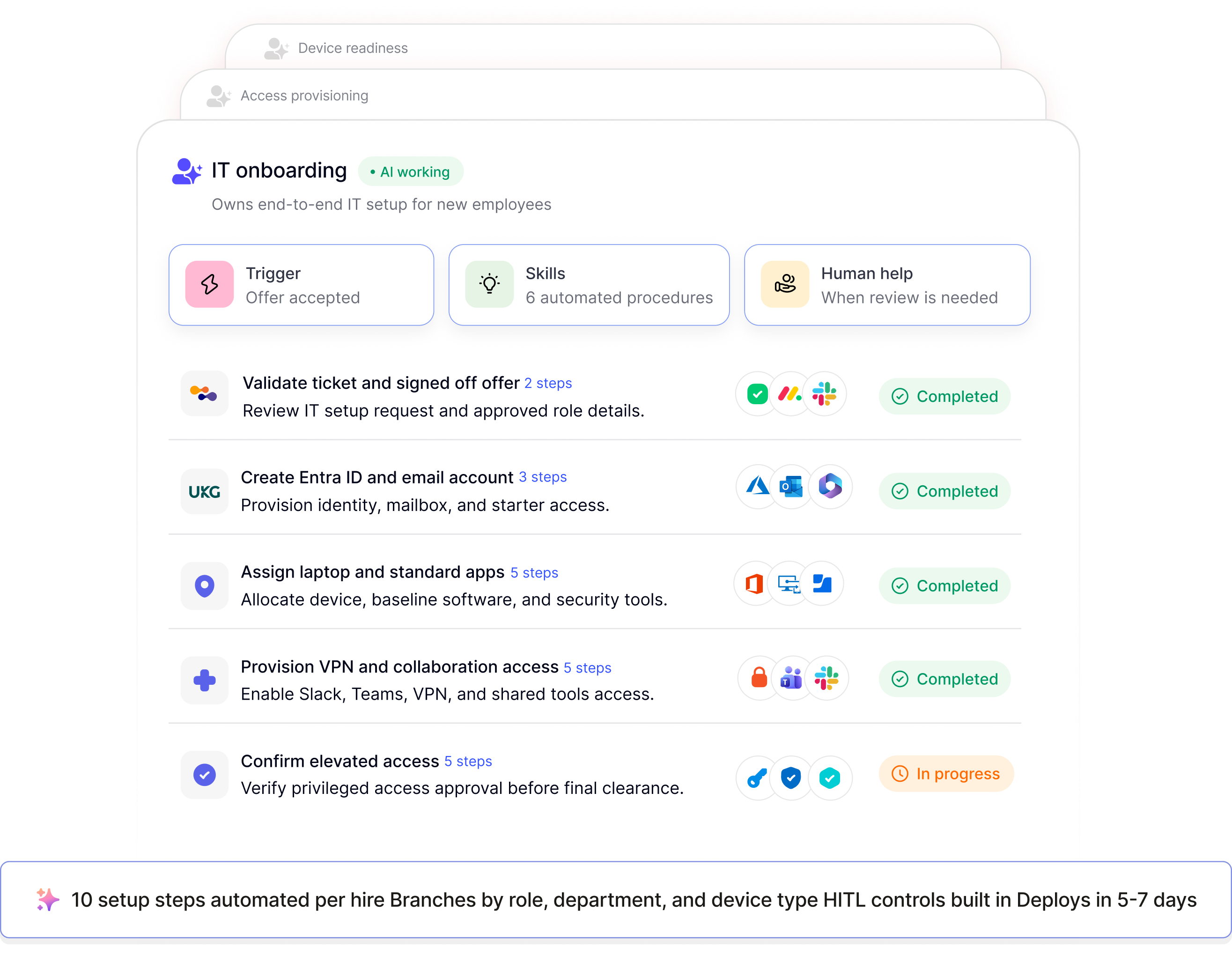
Six steps the AI agent runs. IT coordinates none of them for standard new hires.
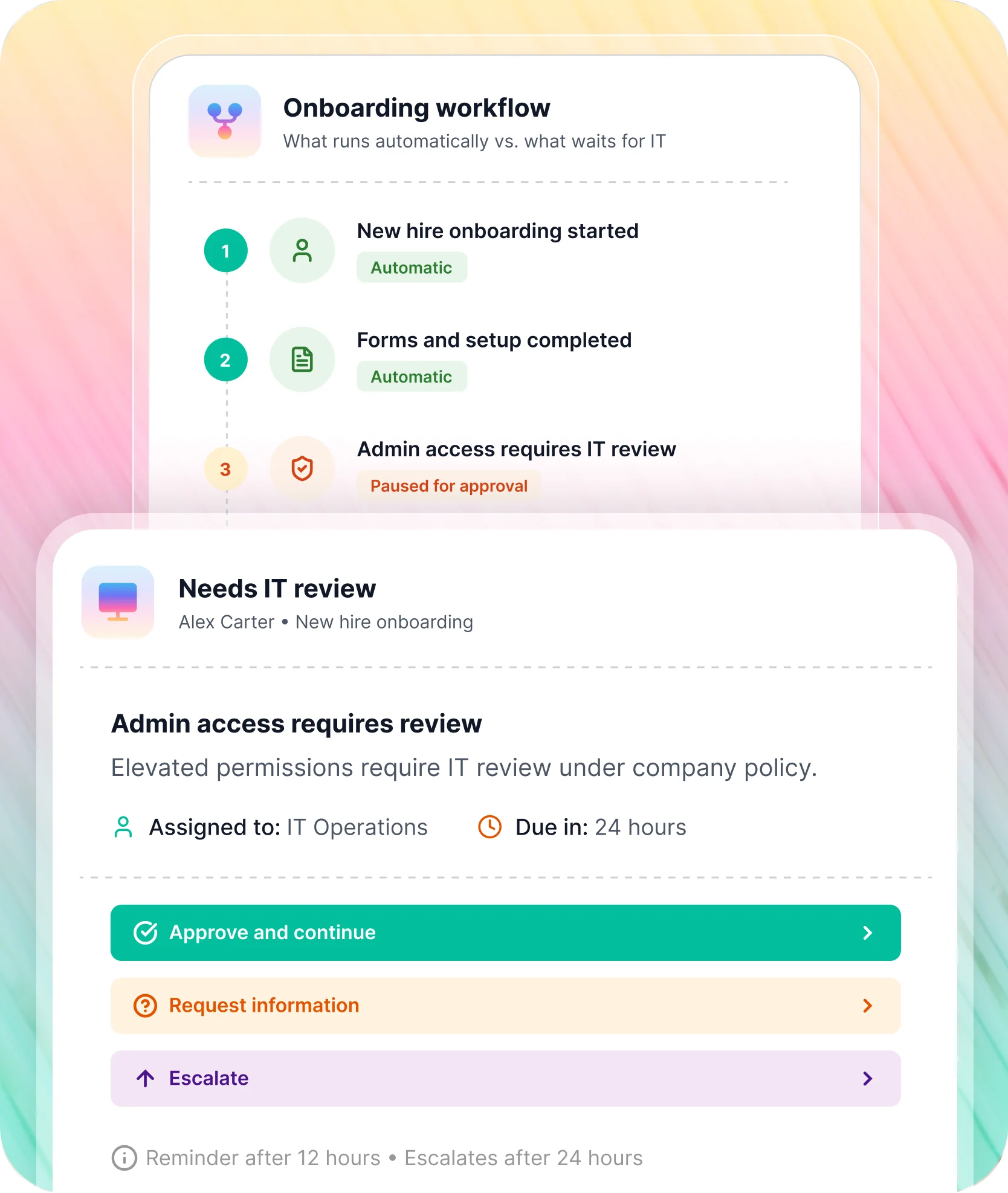
Steps marked HITL pause for human approval before continuing. Everything else executes automatically.

HRIS new hire event received
New hire record created in Workday, ADP, UKG, or any HRIS. Workativ reads role, department, and start date. AI agent selects the correct role bundle and begins the IT onboarding provisioning sequence.


Identity account created
AI agent creates the Azure AD or Okta account with the correct role groups and permissions from the configured bundle. Action logged to audit trail immediately. No IT coordinator opens a portal.


Role-based licences provisioned in parallel with steps 2 and 4
All software licences in the role bundle are provisioned simultaneously. Engineering gets GitHub, Jira, Confluence etc. Sales gets Salesforce, Outreach, and LinkedIn Sales Navigator. Each role, its own bundle, automatically applied.


Device request routed to IT
Hardware request created in ServiceNow or Freshservice with the correct device spec for the role. Standard role. devices confirm automatically. Non-standard requests custom specs, accessibility requirements pause for IT approval before proceeding.


New hire setup checklist delivered in Slack or Teams
AI agent sends the new hire their complete IT setup in one message account details, software access links, device status, VPN guide, and first-day instructions. Questions answered from the IT knowledge base in the same thread.


IT receives single completion confirmation
When every step confirms, IT gets one notification not a sequence of alerts across four systems. Any failure flagged immediately with the specific step, system, and error. Dependent steps pause. Nothing silently skips.

Not every new hire setup is standard. IT decides what needs a sign-off.
Define approval gates per role or exception type
Configure which steps require IT sign-off elevated access, non-standard hardware, roles without a configured bundle.
Auto-escalation if no response
If IT does not respond within the configured window, the AI agent escalates to the next approver automatically. No step stalls silently.
Full audit record without anyone filing it
IT can generate a complete onboarding record for any new hire at any time no chasing emails or reconstructing from tickets.
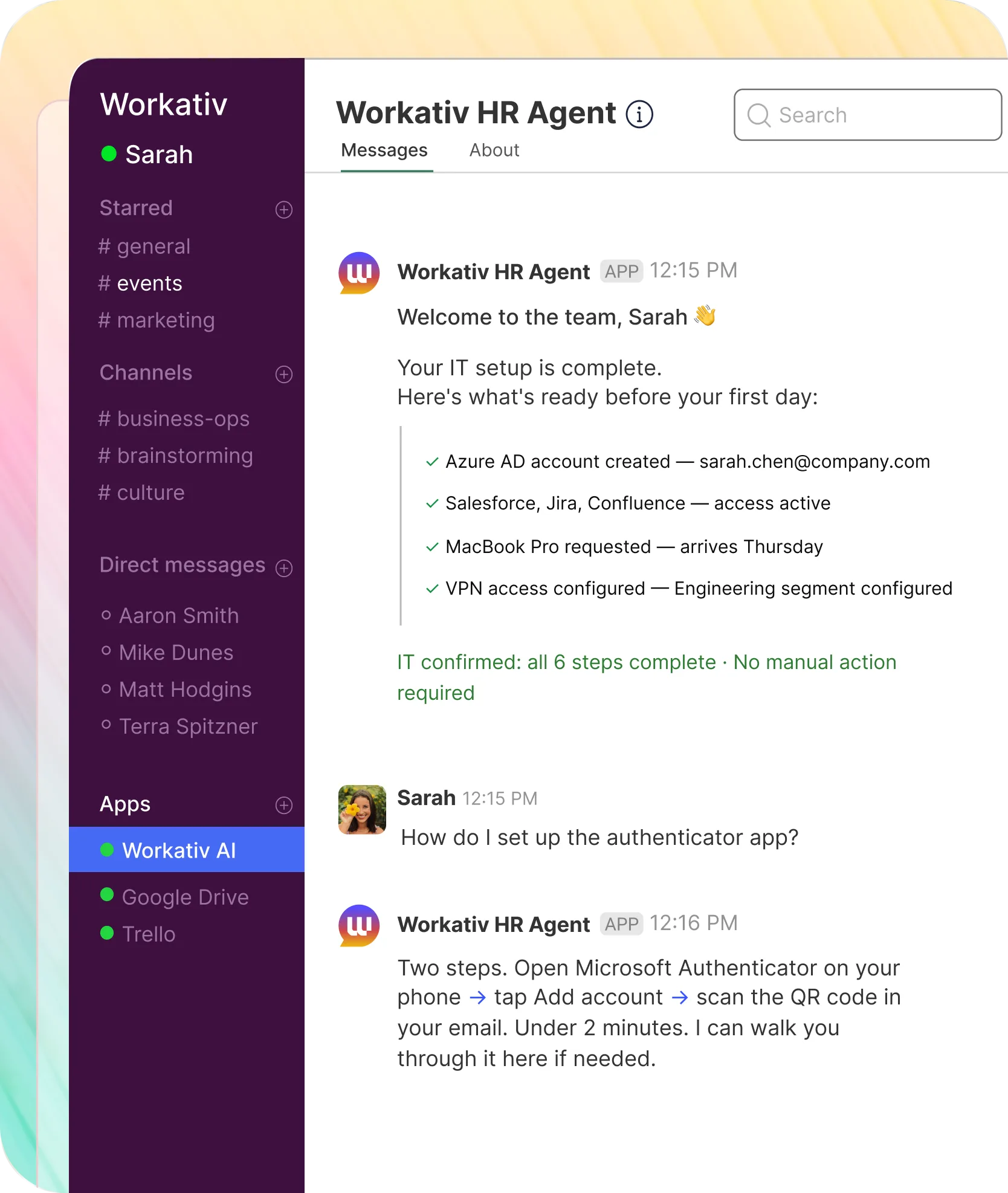
The workflow already ran. The new hire just needs to show up.
Accounts provisioned. Licences assigned. Checklist waiting in Slack or Microsoft Teams. The AI agent answers what the new hire asks.

Welcome message and checklist before day one
Arrives in Slack or Teams before their first message. Account details, software links, device status, VPN guide one thread, no portal to find.
System access confirmed provisioned and ready
Every application in their role bundle is live on day one. No "your access is pending." No IT ticket to chase.
IT questions answered in the same thread
New hire asks about VPN setup, approved software, or security procedures. Workativ pulls the answer from your IT knowledge base and replies in the same thread no wait, no ticket.
MFA and security setup guided step by step
Authenticator app, SSO activation, security policy walkthrough handled in the same Slack or Teams thread.
What NMDC measured when Workativ automated IT onboarding for 13,000 employees.
NMDC Group, Abu Dhabi integrated energy, marine services, and EPC. Deployed on Microsoft Teams. IT onboarding automation runs from their HRIS the moment a new hire record is created.
"Workativ has been with us every step of the way. From our first IT support use case to HR, and soon Procurement. The platform grows with us, and so does the team behind it. It's rare to find a solution that's both powerful and genuinely easy to manage."

Imran Abid
IT Operations Leader · NMDC Group

Every system in the IT provisioning chain. Pre-built connectors. No custom integration work.


%20--%3e%3csvg%20version='1.1'%20id='Layer_1'%20xmlns='http://www.w3.org/2000/svg'%20xmlns:xlink='http://www.w3.org/1999/xlink'%20x='0px'%20y='0px'%20viewBox='0%200%20512%20512'%20style='enable-background:new%200%200%20512%20512;'%20xml:space='preserve'%3e%3cstyle%20type='text/css'%3e%20.st0{fill:%23F7F7F7;}%20.st1{fill:%2328E4C3;}%20.st2{fill:url(%23SVGID_1_);}%20.st3{fill:url(%23SVGID_2_);}%20%3c/style%3e%3ccircle%20class='st0'%20cx='256'%20cy='256'%20r='245.5'/%3e%3cg%3e%3cg%3e%3cpath%20class='st1'%20d='M304.7,405.6'/%3e%3c/g%3e%3c/g%3e%3cg%3e%3cg%3e%3cpath%20class='st1'%20d='M305.8,353'/%3e%3c/g%3e%3c/g%3e%3clinearGradient%20id='SVGID_1_'%20gradientUnits='userSpaceOnUse'%20x1='388.1461'%20y1='99.0534'%20x2='204.4846'%20y2='204.5899'%20gradientTransform='matrix(1%200%200%20-1%200%20514)'%3e%3cstop%20offset='0.18'%20style='stop-color:%230052CC'/%3e%3cstop%20offset='1'%20style='stop-color:%232684FF'/%3e%3c/linearGradient%3e%3cpath%20class='st2'%20d='M119.9,330.3c-3,4.9-6.4,10.7-9.3,15.3c-2.6,4.4-1.2,10,3.1,12.7l60.7,37.4c4.4,2.7,10.1,1.3,12.9-3%20c0,0,0.1-0.1,0.1-0.1c2.4-4.1,5.6-9.3,9-15c24-39.7,48.2-34.8,91.9-14l60.2,28.6c4.7,2.2,10.2,0.2,12.4-4.4c0-0.1,0.1-0.2,0.1-0.3%20l28.9-65.4c2-4.7,0-10.1-4.7-12.2c-12.7-6-38-17.9-60.7-28.9C242.6,241.2,173.1,243.7,119.9,330.3z'/%3e%3clinearGradient%20id='SVGID_2_'%20gradientUnits='userSpaceOnUse'%20x1='613.0198'%20y1='1773.9866'%20x2='429.3116'%20y2='1879.5697'%20gradientTransform='matrix(-1%200%200%201%20736.83%20-1676.71)'%3e%3cstop%20offset='0.18'%20style='stop-color:%230052CC'/%3e%3cstop%20offset='1'%20style='stop-color:%232684FF'/%3e%3c/linearGradient%3e%3cpath%20class='st3'%20d='M392.1,181.9c3-4.9,6.4-10.7,9.3-15.3c2.6-4.4,1.2-10-3.1-12.7l-60.7-37.4c-4.3-2.9-10.1-1.7-13,2.5%20c-0.1,0.2-0.2,0.4-0.3,0.6c-2.4,4.1-5.6,9.3-9,15c-24,39.7-48.2,34.8-91.9,14l-60-28.5c-4.7-2.2-10.2-0.2-12.4,4.4%20c0,0.1-0.1,0.2-0.1,0.3L122,190.2c-2,4.7,0,10.1,4.7,12.2c12.7,6,38,17.9,60.7,28.9C269.4,271,338.9,268.4,392.1,181.9z'/%3e%3c/svg%3e)


%20--%3e%3csvg%20version='1.1'%20id='Layer_1'%20xmlns='http://www.w3.org/2000/svg'%20xmlns:xlink='http://www.w3.org/1999/xlink'%20x='0px'%20y='0px'%20viewBox='0%200%20512%20512'%20style='enable-background:new%200%200%20512%20512;'%20xml:space='preserve'%3e%3cstyle%20type='text/css'%3e%20.st0{fill:%23EB3C00;}%20.st1{fill:%23FFFFFF;}%20%3c/style%3e%3ccircle%20class='st0'%20cx='256'%20cy='256'%20r='245.5'/%3e%3cpath%20class='st1'%20d='M152.2,332.7v-152L286.7,131l73.1,23.4V359l-73.1,22L152.2,332.7l134.4,16.2V171.9L199,192.4v119.8L152.2,332.7%20z'/%3e%3c/svg%3e)


%20--%3e%3csvg%20version='1.1'%20id='Layer_1'%20xmlns='http://www.w3.org/2000/svg'%20xmlns:xlink='http://www.w3.org/1999/xlink'%20x='0px'%20y='0px'%20viewBox='0%200%20512%20512'%20style='enable-background:new%200%200%20512%20512;'%20xml:space='preserve'%3e%3cstyle%20type='text/css'%3e%20.st0{fill:%230062FF;}%20.st1{fill:%23FFFFFF;}%20%3c/style%3e%3ccircle%20class='st0'%20cx='256'%20cy='256'%20r='245.5'/%3e%3cpath%20class='st1'%20d='M256,162.5l-91,58.2l91,58.2l-91,58.2l-91-59.1l91-58.2l-91-57.3l91-58.2L256,162.5z%20M164.1,355.5l91-58.2%20l91,58.2l-91,58.2L164.1,355.5z%20M256,278.1l91-58.2l-91-57.3l91-58.2l91,58.2l-91,58.2l91,58.2l-91,58.2L256,278.1z'/%3e%3c/svg%3e)


Full audit trail from HRIS trigger to day-one confirmation.
IT onboarding that runs before
IT gets the email.
HRIS record created. AI agent triggers. New hire ready. IT does nothing manually for standard setups.
IT onboarding is the start of the access lifecycle.
Access management
Access Provisioning Automation
Identity
Password Reset Automation
IT helpdesk
IT Helpdesk Automation
Frequently asked questions
Questions CHROs, IT Directors, and People Operations leaders ask about employee onboarding automation.
What is IT onboarding automation?
IT onboarding automation uses an AI agent to run the full new hire IT setup sequence automatically triggered by the HRIS record, not by an IT coordinator. When a new hire is created in Workday, BambooHR, or your HRIS, Workativ's AI agent creates the Azure AD or Okta account, provisions role-based access, assigns software licences, requests device setup, and sends the new hire a checklist in Slack or Microsoft Teams. Every step runs in parallel. IT receives one completion confirmation. The new hire has everything ready before day one.
How is IT onboarding automation different from access provisioning automation?
Access provisioning handles mid-tenure requests an employee asks for Salesforce access, a manager approves, the AI agent provisions. IT onboarding automation fires automatically from the HRIS new hire event. No employee asks. No manager approves each item. The AI agent applies the full role-based access bundle and confirms completion before the new hire's first day. One is reactive. The other is automatic.
What triggers the IT onboarding workflow?
A new hire record created in your HRIS Workday, BambooHR, UKG, or others. Workativ reads the employee's role and start date and triggers the provisioning sequence automatically. No manual trigger. No IT coordinator checking a calendar. The AI agent pulls the role-based access bundle, builds the Azure AD or Okta account, provisions licences, routes the device request, and delivers the setup checklist in Slack or Teams all in one automated workflow.
Does Workativ provision IT access in parallel or sequentially?
In parallel. Most IT onboarding workflows run steps one after another account first, then licences, then device request. Workativ's AI agent fires every step simultaneously. The practical difference: a new hire who would have waited three days gets everything confirmed before their first morning, while IT receives one notification instead of tracking four separate steps.
Which HRIS systems does Workativ integrate with?
Workativ integrates with Workday, BambooHR, UKG, SAP SuccessFactors, Oracle HCM, and other major HRIS platforms for new hire event triggers. When the HRIS creates the new hire record, Workativ reads role, department, and start date to determine the correct access bundle. Pre-built connectors no custom integration work.
What IT systems does Workativ provision for new hires?
Azure Active Directory (Entra ID), Okta, on-premises Active Directory, and Google Workspace for identity. Software licences assigned by role template. Device requests routed to ServiceNow or Freshservice. Setup checklist delivered in Slack or Microsoft Teams. Every system the new hire needs without IT touching any of them manually for standard role setups.
What does the new hire receive before day one?
A single Workativ message in Slack or Microsoft Teams with their complete IT setup: account confirmation, software access links, device status, and first-day resources. Questions go in the same thread. The AI agent answers from your IT knowledge base. If something needs IT involvement, it escalates with full context. The new hire never emails IT or visits a portal.
Can Workativ handle role-based IT onboarding automatically?
Yes. IT administrators define access bundles per role in Workativ's no-code platform. A new hire in Engineering gets a different package than one in Sales automatically, based on the HRIS role. The bundles are defined once. The AI agent applies them on every new hire event without individual review. No IT coordinator checking a list.
What happens when a provisioning step fails or an exception occurs?
Workativ's AI agent flags the specific failure to IT immediately which step, which system, what went wrong. Dependent steps pause. IT gets the exact issue, not a vague status. On resolution, the workflow resumes from where it stopped. Nothing is restarted from scratch.
Does Workativ handle IT offboarding as well as onboarding?
Yes. A termination event in your HRIS triggers the offboarding sequence revoking Azure AD and Okta access, deprovisioning licences, logging every revocation to the audit trail. Every access grant provisioned at onboarding is tracked and revoked at offboarding. No manual checklist. No orphaned accounts.
Is IT onboarding automation secure?
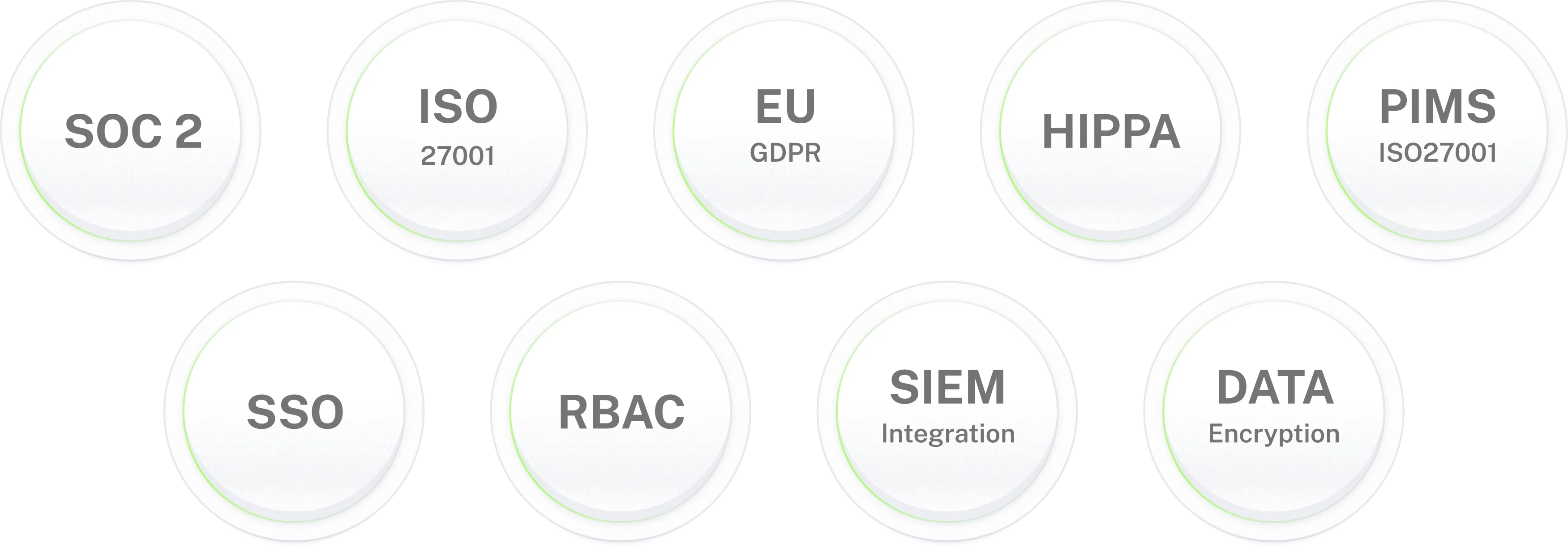
Yes. The AI agent provisions only within the role bundles IT administrators configure. It cannot assign access beyond those boundaries. Every action logs to an immutable audit trail which system, what was granted, when, confirmation status. Workativ is SOC 2 Type II, ISO 27001, GDPR, and HIPAA compliant.
How quickly can IT onboarding automation be deployed?
5 to 7 days using pre-built connectors for your HRIS, Azure AD or Okta, Slack, and Microsoft Teams. No developer resources required. Start with one role type your most common new hire department confirm the workflow, then expand. Role bundles are set up once and run automatically from there.