


Access provisioning automation that completes the request not just routes the ticket.
Workativ AI agents automate access requests end to end from Slack or Microsoft Teams employee asks, policy checked, manager approves with one tap, access provisioned in Okta or Azure AD immediately. No ticket. No IT manual step. No waiting.
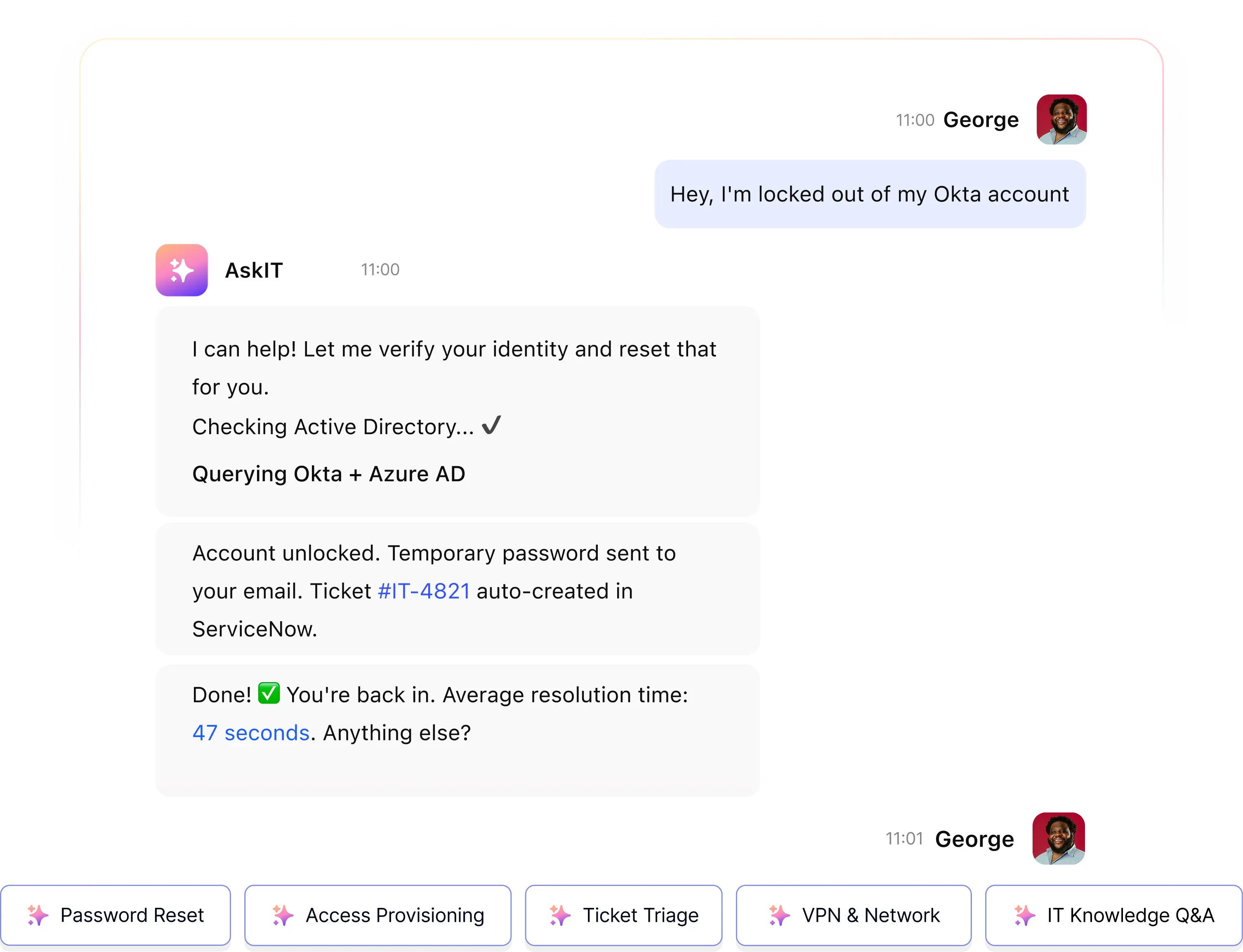
IT Teams of all sizes trusts Workativ AI to automate IT Operations & Support

Access requests are 30–40% of your IT helpdesk queue. Every one is handled manually. Most take days.
Gartner estimates 50% of helpdesk requests are permissions-related. Access request automation eliminates the manual steps approval emails, Okta logins, ticket closures that multiply the delay on every one.
30–40%
Of all IT helpdesk tickets are access requests
An employee needs Salesforce, Jira, or a shared drive access. Each request creates a ticket, an approval email, an IT manual step in Okta, and a reply. Every time. For every employee.
2–4 days
Average wait time for a software access request
Ticket created. Manager emailed. Manager approves (eventually). IT picks up the ticket and provisions in Okta. IT closes the ticket. Employee is unblocked 2 to 4 days later.
77%
Of organisations are still manually provisioning access
Manual provisioning means orphaned accounts, missed revocations, and access that outlives the role change. Every manual step is an audit risk and a security gap.
Employee asks in Slack. Manager approves with one tap. Access provisioned in Okta.
Workativ handles the full access provisioning lifecycle from conversational request through system execution without any IT manual step for standard access.
Employee requests access in Slack or Teams
"I need access to Salesforce for the new project." Natural language. No portal, no form, no ticket queue.
Policy checked automatically
Workativ checks eligibility and your approval policy. Standard access within policy can auto-approve. Non-standard routes to the manager.
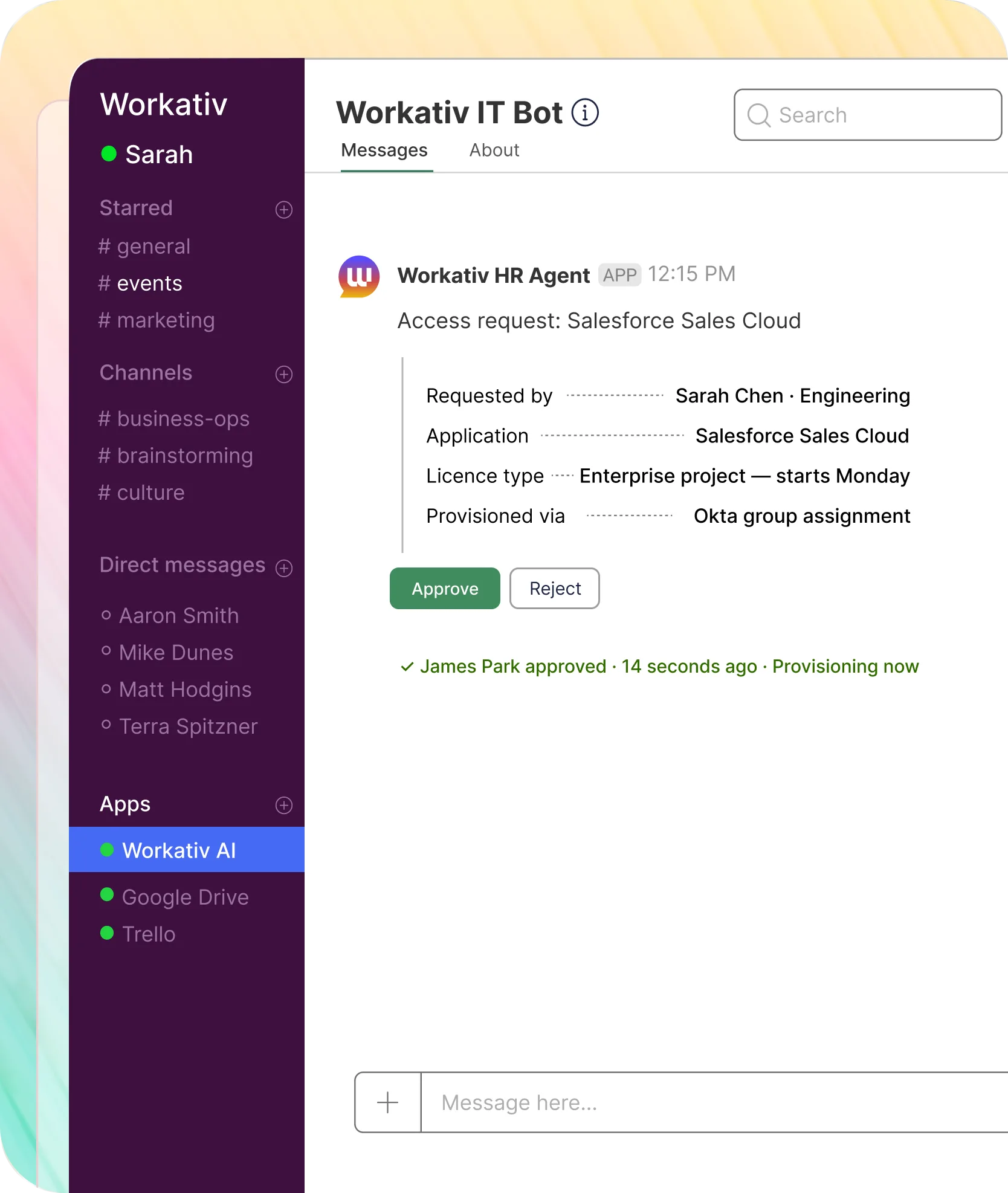
Manager approves with one tap
Manager receives an approval notification in Slack or Teams. One tap approve or reject. No email. No separate portal login.
Access provisioned and confirmed
Workativ provisions in Okta or Azure AD via API immediately on approval. Employee confirmed in their original thread.
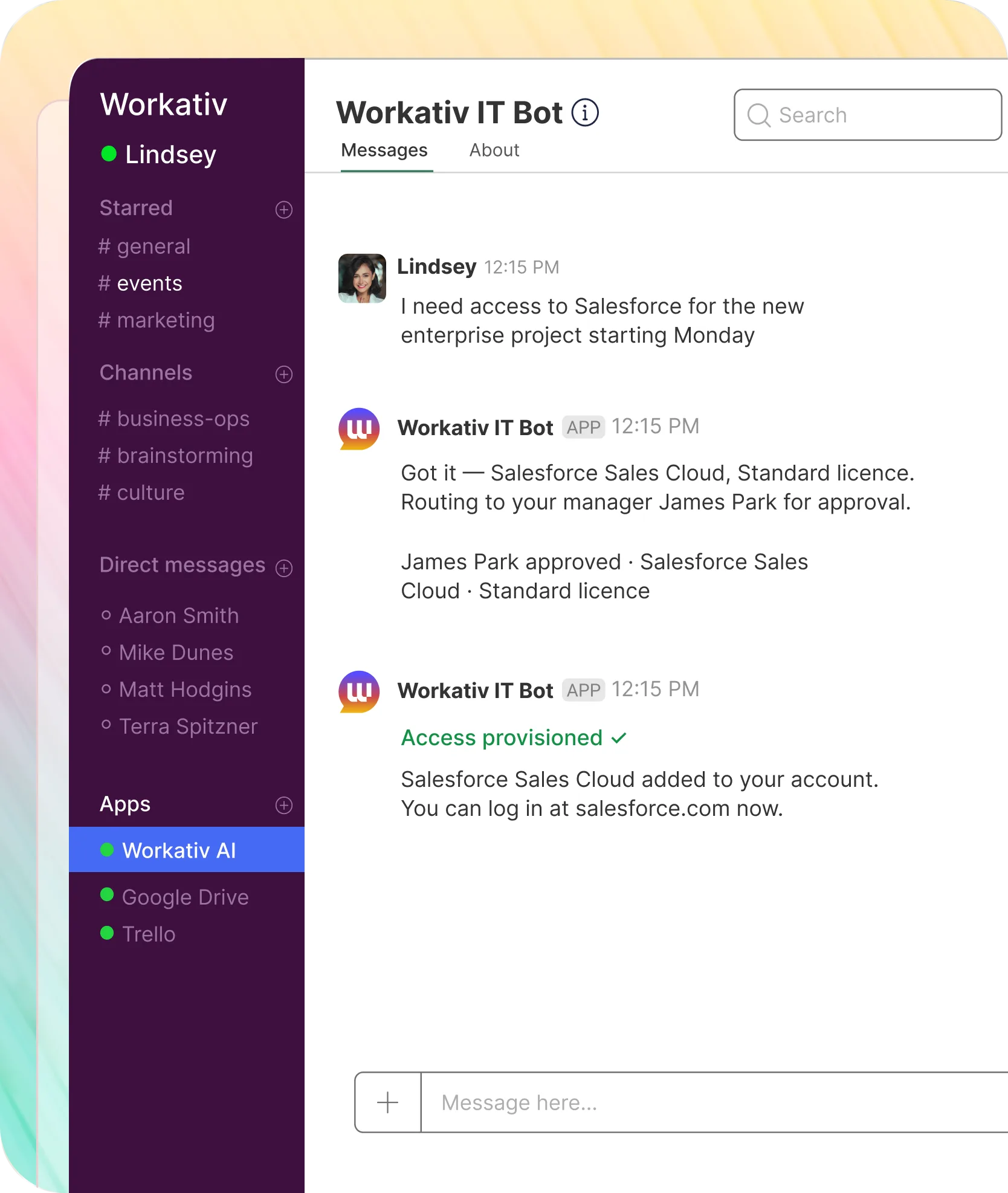
The approval lives in Slack. Not in a portal your manager has to remember to check.
Most access request automation tools route approvals to a separate portal or an email thread. Workativ routes approvals natively inside Slack or Teams where your managers already are.

One tap approve or reject in Slack
Manager receives the full request in a Slack notification and approves or rejects with a single tap. No login to a portal, no email reply chain, no digging through a ticketing system.
Auto-escalation if no response
If the manager does not respond within your configured window, Workativ auto-escalates to an IT administrator.
Every approval logged to audit trail
Approver identity, timestamp, decision, and justification are written to an immutable audit log on every request.
Auto-approval for low-risk standard access
Standard application access within your policy can be configured to auto-approve and provision without manager involvement.
Joiner, mover, leaver access provisioning automation for every employee lifecycle event.
Provisioning is not only about new access requests. Workativ handles the full joiner-mover-leaver lifecycle automatically.
Onboarding access provisioning
- New hire trigger from HRIS
- Azure AD or Okta account created
- Role-based access bundle provisioned
- Setup checklist sent in Slack or Teams
Software access request automation
- Request received in Slack or Teams
- Policy and eligibility checked
- Manager one-tap approval in Slack
- Provisioned in Okta on approval
Access revocation and role changes
- Role change or termination event fires
- Previous role access revoked in sequence
- New role access provisioned on approval
- Audit log written to ITSM
Access provisioning automation across 80 applications in production at GoTo.
GoTo deployed Workativ across IT and HR for 5,000 employees in Slack. Application access including SailPoint and GoTo Resolve was one of their highest-volume use cases. NMDC Group measured the broader IT automation outcome.
"For us, the real value of Workativ is moving beyond AI-powered answers to AI-powered execution. Routine IT requests can now be resolved through self-service in Slack, with Workativ taking action across the systems behind the request. It reduces the operational load on IT while giving employees a much faster and more consistent support experience."

Juan Ortiz
Senior IT Engineer

Pre-built connectors for every identity system and ITSM your IT team already uses.
Pre-built connectors no custom integration work. Workativ connects to your existing stack in 5 to 7 days.


'/%3e%3cpath%20d='M7.53747%209.7499L4.18595%209.72912C3.89511%209.72912%203.66314%209.49022%203.66314%209.20285C3.66314%209.08859%203.70122%208.98126%203.76701%208.89124L8.69389%202.30244C10.2589%203.46925%2010.5809%205.68513%209.41059%207.2501L7.53747%209.7499Z'%20fill='url(%23paint1_linear_217_318)'/%3e%3cdefs%3e%3clinearGradient%20id='paint0_linear_217_318'%20x1='7.3717'%20y1='1.41211'%20x2='9.07645'%20y2='11.0799'%20gradientUnits='userSpaceOnUse'%3e%3cstop%20stop-color='%239DC9FC'/%3e%3cstop%20offset='0.6866'%20stop-color='white'/%3e%3c/linearGradient%3e%3clinearGradient%20id='paint1_linear_217_318'%20x1='9.68512'%20y1='1.62241'%20x2='6.91576'%20y2='7.45173'%20gradientUnits='userSpaceOnUse'%3e%3cstop%20stop-color='%239DC9FC'/%3e%3cstop%20offset='0.7152'%20stop-color='white'/%3e%3c/linearGradient%3e%3c/defs%3e%3c/svg%3e)


%20--%3e%3csvg%20version='1.1'%20id='Layer_1'%20xmlns='http://www.w3.org/2000/svg'%20xmlns:xlink='http://www.w3.org/1999/xlink'%20x='0px'%20y='0px'%20viewBox='0%200%20512%20512'%20style='enable-background:new%200%200%20512%20512;'%20xml:space='preserve'%3e%3cstyle%20type='text/css'%3e%20.st0{fill:%23F7F7F7;}%20.st1{fill:%2328E4C3;}%20.st2{fill:url(%23SVGID_1_);}%20.st3{fill:url(%23SVGID_2_);}%20%3c/style%3e%3ccircle%20class='st0'%20cx='256'%20cy='256'%20r='245.5'/%3e%3cg%3e%3cg%3e%3cpath%20class='st1'%20d='M304.7,405.6'/%3e%3c/g%3e%3c/g%3e%3cg%3e%3cg%3e%3cpath%20class='st1'%20d='M305.8,353'/%3e%3c/g%3e%3c/g%3e%3clinearGradient%20id='SVGID_1_'%20gradientUnits='userSpaceOnUse'%20x1='388.1461'%20y1='99.0534'%20x2='204.4846'%20y2='204.5899'%20gradientTransform='matrix(1%200%200%20-1%200%20514)'%3e%3cstop%20offset='0.18'%20style='stop-color:%230052CC'/%3e%3cstop%20offset='1'%20style='stop-color:%232684FF'/%3e%3c/linearGradient%3e%3cpath%20class='st2'%20d='M119.9,330.3c-3,4.9-6.4,10.7-9.3,15.3c-2.6,4.4-1.2,10,3.1,12.7l60.7,37.4c4.4,2.7,10.1,1.3,12.9-3%20c0,0,0.1-0.1,0.1-0.1c2.4-4.1,5.6-9.3,9-15c24-39.7,48.2-34.8,91.9-14l60.2,28.6c4.7,2.2,10.2,0.2,12.4-4.4c0-0.1,0.1-0.2,0.1-0.3%20l28.9-65.4c2-4.7,0-10.1-4.7-12.2c-12.7-6-38-17.9-60.7-28.9C242.6,241.2,173.1,243.7,119.9,330.3z'/%3e%3clinearGradient%20id='SVGID_2_'%20gradientUnits='userSpaceOnUse'%20x1='613.0198'%20y1='1773.9866'%20x2='429.3116'%20y2='1879.5697'%20gradientTransform='matrix(-1%200%200%201%20736.83%20-1676.71)'%3e%3cstop%20offset='0.18'%20style='stop-color:%230052CC'/%3e%3cstop%20offset='1'%20style='stop-color:%232684FF'/%3e%3c/linearGradient%3e%3cpath%20class='st3'%20d='M392.1,181.9c3-4.9,6.4-10.7,9.3-15.3c2.6-4.4,1.2-10-3.1-12.7l-60.7-37.4c-4.3-2.9-10.1-1.7-13,2.5%20c-0.1,0.2-0.2,0.4-0.3,0.6c-2.4,4.1-5.6,9.3-9,15c-24,39.7-48.2,34.8-91.9,14l-60-28.5c-4.7-2.2-10.2-0.2-12.4,4.4%20c0,0.1-0.1,0.2-0.1,0.3L122,190.2c-2,4.7,0,10.1,4.7,12.2c12.7,6,38,17.9,60.7,28.9C269.4,271,338.9,268.4,392.1,181.9z'/%3e%3c/svg%3e)



%20--%3e%3csvg%20version='1.1'%20id='Layer_1'%20xmlns='http://www.w3.org/2000/svg'%20xmlns:xlink='http://www.w3.org/1999/xlink'%20x='0px'%20y='0px'%20viewBox='0%200%20512%20512'%20style='enable-background:new%200%200%20512%20512;'%20xml:space='preserve'%3e%3cstyle%20type='text/css'%3e%20.st0{fill:%23EB3C00;}%20.st1{fill:%23FFFFFF;}%20%3c/style%3e%3ccircle%20class='st0'%20cx='256'%20cy='256'%20r='245.5'/%3e%3cpath%20class='st1'%20d='M152.2,332.7v-152L286.7,131l73.1,23.4V359l-73.1,22L152.2,332.7l134.4,16.2V171.9L199,192.4v119.8L152.2,332.7%20z'/%3e%3c/svg%3e)

'%3e%3cpath%20d='M1.86774%200H2.41284C2.55325%200.0357914%202.8438%200.0814543%202.96023%200.144319C3.57556%200.476574%204.24389%200.994086%204.78094%201.44029C4.90785%201.49857%205.14031%201.69076%205.26616%201.78501L6.30254%202.56565L9.23874%204.76784L9.98605%205.32579C10.1165%205.42327%2010.3896%205.61784%2010.4874%205.73305C10.5933%205.62723%2010.7819%205.49083%2010.9035%205.39513C11.2293%205.13895%2011.5711%204.89897%2011.9015%204.64888L14.841%202.43616C15.2641%202.11793%2015.808%201.74101%2016.2059%201.4114C16.7548%201.01773%2017.2984%200.503308%2017.8952%200.193124C18.0888%200.0925009%2018.3311%200.0707975%2018.4996%200.00453492L18.511%200H19.1089C19.2716%200.0419345%2019.4446%200.0664859%2019.6017%200.126337C20.3949%200.428494%2020.8251%201.03647%2020.9795%201.84719V4.05546L17.6977%206.51872L16.7256%207.24655C16.6175%207.32813%2016.3229%207.56223%2016.2176%207.62326L16.2116%207.64067C16.0556%207.74125%2015.7554%207.98423%2015.5914%208.10717L14.2347%209.12565C12.9949%2010.0567%2011.7226%2010.9908%2010.4942%2011.9326C10.3311%2011.8196%2010.1521%2011.6753%209.99028%2011.5543L8.91562%2010.7499L6.14505%208.67116C5.6887%208.32244%205.22946%207.97753%204.76737%207.63644L4.76105%207.62385C4.64747%207.54843%204.4662%207.40207%204.35254%207.31617L3.58531%206.74057L0.993507%204.79937C0.666643%204.55579%200.329975%204.28777%200%204.0539V1.89895C0.0211067%201.8406%200.034732%201.7287%200.0477586%201.66355C0.195443%200.924862%200.778193%200.297181%201.50398%200.095359C1.61897%200.0633797%201.74239%200.0411929%201.85419%200.00451034L1.86774%200Z'%20fill='%23EB4337'/%3e%3cpath%20d='M18.5112%200H19.109C19.2718%200.0419345%2019.4448%200.0664859%2019.6018%200.126337C20.395%200.428494%2020.8252%201.03647%2020.9797%201.8472V4.05546L17.6978%206.51872L16.7258%207.24655C16.6176%207.32813%2016.3231%207.56223%2016.2177%207.62326C16.2065%207.10816%2016.2151%206.56484%2016.215%206.04638L16.2148%203.13227L16.2154%201.98927C16.2154%201.85241%2016.2236%201.52684%2016.2061%201.4114C16.755%201.01773%2017.2986%200.503308%2017.8953%200.193124C18.089%200.0925009%2018.3312%200.0707975%2018.4998%200.00453492L18.5112%200Z'%20fill='%23FCBC03'/%3e%3cpath%20d='M1.86774%200H2.41284C2.55325%200.0357914%202.8438%200.0814543%202.96023%200.144319C3.57556%200.476574%204.24389%200.994086%204.78094%201.44029C4.75802%201.55136%204.76536%201.81314%204.76577%201.93571L4.7683%202.76769L4.76727%206.06197L4.76854%207.06889C4.76879%207.22294%204.77708%207.48131%204.76105%207.62385C4.64746%207.54843%204.4662%207.40207%204.35254%207.31617L3.58531%206.74057L0.993506%204.79937C0.666643%204.5558%200.329975%204.28777%200%204.0539V1.89895C0.0211067%201.8406%200.034732%201.7287%200.0477586%201.66355C0.195443%200.924862%200.778193%200.297181%201.50398%200.095359C1.61897%200.0633798%201.74239%200.0411929%201.85419%200.00451034L1.86774%200Z'%20fill='%23C62220'/%3e%3cpath%20d='M0%204.05371C0.329975%204.28758%200.666643%204.5556%200.993507%204.79918L3.58531%206.74038L4.35254%207.31598C4.4662%207.40188%204.64747%207.54824%204.76105%207.62365L4.76737%207.63625C4.79294%207.81891%204.78411%208.19988%204.78406%208.39833L4.78312%209.71796L4.78339%2014.2476C4.7834%2014.4489%204.8101%2015.6601%204.76016%2015.7263C4.75851%2015.7284%204.75656%2015.7304%204.75498%2015.7326C4.75244%2015.7361%204.75024%2015.74%204.74778%2015.7435C4.7463%2015.7457%204.74469%2015.7477%204.74315%2015.7498H1.23433C1.02953%2015.6658%200.870008%2015.6564%200.656526%2015.5145C0.258114%2015.2497%200.102217%2014.9456%200%2014.4978V4.05371Z'%20fill='%234185F5'/%3e%3cpath%20d='M20.9794%204.05566V14.5025C20.828%2015.1172%2020.5387%2015.5356%2019.8875%2015.6981C19.8377%2015.7104%2019.7443%2015.7302%2019.7008%2015.7502H16.235C16.1758%2015.6436%2016.1987%2013.9178%2016.1987%2013.683L16.199%2010.2145L16.1984%208.51668C16.1982%208.31838%2016.1872%207.81396%2016.2115%207.64088L16.2175%207.62347C16.3228%207.56244%2016.6174%207.32834%2016.7255%207.24676L17.6976%206.51892L20.9794%204.05566Z'%20fill='%2333A953'/%3e%3c/g%3e%3cdefs%3e%3cclipPath%20id='clip0_1380_1288'%3e%3crect%20width='20.9795'%20height='15.75'%20fill='white'/%3e%3c/clipPath%3e%3c/defs%3e%3c/svg%3e)
%20--%3e%3csvg%20version='1.1'%20id='Layer_1'%20xmlns='http://www.w3.org/2000/svg'%20xmlns:xlink='http://www.w3.org/1999/xlink'%20x='0px'%20y='0px'%20viewBox='0%200%20512%20512'%20style='enable-background:new%200%200%20512%20512;'%20xml:space='preserve'%3e%3cstyle%20type='text/css'%3e%20.st0{fill:%230062FF;}%20.st1{fill:%23FFFFFF;}%20%3c/style%3e%3ccircle%20class='st0'%20cx='256'%20cy='256'%20r='245.5'/%3e%3cpath%20class='st1'%20d='M256,162.5l-91,58.2l91,58.2l-91,58.2l-91-59.1l91-58.2l-91-57.3l91-58.2L256,162.5z%20M164.1,355.5l91-58.2%20l91,58.2l-91,58.2L164.1,355.5z%20M256,278.1l91-58.2l-91-57.3l91-58.2l91,58.2l-91,58.2l91,58.2l-91,58.2L256,278.1z'/%3e%3c/svg%3e)


Every access grant approved before it executes. Every grant revoked when it should be.
Automate software access
requests for your IT team.
Automate access requests from Slack or Teams. Employee asks, manager approves with one tap, Okta provisions. Done in one conversation.
Access provisioning is one part of the IT helpdesk picture.
Identity
Password Reset Automation
IT helpdesk
IT Helpdesk Automation
IT support
IT Support Chatbot
Frequently asked questions
Common questions from CIOs, IT Directors, and IT Service Desk Leaders evaluating access request automation for their helpdesk.
What is access provisioning automation?
Access provisioning automation is the use of an AI agent to handle software and system access requests end to end intake, policy check, approval routing, and provisioning without manual IT involvement. An employee asks for access in Slack or Teams, the AI agent checks their eligibility, routes an approval to their manager in the same channel, and provisions access in Okta or Azure AD immediately on approval. No ticket is created for standard requests. No IT engineer processes the request manually. Workativ handles the full access lifecycle conversationally.
How is access provisioning automation different from an IAM tool?
Identity and access management tools like Okta and Azure AD manage directories, authentication, and group membership they execute provisioning but do not handle the employee-facing request, the approval workflow, or the ITSM record. Access provisioning automation handles the business process that sits in front of the IAM tool: an employee asks in Slack, the AI agent checks policy, routes manager approval, and instructs Okta to provision. Workativ owns the workflow and audit trail from request through confirmation. Your IAM tool executes the final group change.
How does one-tap approval work in Slack or Teams?
When an employee requests access, Workativ sends an approval notification directly to the employee's manager in Slack or Teams. The notification shows the employee name, the application requested, the licence type, and the justification. The manager approves or rejects with a single tap no separate portal, no email thread, no login to another system. On approval, Workativ immediately provisions access in Okta, Azure AD, or the target application. On rejection, the employee is notified in their original Slack thread with the outcome.
Which systems does Workativ support for access provisioning automation?
Workativ supports access provisioning automation for Okta, Azure Active Directory (Entra ID), on-premises Active Directory, Google Workspace, and SailPoint. For ITSM, Workativ integrates with ServiceNow, Jira Service Management, and Freshservice creating access request records automatically for audit and exception handling. Employees interact only through Slack or Microsoft Teams. GoTo provisions access across 80 applications including SailPoint and GoTo Resolve using Workativ.
What happens if a manager does not approve the access request?
Workativ applies your configured escalation policy when a manager does not respond within your defined window. The request auto-escalates to the next approver, routes to an IT administrator, or notifies the employee with an expected response time. Expired requests do not silently drop every request has a defined outcome path. Rejected requests return the manager's decision to the employee in their original Slack or Teams thread.
How does Workativ handle access provisioning when an employee changes roles?
When an employee changes roles, Workativ triggers an access adjustment workflow from your HRIS or on a manual trigger. Previous role access is revoked in the defined sequence. New role access is requested, approved, and provisioned through the same conversational workflow. Role changes are among the highest-risk access events standing privileges from previous roles are a common audit finding. Workativ automates both revocation and provisioning in a single workflow so neither step is missed.
Does Workativ automatically revoke access when an employee is offboarded?
Yes. An offboarding event from your HRIS or a manually triggered offboarding workflow instructs Workativ to revoke access across Okta, Azure AD, SailPoint, and application-specific grants in the configured sequence. Each revocation is logged with timestamp and outcome. Because Workativ tracks what it provisioned, nothing is missed there is no separate deprovisioning checklist to manage alongside your offboarding process.
Can Workativ handle role-based access provisioning automation?
Yes. Role-based access provisioning automation maps job roles to access bundles. When a new hire is created in the HRIS with a specific role, Workativ provisions the standard access package for that role without individual requests. When a role change occurs, Workativ calculates the access delta and applies it adding new role access and revoking previous role access. Role-based provisioning reduces ad hoc access requests significantly and keeps access aligned with what each role actually requires.
How does access provisioning automation work for new hire onboarding?
When a new hire record is created in your HRIS, Workativ triggers the onboarding access provisioning workflow. The new hire's role determines their standard access package. Accounts are created in Azure AD or Okta, software licences provisioned by role template, and a setup checklist sent in Slack or Teams before their first day. Managers receive a confirmation when all provisioning steps complete. No IT engineer processes each step the workflow runs end to end automatically.
Is access provisioning automation secure?
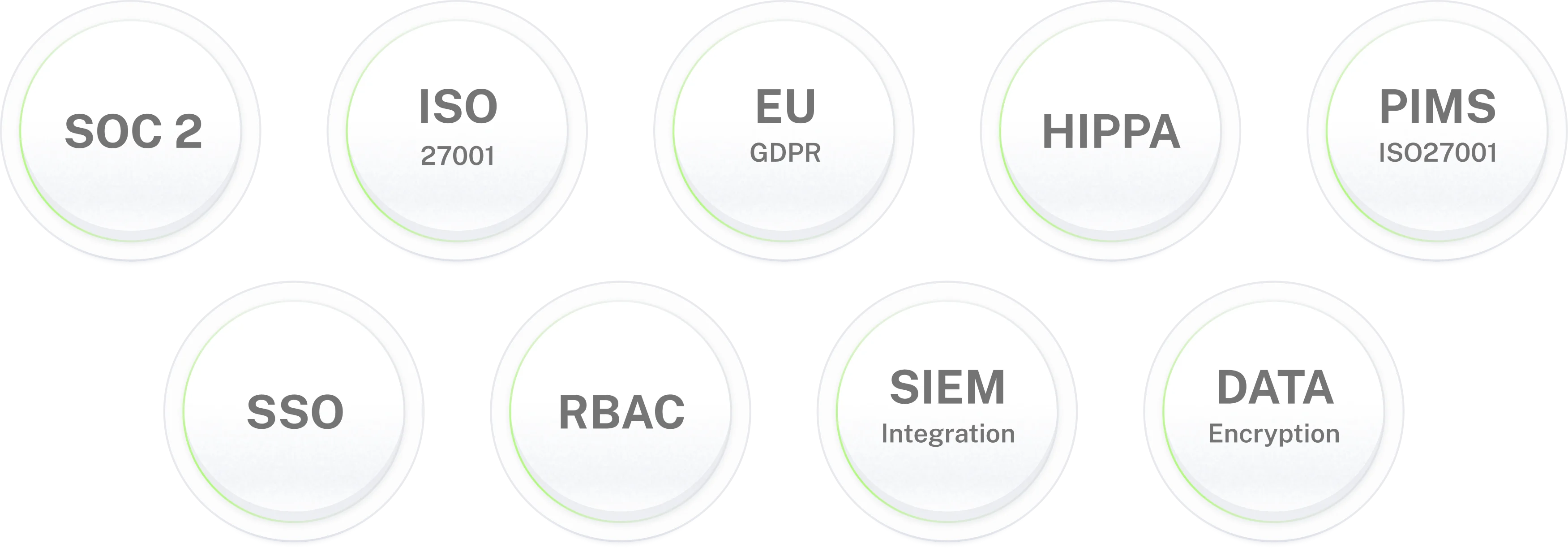
Yes. No provisioning executes without an approval from an authorised approver the AI agent enforces this on every request, with no exceptions for repeat requesters or urgent cases. Every provisioning and revocation action writes to an immutable audit log: requester, approver, system, timestamp, and outcome. API tokens and credentials are masked in all logs. Workativ holds SOC 2 Type II, ISO 27001, GDPR, and HIPAA certifications.
What results do Workativ customers achieve with access provisioning automation?
The clearest example is GoTo: 5,000 employees, 80+ applications including SailPoint and GoTo Resolve, 84% of all employee IT and HR support requests resolved automatically with access provisioning among the highest-volume use cases. NMDC Group measured the broader IT automation outcome: 78% of 6,000 monthly tickets automated, $37,000+ per month in L1 costs removed, and 390 engineer-hours recaptured monthly.
How quickly can access provisioning automation be deployed?
Workativ access provisioning automation deploys in 5 to 7 days using pre-built connectors for Okta, Azure AD, Slack, and Microsoft Teams. No developer resources and no implementation consultant are required. Configuration is done in Workativ's no-code platform. The recommended approach: start with the highest-volume access request type typically standard software access for a common application and expand to role-based and lifecycle provisioning from there.