


Workday has your data. Now add an AI agent.
Workativ's Workday AI agent answers every HR query in Slack or Teams and runs every lifecycle workflow automatically onboarding, offboarding, benefits enrollment, performance cycles, pre-hire. HR handles nothing manually for standard requests.
IT Teams of all sizes trusts Workativ AI to automate IT Operations & Support

Workday is powerful. But three problems keep HR's inbox full.

HR answers the same Workday questions weekly
PTO balances, pay dates, benefits eligibility. Up to 70% of HR tickets are requests Workday already has the answer to.

Employees skip the Workday portal
Logging into Workday for a PTO balance takes longer than messaging HR. So employees message HR.

Every Workday event still needs someone
New hire in Workday still needs Okta and ServiceNow. Offboarding still needs COBRA. HR coordinates both.
Every Workday HR query answered in Slack. HR answers nothing manually.
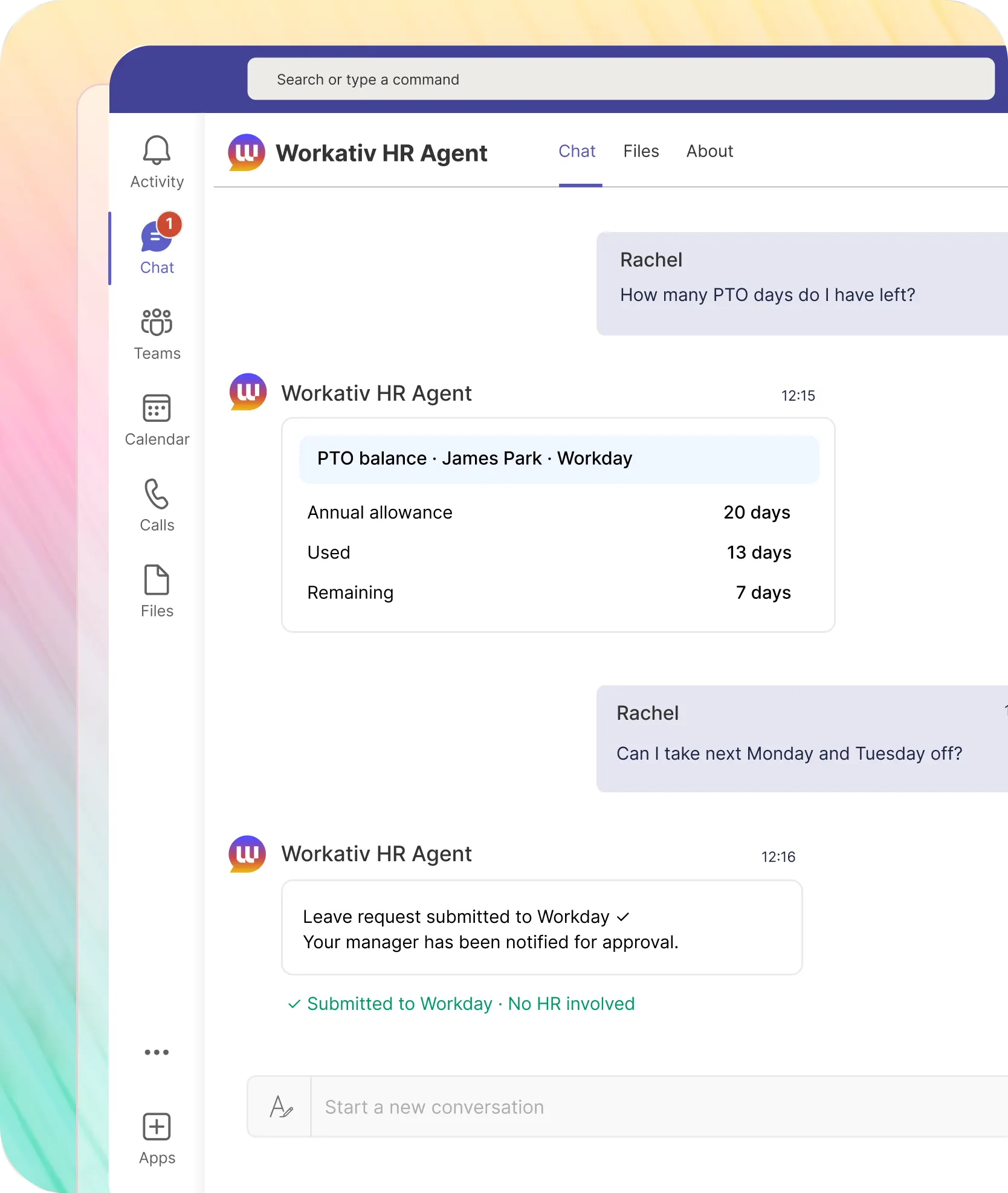
Employee asks in Slack. Workativ reads from Workday and replies in the same thread PTO balances, payslips, policy answers, personal updates. No portal login. No HR ticket.
PTO balance pulled from Workday in seconds. Leave submitted and approved all in Slack.
Employee stays in Slack the whole time. No Workday portal. No emailing HR. The balance is live not a cached number from last week.

Balance reflects same-day accruals not a cached figure
Leave submitted through Workday's business process HR not in the chain
Manager approves with one tap Workday record updated, employee confirmed
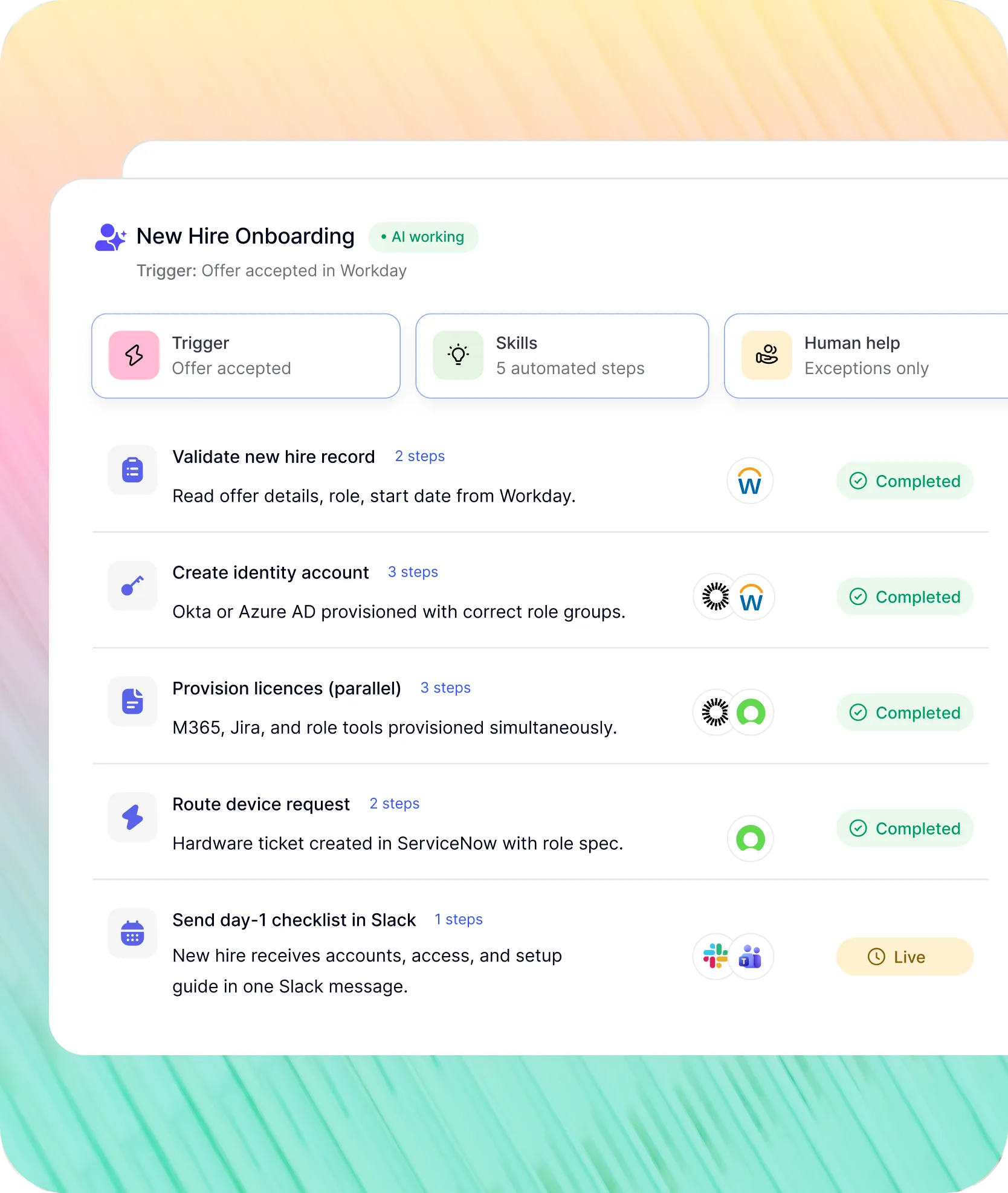
Workday onboarding, Workday offboarding, benefits enrollment, and performance reviews running without HR.
Offer accepted in Workday. Termination event fires. Enrollment window opens. Workativ runs the next step across every connected system while keeping HR in the loop.
Offer accepted in Workday. Identity provisioned, device requested, day-1 checklist sent no HR step..
Triggered by Workday new hire event no manual step
Okta / Azure AD provisioned with correct role and groups
Day-1 setup checklist delivered to new hire in Slack
How GoTo resolved 80% of HR queries automatically with Workday connected to Workativ in Slack.
“ Our AI Bot Orion has become a critical enabler of employee self‑service. The quality of responses is fast, comprehensive, and highly reliable, allowing employees to find accurate answers without needing to escalate to HR or IT. What really sets Workativ apart is the visibility into question trends, resolution rates, and where AI is genuinely reducing operational workload. ”

Susan Treadway
Vice President, HR Operations

Connect Workday to Slack in three steps. No Workday Studio. No developer.
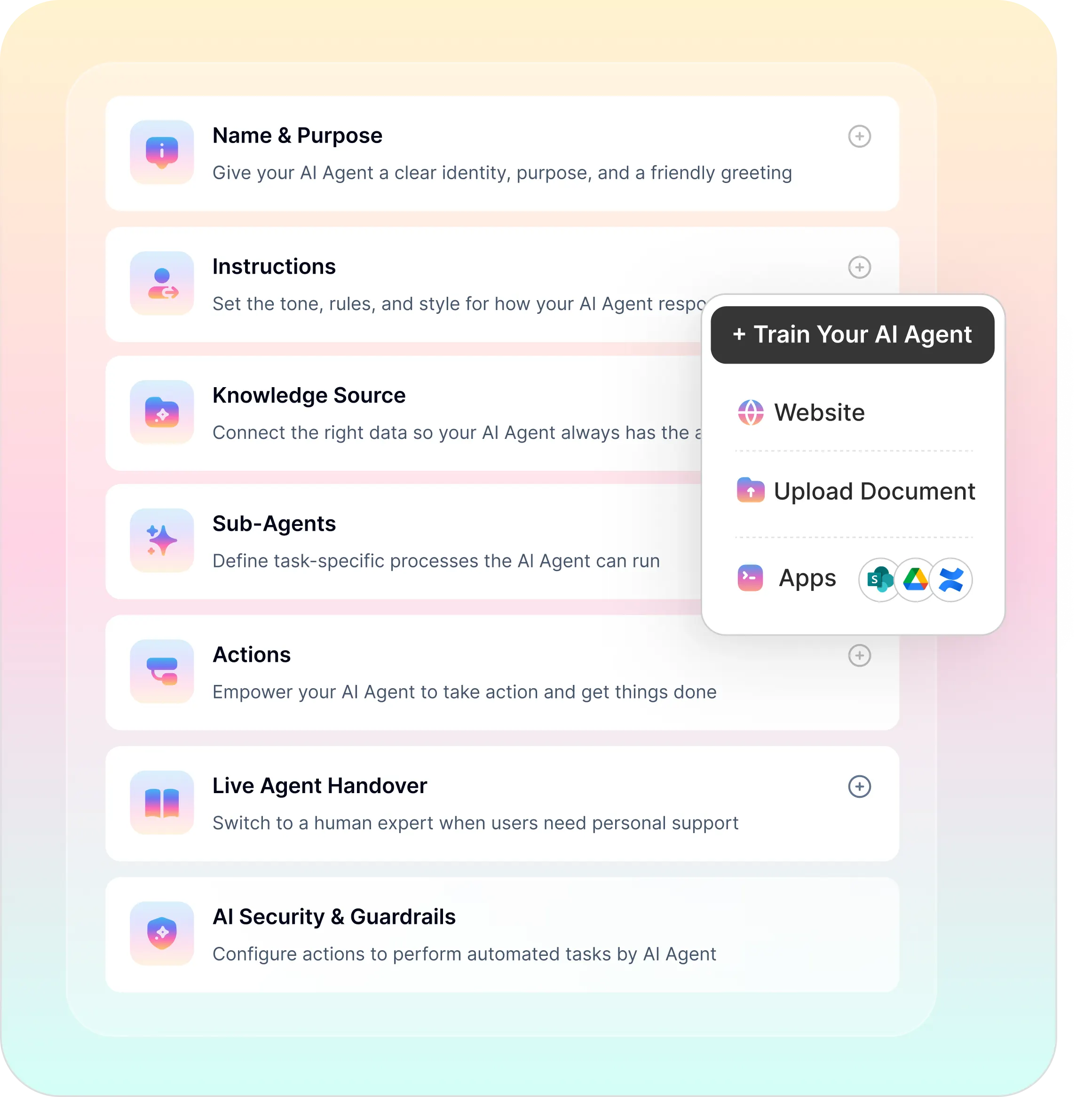
Five platform capabilities. One no-code studio. No developer, no months-long rollout
No-code builder, agentic RAG, workflow automation, enterprise security, and analytics in one platform.
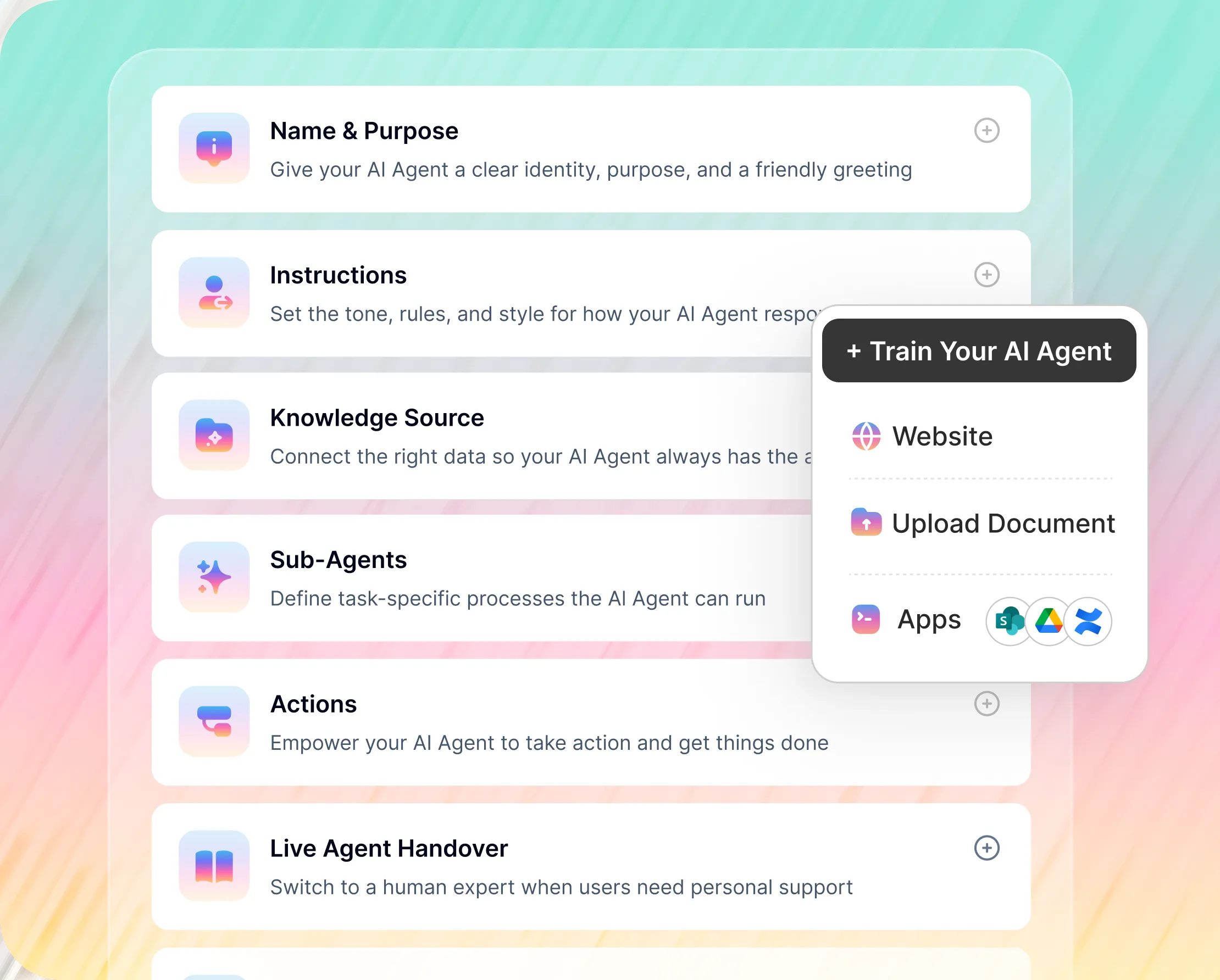
No-Code Workday AI Agent Builder
Build and deploy a Workday AI agent using Workativ's no-code studio.
Workday actions added without code or API knowledge
Live agent handover when employees need human HR
Workday launched Sana in March 2026. Honest comparison for mid-market HR teams.
Sana covers Workday-native tasks. For cross-system workflows, here is the comparison.
What matters to you |  |  |  |
|---|---|---|---|
Who can use it |  | Workday subscribers only | Enterprise only |
External app integrations | | 18 connectors (Sana Enterprise only) | Broad, complex setup |
Deploy on Slack or Teams | | Slack connector (Sana Enterprise) | |
No-code agent builder | | Pre-built skills only, limited custom |  |
HR + IT automation cross-function | | Primarily Workday HR and Finance | |
Custom workflow creation | | Limited to 300 pre-defined skills | Yes, heavy IT involvement |

When to use Workday Sana: Your org is 100% Workday and you only need AI for Workday-native tasks. Sana covers the basics and is included in Workday.
Workativ: The moment you need cross-system automation Okta, Jira, ServiceNow or want HR and IT support in one AI agent. Workativ and Sana can run alongside each other. If you are evaluating a Workday chatbot alternative that connects to your wider stack, Workativ is built for that use case.
Workativ vs Moveworks vs Leena AI for Workday HR automation.
Three platforms that integrate with Workday. Different audiences, different pricing, different deployment realities.
Capability | | | '%3e%3cpath%20d='M80.1884%2012.6011L73.6696%2012.5809L71.9802%2017.1653L69.0146%2017.1485L75.4093%200.62793H78.4823L84.8803%2017.1451L81.8879%2017.1619L80.1884%2012.5977V12.6011ZM79.4126%2010.2266L77.5419%204.95371L76.9273%203.10988C76.6419%204.12415%2076.3665%205.03431%2076.0205%205.99485L74.489%2010.2467L79.4126%2010.2266Z'%20fill='white'/%3e%3cpath%20d='M64.0433%206.25021L64.05%2017.1117L61.7091%2017.1184C61.6587%2016.7691%2061.7561%2016.487%2061.6553%2016.1914C59.3212%2017.7565%2056.238%2017.3199%2054.4446%2015.2611C52.6511%2013.2023%2052.6579%2010.0991%2054.4883%208.05373C56.2985%206.02854%2059.3447%205.61545%2061.6755%207.18387L61.7259%206.24685H64.0466L64.0433%206.25021ZM61.7024%2011.6843C61.7024%209.96473%2060.3052%208.57095%2058.5823%208.57095C56.8594%208.57095%2055.4622%209.96473%2055.4622%2011.6843C55.4622%2013.4039%2056.8594%2014.7976%2058.5823%2014.7976C60.3052%2014.7976%2061.7024%2013.4039%2061.7024%2011.6843Z'%20fill='white'/%3e%3cpath%20d='M50.0389%2017.1218L49.9986%2011.4929C49.9885%209.82709%2048.5107%208.57436%2046.9121%208.56092C45.3134%208.54749%2043.7786%209.8338%2043.7719%2011.5366L43.745%2017.1184H41.4209V6.27377L43.745%206.25698C43.7887%206.57268%2043.7013%206.84472%2043.8122%207.16042C45.5552%206.02524%2047.7114%205.90097%2049.5754%206.93204C51.2076%207.83212%2052.363%209.61886%2052.3663%2011.634L52.3764%2017.1184H50.0422L50.0389%2017.1218Z'%20fill='white'/%3e%3cpath%20d='M89.9244%200.681641V17.1686L87.1166%2017.1586L87.1133%200.701792L89.9244%200.681641Z'%20fill='white'/%3e%3cpath%20d='M10.6902%2014.801V17.1217H0V0H2.33417L2.33081%2014.7977L10.6902%2014.801Z'%20fill='white'/%3e%3cpath%20d='M13.1455%2023.9998H12.3428C11.9398%2023.7278%2011.4326%2023.4222%2011.4326%2022.8277L11.4561%2011.3785C11.4662%206.76388%2015.399%202.96875%2020.0136%202.96875H32.101C36.9372%202.96875%2040.7156%207.03928%2040.682%2011.7479C40.6484%2016.4566%2036.8533%2020.4062%2032.0405%2020.4129L20.2622%2020.4331L13.1455%2023.9998ZM20.2823%2018.109L32.0506%2018.0787C35.5905%2018.0687%2038.3344%2015.0829%2038.3209%2011.6572C38.3075%208.20133%2035.5132%205.28277%2031.97%205.27941H20.1614C16.6887%205.27941%2013.7903%208.08714%2013.7836%2011.5498L13.7668%2021.041L18.9053%2018.5053C19.3386%2018.2903%2019.7282%2018.109%2020.289%2018.1056L20.2823%2018.109Z'%20fill='white'/%3e%3cpath%20d='M29.0345%2012.8565C29.3402%2013.8372%2030.2772%2014.4854%2031.137%2014.7037C32.2554%2014.9858%2033.2763%2014.6365%2034.1093%2013.9077L35.896%2015.409C34.0354%2017.3603%2031.0933%2017.6861%2028.87%2016.2083C26.6903%2014.7574%2025.8171%2011.9161%2026.9388%209.42411C27.99%207.09329%2030.6097%205.75996%2033.2226%206.39808C35.6945%207.00261%2037.498%209.3032%2037.3603%2011.9631C37.3435%2012.2654%2037.4006%2012.5341%2037.3402%2012.8464L29.0312%2012.8599L29.0345%2012.8565ZM34.781%2010.4988C34.2234%209.18565%2033.011%208.5341%2031.7684%208.5744C30.5257%208.6147%2029.4376%209.35694%2029.0077%2010.5257L34.781%2010.4988Z'%20fill='white'/%3e%3cpath%20d='M17.3566%2012.8562C17.632%2013.8167%2018.5791%2014.475%2019.4187%2014.6899C20.5572%2014.9855%2021.5782%2014.653%2022.4178%2013.904L24.2079%2015.4154C22.3171%2017.3734%2019.3817%2017.6824%2017.1584%2016.1845C15.0224%2014.7436%2014.1525%2011.9393%2015.2474%209.46741C16.2684%207.16346%2018.8242%205.80326%2021.417%206.37085C23.8822%206.91158%2025.7428%209.14163%2025.689%2011.7915C25.6823%2012.1475%2025.7159%2012.4666%2025.6756%2012.8427L17.3599%2012.8562H17.3566ZM23.103%2010.4985C22.5488%209.19537%2021.3566%208.54046%2020.1173%208.57069C18.878%208.60091%2017.82%209.30284%2017.3129%2010.5119L23.103%2010.4951V10.4985Z'%20fill='white'/%3e%3c/g%3e%3cdefs%3e%3cclipPath%20id='clip0_709_2506'%3e%3crect%20width='89.9244'%20height='24'%20fill='white'/%3e%3c/clipPath%3e%3c/defs%3e%3c/svg%3e) |
|---|---|---|---|
Workday integration | | Custom dev required | Pre-built, enterprise setup |
Deployment time | | Weeks to months | Weeks to months |
Pricing model | | $200K–$1M+/yr, quote only | Per-employee, quote only |
Mid-market fit | | Enterprise only | Enterprise only |
No-code configuration | | | Partial some config required |
HR + IT in one agent | | | |
Workday plus your entire enterprise stack. One platform.
Workday integration with an AI agent layer connects HR data to every system employees and HR teams use.


'/%3e%3cpath%20d='M7.53747%209.7499L4.18595%209.72912C3.89511%209.72912%203.66314%209.49022%203.66314%209.20285C3.66314%209.08859%203.70122%208.98126%203.76701%208.89124L8.69389%202.30244C10.2589%203.46925%2010.5809%205.68513%209.41059%207.2501L7.53747%209.7499Z'%20fill='url(%23paint1_linear_217_318)'/%3e%3cdefs%3e%3clinearGradient%20id='paint0_linear_217_318'%20x1='7.3717'%20y1='1.41211'%20x2='9.07645'%20y2='11.0799'%20gradientUnits='userSpaceOnUse'%3e%3cstop%20stop-color='%239DC9FC'/%3e%3cstop%20offset='0.6866'%20stop-color='white'/%3e%3c/linearGradient%3e%3clinearGradient%20id='paint1_linear_217_318'%20x1='9.68512'%20y1='1.62241'%20x2='6.91576'%20y2='7.45173'%20gradientUnits='userSpaceOnUse'%3e%3cstop%20stop-color='%239DC9FC'/%3e%3cstop%20offset='0.7152'%20stop-color='white'/%3e%3c/linearGradient%3e%3c/defs%3e%3c/svg%3e)


%20--%3e%3csvg%20version='1.1'%20id='Layer_1'%20xmlns='http://www.w3.org/2000/svg'%20xmlns:xlink='http://www.w3.org/1999/xlink'%20x='0px'%20y='0px'%20viewBox='0%200%20512%20512'%20style='enable-background:new%200%200%20512%20512;'%20xml:space='preserve'%3e%3cstyle%20type='text/css'%3e%20.st0{fill:%23F7F7F7;}%20.st1{fill:%2328E4C3;}%20.st2{fill:url(%23SVGID_1_);}%20.st3{fill:url(%23SVGID_2_);}%20%3c/style%3e%3ccircle%20class='st0'%20cx='256'%20cy='256'%20r='245.5'/%3e%3cg%3e%3cg%3e%3cpath%20class='st1'%20d='M304.7,405.6'/%3e%3c/g%3e%3c/g%3e%3cg%3e%3cg%3e%3cpath%20class='st1'%20d='M305.8,353'/%3e%3c/g%3e%3c/g%3e%3clinearGradient%20id='SVGID_1_'%20gradientUnits='userSpaceOnUse'%20x1='388.1461'%20y1='99.0534'%20x2='204.4846'%20y2='204.5899'%20gradientTransform='matrix(1%200%200%20-1%200%20514)'%3e%3cstop%20offset='0.18'%20style='stop-color:%230052CC'/%3e%3cstop%20offset='1'%20style='stop-color:%232684FF'/%3e%3c/linearGradient%3e%3cpath%20class='st2'%20d='M119.9,330.3c-3,4.9-6.4,10.7-9.3,15.3c-2.6,4.4-1.2,10,3.1,12.7l60.7,37.4c4.4,2.7,10.1,1.3,12.9-3%20c0,0,0.1-0.1,0.1-0.1c2.4-4.1,5.6-9.3,9-15c24-39.7,48.2-34.8,91.9-14l60.2,28.6c4.7,2.2,10.2,0.2,12.4-4.4c0-0.1,0.1-0.2,0.1-0.3%20l28.9-65.4c2-4.7,0-10.1-4.7-12.2c-12.7-6-38-17.9-60.7-28.9C242.6,241.2,173.1,243.7,119.9,330.3z'/%3e%3clinearGradient%20id='SVGID_2_'%20gradientUnits='userSpaceOnUse'%20x1='613.0198'%20y1='1773.9866'%20x2='429.3116'%20y2='1879.5697'%20gradientTransform='matrix(-1%200%200%201%20736.83%20-1676.71)'%3e%3cstop%20offset='0.18'%20style='stop-color:%230052CC'/%3e%3cstop%20offset='1'%20style='stop-color:%232684FF'/%3e%3c/linearGradient%3e%3cpath%20class='st3'%20d='M392.1,181.9c3-4.9,6.4-10.7,9.3-15.3c2.6-4.4,1.2-10-3.1-12.7l-60.7-37.4c-4.3-2.9-10.1-1.7-13,2.5%20c-0.1,0.2-0.2,0.4-0.3,0.6c-2.4,4.1-5.6,9.3-9,15c-24,39.7-48.2,34.8-91.9,14l-60-28.5c-4.7-2.2-10.2-0.2-12.4,4.4%20c0,0.1-0.1,0.2-0.1,0.3L122,190.2c-2,4.7,0,10.1,4.7,12.2c12.7,6,38,17.9,60.7,28.9C269.4,271,338.9,268.4,392.1,181.9z'/%3e%3c/svg%3e)



%20--%3e%3csvg%20version='1.1'%20id='Layer_1'%20xmlns='http://www.w3.org/2000/svg'%20xmlns:xlink='http://www.w3.org/1999/xlink'%20x='0px'%20y='0px'%20viewBox='0%200%20512%20512'%20style='enable-background:new%200%200%20512%20512;'%20xml:space='preserve'%3e%3cstyle%20type='text/css'%3e%20.st0{fill:%23EB3C00;}%20.st1{fill:%23FFFFFF;}%20%3c/style%3e%3ccircle%20class='st0'%20cx='256'%20cy='256'%20r='245.5'/%3e%3cpath%20class='st1'%20d='M152.2,332.7v-152L286.7,131l73.1,23.4V359l-73.1,22L152.2,332.7l134.4,16.2V171.9L199,192.4v119.8L152.2,332.7%20z'/%3e%3c/svg%3e)

'%3e%3cpath%20d='M1.86774%200H2.41284C2.55325%200.0357914%202.8438%200.0814543%202.96023%200.144319C3.57556%200.476574%204.24389%200.994086%204.78094%201.44029C4.90785%201.49857%205.14031%201.69076%205.26616%201.78501L6.30254%202.56565L9.23874%204.76784L9.98605%205.32579C10.1165%205.42327%2010.3896%205.61784%2010.4874%205.73305C10.5933%205.62723%2010.7819%205.49083%2010.9035%205.39513C11.2293%205.13895%2011.5711%204.89897%2011.9015%204.64888L14.841%202.43616C15.2641%202.11793%2015.808%201.74101%2016.2059%201.4114C16.7548%201.01773%2017.2984%200.503308%2017.8952%200.193124C18.0888%200.0925009%2018.3311%200.0707975%2018.4996%200.00453492L18.511%200H19.1089C19.2716%200.0419345%2019.4446%200.0664859%2019.6017%200.126337C20.3949%200.428494%2020.8251%201.03647%2020.9795%201.84719V4.05546L17.6977%206.51872L16.7256%207.24655C16.6175%207.32813%2016.3229%207.56223%2016.2176%207.62326L16.2116%207.64067C16.0556%207.74125%2015.7554%207.98423%2015.5914%208.10717L14.2347%209.12565C12.9949%2010.0567%2011.7226%2010.9908%2010.4942%2011.9326C10.3311%2011.8196%2010.1521%2011.6753%209.99028%2011.5543L8.91562%2010.7499L6.14505%208.67116C5.6887%208.32244%205.22946%207.97753%204.76737%207.63644L4.76105%207.62385C4.64747%207.54843%204.4662%207.40207%204.35254%207.31617L3.58531%206.74057L0.993507%204.79937C0.666643%204.55579%200.329975%204.28777%200%204.0539V1.89895C0.0211067%201.8406%200.034732%201.7287%200.0477586%201.66355C0.195443%200.924862%200.778193%200.297181%201.50398%200.095359C1.61897%200.0633797%201.74239%200.0411929%201.85419%200.00451034L1.86774%200Z'%20fill='%23EB4337'/%3e%3cpath%20d='M18.5112%200H19.109C19.2718%200.0419345%2019.4448%200.0664859%2019.6018%200.126337C20.395%200.428494%2020.8252%201.03647%2020.9797%201.8472V4.05546L17.6978%206.51872L16.7258%207.24655C16.6176%207.32813%2016.3231%207.56223%2016.2177%207.62326C16.2065%207.10816%2016.2151%206.56484%2016.215%206.04638L16.2148%203.13227L16.2154%201.98927C16.2154%201.85241%2016.2236%201.52684%2016.2061%201.4114C16.755%201.01773%2017.2986%200.503308%2017.8953%200.193124C18.089%200.0925009%2018.3312%200.0707975%2018.4998%200.00453492L18.5112%200Z'%20fill='%23FCBC03'/%3e%3cpath%20d='M1.86774%200H2.41284C2.55325%200.0357914%202.8438%200.0814543%202.96023%200.144319C3.57556%200.476574%204.24389%200.994086%204.78094%201.44029C4.75802%201.55136%204.76536%201.81314%204.76577%201.93571L4.7683%202.76769L4.76727%206.06197L4.76854%207.06889C4.76879%207.22294%204.77708%207.48131%204.76105%207.62385C4.64746%207.54843%204.4662%207.40207%204.35254%207.31617L3.58531%206.74057L0.993506%204.79937C0.666643%204.5558%200.329975%204.28777%200%204.0539V1.89895C0.0211067%201.8406%200.034732%201.7287%200.0477586%201.66355C0.195443%200.924862%200.778193%200.297181%201.50398%200.095359C1.61897%200.0633798%201.74239%200.0411929%201.85419%200.00451034L1.86774%200Z'%20fill='%23C62220'/%3e%3cpath%20d='M0%204.05371C0.329975%204.28758%200.666643%204.5556%200.993507%204.79918L3.58531%206.74038L4.35254%207.31598C4.4662%207.40188%204.64747%207.54824%204.76105%207.62365L4.76737%207.63625C4.79294%207.81891%204.78411%208.19988%204.78406%208.39833L4.78312%209.71796L4.78339%2014.2476C4.7834%2014.4489%204.8101%2015.6601%204.76016%2015.7263C4.75851%2015.7284%204.75656%2015.7304%204.75498%2015.7326C4.75244%2015.7361%204.75024%2015.74%204.74778%2015.7435C4.7463%2015.7457%204.74469%2015.7477%204.74315%2015.7498H1.23433C1.02953%2015.6658%200.870008%2015.6564%200.656526%2015.5145C0.258114%2015.2497%200.102217%2014.9456%200%2014.4978V4.05371Z'%20fill='%234185F5'/%3e%3cpath%20d='M20.9794%204.05566V14.5025C20.828%2015.1172%2020.5387%2015.5356%2019.8875%2015.6981C19.8377%2015.7104%2019.7443%2015.7302%2019.7008%2015.7502H16.235C16.1758%2015.6436%2016.1987%2013.9178%2016.1987%2013.683L16.199%2010.2145L16.1984%208.51668C16.1982%208.31838%2016.1872%207.81396%2016.2115%207.64088L16.2175%207.62347C16.3228%207.56244%2016.6174%207.32834%2016.7255%207.24676L17.6976%206.51892L20.9794%204.05566Z'%20fill='%2333A953'/%3e%3c/g%3e%3cdefs%3e%3cclipPath%20id='clip0_1380_1288'%3e%3crect%20width='20.9795'%20height='15.75'%20fill='white'/%3e%3c/clipPath%3e%3c/defs%3e%3c/svg%3e)
%20--%3e%3csvg%20version='1.1'%20id='Layer_1'%20xmlns='http://www.w3.org/2000/svg'%20xmlns:xlink='http://www.w3.org/1999/xlink'%20x='0px'%20y='0px'%20viewBox='0%200%20512%20512'%20style='enable-background:new%200%200%20512%20512;'%20xml:space='preserve'%3e%3cstyle%20type='text/css'%3e%20.st0{fill:%230062FF;}%20.st1{fill:%23FFFFFF;}%20%3c/style%3e%3ccircle%20class='st0'%20cx='256'%20cy='256'%20r='245.5'/%3e%3cpath%20class='st1'%20d='M256,162.5l-91,58.2l91,58.2l-91,58.2l-91-59.1l91-58.2l-91-57.3l91-58.2L256,162.5z%20M164.1,355.5l91-58.2%20l91,58.2l-91,58.2L164.1,355.5z%20M256,278.1l91-58.2l-91-57.3l91-58.2l91,58.2l-91,58.2l91,58.2l-91,58.2L256,278.1z'/%3e%3c/svg%3e)


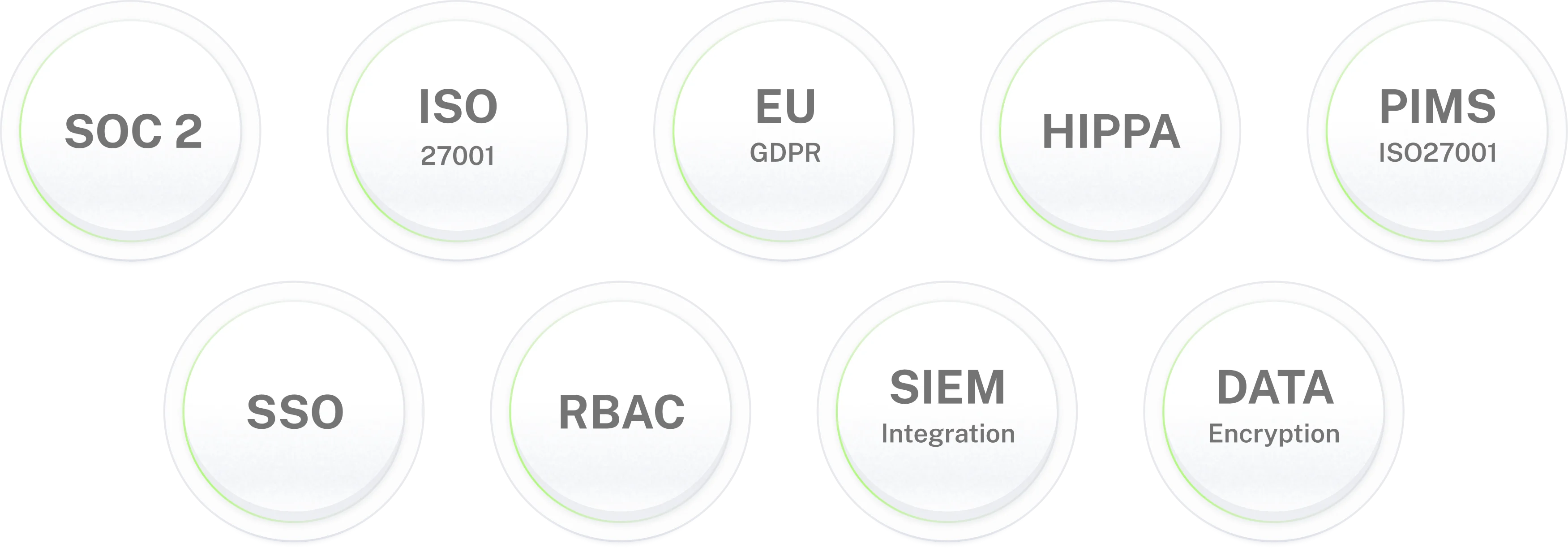
Enterprise-grade security. For HR data that matters.
Connect Workday to Slack.
Deploy in days
80% of Workday HR queries handled automatically. Every lifecycle workflow running itself. HR focuses on what needs judgment.
Frequently asked questions
Workday AI agent frequently asked questions
What is a Workday AI agent?
A Workday AI agent connects to your Workday HCM instance and lets employees complete HR requests in Slack or Microsoft Teams without logging into Workday. It retrieves live data from Workday, submits actions through Workday's business processes, and answers HR policy questions from your knowledge base. Workativ's Workday AI agent also runs multi-step lifecycle workflows onboarding, offboarding, benefits enrollment, performance review cycles, and pre-hire checks triggered by Workday events and coordinated across Okta, ServiceNow, Slack, and 100+ other applications.
How does Workativ integrate with Workday?
Workativ connects to Workday via pre-built no-code connectors using Workday web services APIs, secured with OAuth 2.0 and role-based access controls. Once connected, Workativ reads permitted Workday data and writes back to Workday all from conversations in Slack or Microsoft Teams. No Workday Studio project. No developer required.
Is Workativ different from Workday Sana?
Yes. Workday Sana is Workday's own AI layer 300+ skills, built into Workday, available to subscribers. Workativ is an independent platform connecting Workday to your entire enterprise stack. Sana operates primarily within Workday (18 external connectors on Sana Enterprise). Workativ connects Workday with 100+ applications Okta, ServiceNow, Jira, Azure AD in one no-code platform. They can run alongside each other.
What Workday workflows can Workativ automate?
Workativ automates five Workday-triggered lifecycle workflows: new hire onboarding (offer accepted → Okta provisioning → ServiceNow device request → day-1 checklist in Slack), employee offboarding (termination → access revocation → COBRA → equipment return), benefits enrollment (enrollment window → reminders → election submission via API), performance review cycle (cycle launch → self-assessment reminders → manager alerts → escalation report), and pre-hire background checks (offer extended → screening initiated → HR alerted → onboarding triggered on clear).
Does the Workday AI agent require coding?
No. Workativ's no-code platform lets HR or IT administrators connect Workday, configure the AI agent, set up workflows, and deploy to Slack or Microsoft Teams without any developer involvement. Pre-built Workday connectors cover the most common HR use cases. Most organisations deploy within 3 to 5 days.
Is Workativ's Workday integration secure?
Yes. Workativ connects to Workday using OAuth 2.0 with role-based access controls. The AI agent can only access data and actions it has been explicitly permitted. All API credentials are masked in logs. Employee PII is never used to train models. Workativ is SOC 2 Type II, ISO 27001, GDPR, and HIPAA compliant. Every Workday action is logged to an immutable audit trail.
How long does deployment take?
3 to 5 days for standard Workday HR use cases PTO, payslips, policy Q&A, personal updates. No Workday Studio project required. Start with one use case, confirm the workflow, then expand to lifecycle automation.
Can Workativ work alongside Workday Sana?
Yes. Sana handles Workday-native self-service. Workativ handles workflows that cross into other systems Okta, ServiceNow, Jira, Azure AD or require HR and IT support in one AI agent. Many organisations use Workday as their HCM while using Workativ to orchestrate the broader employee support and workflow automation experience across their full stack.
What HR queries can employees ask the Workday AI agent in Slack?
Employees ask in Slack and get answers from live Workday data: PTO balance and accrual, pay date and payslip access, benefits elections and FSA balance, open enrollment deadlines, parental leave and FMLA eligibility, expense reimbursement status, and HR policy questions drawn from uploaded documents. The AI agent reads from Workday HCM directly answers reflect the employee's actual record, not a generic response.
Can the Workday AI agent submit PTO requests?
Yes. Employee asks in Slack, Workativ checks the live PTO balance from Workday, and submits the leave request through Workday's absence management business process. The manager receives an approval card in Slack one tap to approve or decline. Workday record updates on approval. Employee confirmed in the same Slack thread. HR is not in the chain for standard requests.
Does the Workday AI agent work in both Slack and Microsoft Teams?
Yes. Workativ deploys natively in Slack and Microsoft Teams. Employees in either channel use the same Workday AI agent same data, same workflows, same approval flows. Workday Sana operates within the Workday portal; Workativ delivers the employee experience in whichever channel your organisation already uses.
Can Workativ connect Workday to other systems like Okta and ServiceNow?
Yes. Workativ connects Workday to 100+ enterprise applications Okta, Azure AD, ServiceNow, Jira, Freshservice, Benefitfocus, PlanSource, SharePoint, Confluence, and more. A new hire event in Workday automatically provisions identity in Okta and raises a device request in ServiceNow. Employees get one conversational experience in Slack for requests that touch multiple systems. Workday Sana is limited to the Workday ecosystem; Workativ handles the cross-system coordination.