
Workativ AI agents resolve L0 and L1 IT requests password resets, access provisioning, software installs inside Slack and Microsoft Teams. Your L1 team stop answering the same tickets every day.
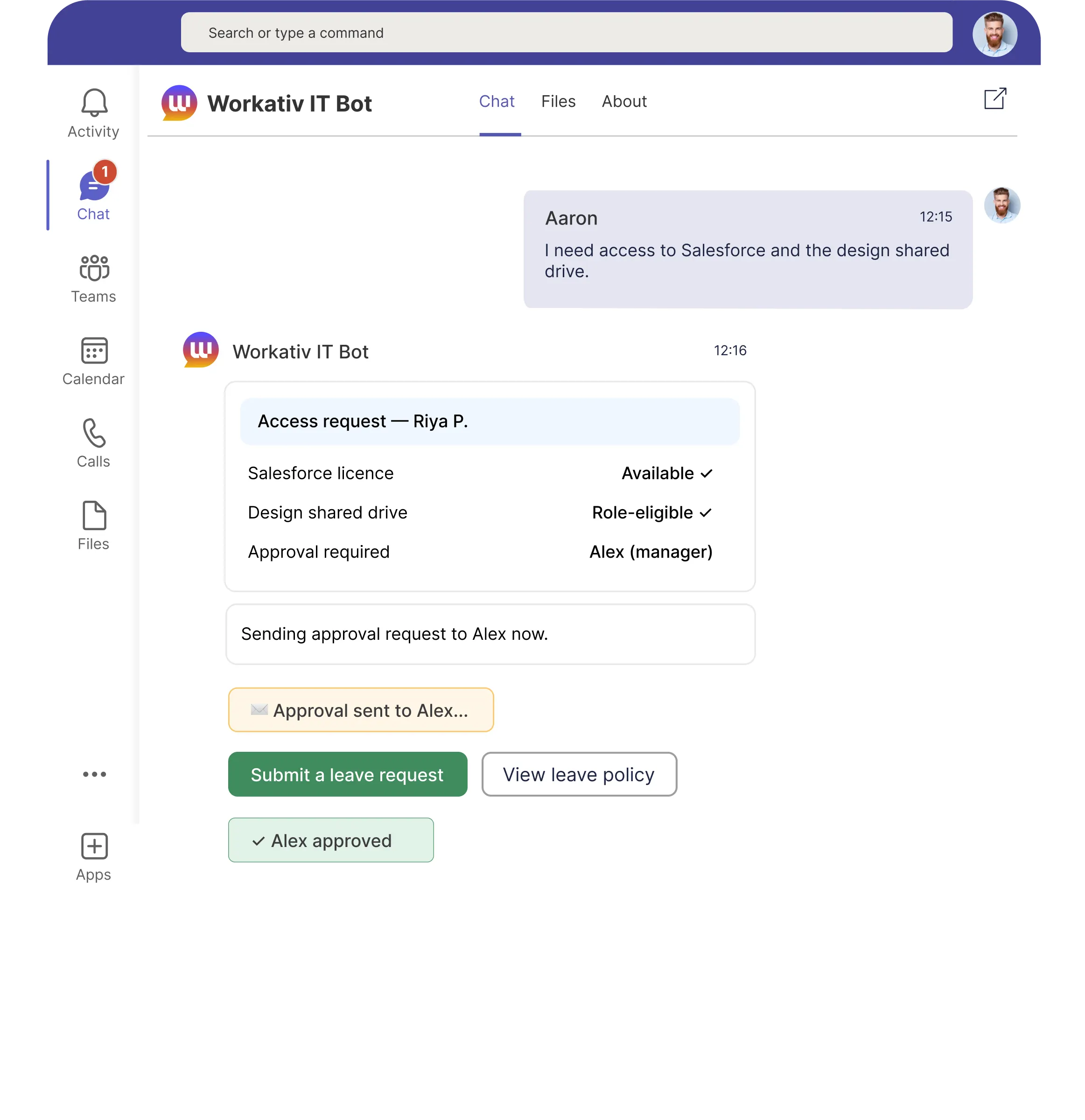

IT helpdesk automation resolves employee IT requests before they reach the service desk using AI agents that execute real actions in Azure AD, Okta, ServiceNow, Jira, and Freshservice. Not chatbots that link to the self-service portal.
Employee locked out -> opens portal -> fills form -> waits hours for an engineer
New hire -> IT manually provisions 12 systems -> delays day-one productivity
Password reset: 23 minutes of engineer time for 2 minutes of actual work
L1 tickets consume 60–70% of service desk capacity no bandwidth for real infrastructure work
Employee messages in Slack -> AI agent unlocks account in Azure AD in under 60 seconds. Zero tickets.
New hire triggers -> IT provisioning runs automatically across Azure AD, Okta, and all licensed apps.
L2+ routes to ServiceNow or Jira with full context and correct priority pre-filled. Engineers get better tickets.
78% of IT tickets resolved without helpdesk involvement. Engineers focus on infrastructure and security.
The same 10 request types, thousands of times a year. No reason for an engineer to touch any of them.
Password resets, account unlocks, software access, VPN the same requests thousands of times a year, each requiring a human to handle.
A password reset takes under 60 seconds to execute. Employees wait hours sometimes days for a ticket to be picked up. That wait is 100% avoidable.
NMDC's 4,680 monthly L1 requests consumed 390 engineer-hours time that should go to infrastructure, security, and strategic work.

The problem is not that your IT team is slow. It is that the helpdesk routes a password reset through the same queue as a server outage. IT helpdesk automation fixes the routing, not the people.
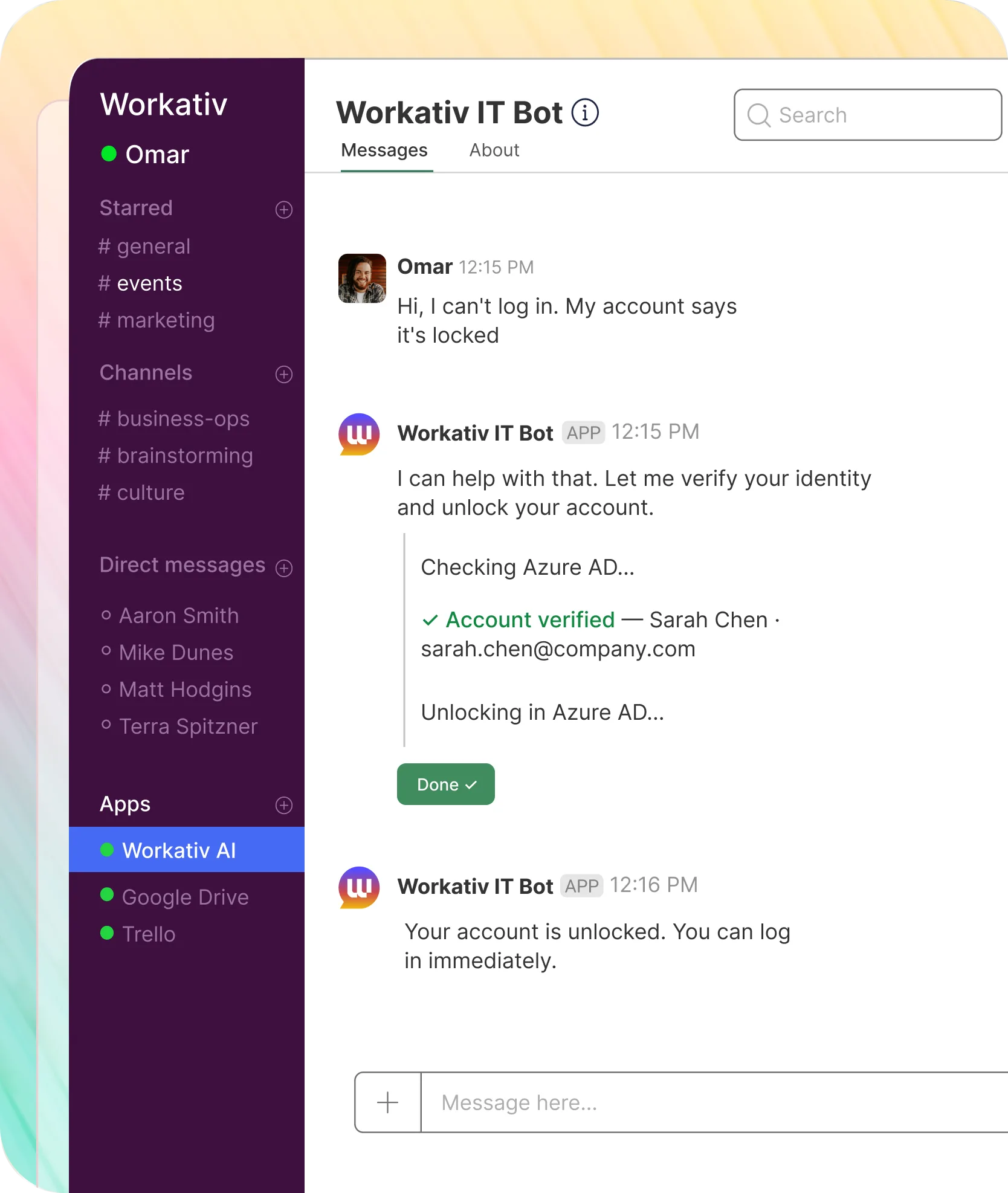
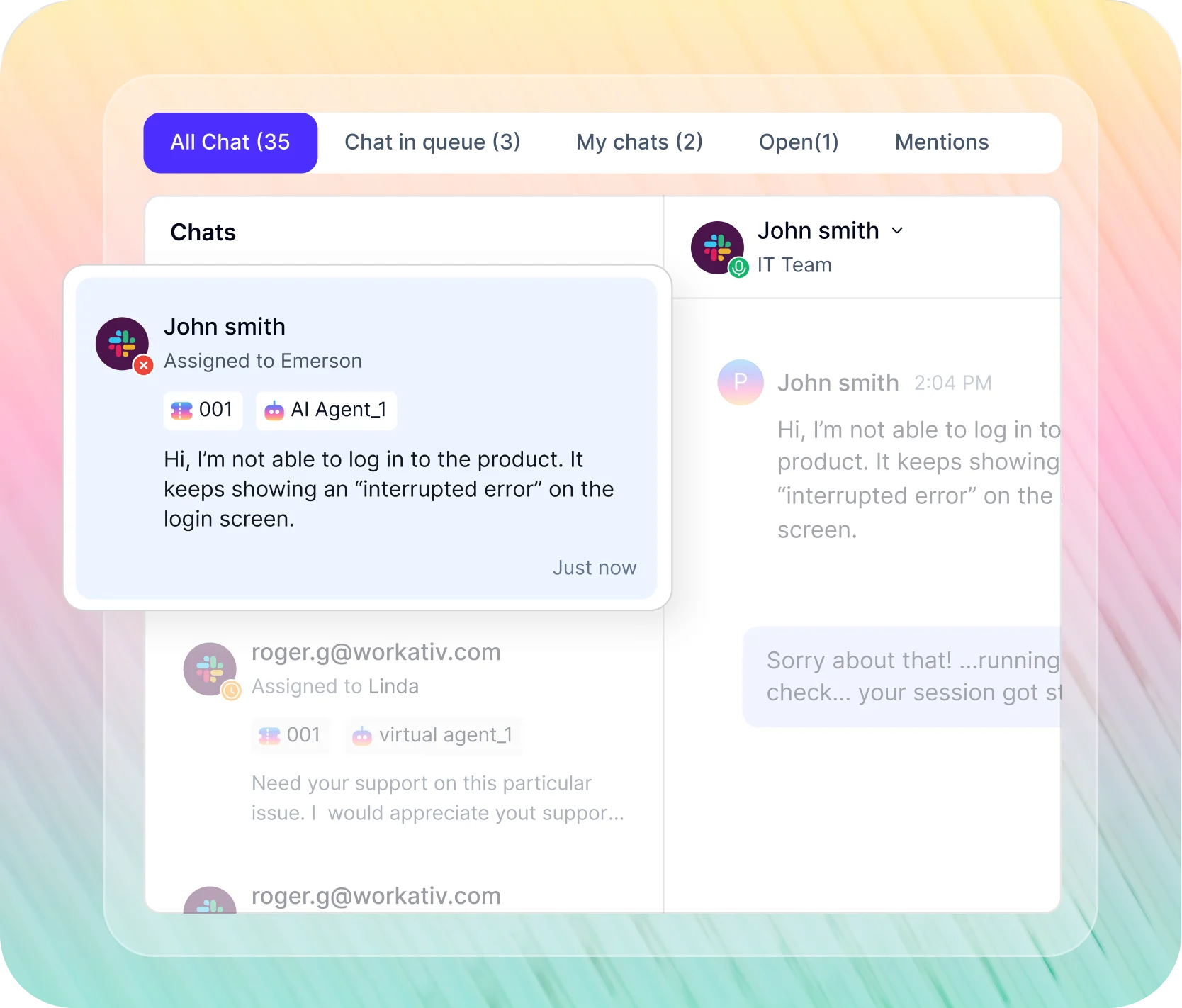
Real conversations. Real executions. Every tab shows a different IT request resolved automatically inside Slack or Microsoft Teams.

Natural language no form, no portal. AI agent receives and classifies the request instantly.
Identity confirmed, account unlocked or password reset directly in the connected identity system. Action logged to audit trail.
Employee gets confirmation in Slack. No helpdesk ticket. Under 60 seconds from message to resolution.
System events trigger automated IT sequences end to end no IT team coordination required. New hire, role change, or departure Workativ handles the IT side automatically.

From signed contract to day-one access automatically. No IT coordination, no manual licence assignment.

Employee departure triggers automatic access revocation across all systems no manual checklist, full audit trail logged.

Role updates trigger automatic permission adjustments old access removed, new access added, approvals routed.

Licence requests, renewals, and reclamation handled automatically approval rules enforced, unused licences reclaimed.
Not every IT request should be automated. Complex infrastructure issues, security incidents, hardware failures these need a human.
When a request exceeds L1 scope, Workativ creates a ticket in ServiceNow, Jira, or Freshservice with full context, correct category, priority, and assignment group pre-filled.
Slack, Teams, email, and web requests arrive in a single inbox. Respond, reassign, and escalate without switching tools full conversation history attached.
Which request types come up most, which always need a human, where knowledge gaps exist surfaced automatically. No report to build.
NMDC a mining and infrastructure conglomerate with 6,000 monthly IT support tickets deployed Workativ AI agents and measured the result.
resolved automatically without helpdesk involvement
removed. ($8 avg cost per L1 ticket × 4,680 automated tickets)
month redirected from L1 tickets to infrastructure and security work
"Workativ has been with us every step of the way. From our first IT support use case to HR, and soon Procurement. The platform grows with us, and so does the team behind it. It's rare to find a solution that's both powerful and genuinely easy to manage."

IT Operations Leader · NMDC Group

Workativ is ITSM-agnostic it works in front of ServiceNow, Jira Service Management, and Freshservice equally. No vendor lock-in.
Capability |  |  |  |
|---|---|---|---|
Works with Jira, Freshservice & ServiceNow |  |  | Freshservice only |
Deploys in Slack & Teams natively | | | Teams only |
No per-user licensing fees | | | |
Deployment time | | 6+ months enterprise rollout | Weeks with native setup |
IT provisioning & offboarding workflows | | | Limited workflow builder |
L1 ticket auto-resolution | | | Deflects to self-service portal |
Join IT teams that stopped answering the same tickets every day. Deploy in 5 to 7 days.
Questions CIOs, IT Directors, and IT Operations leaders ask about Workativ's IT helpdesk automation.
IT helpdesk automation is the use of AI agents to resolve employee IT requests password resets, account unlocks, access provisioning, software installs without IT engineer involvement. Unlike rule-based automation or simple chatbots that answer questions, AI-powered IT helpdesk automation executes real actions in connected systems like Azure AD, Okta, ServiceNow, and Jira Service Management, confirming outcomes to employees in Slack or Microsoft Teams.
A traditional IT chatbot answers questions and directs employees to the self-service portal. An AI agent for IT helpdesk automation resolves the request. When an employee says their account is locked, the AI agent authenticates the request and unlocks the account in Azure AD no ticket created, no engineer involved. Workativ AI agents execute actions in connected IT systems and confirm outcomes in Slack or Teams.
Workativ automates L0 and L1 IT requests including password resets and account unlocks in Azure AD or Okta, software and license access requests, VPN provisioning, IT policy questions from Confluence or SharePoint, hardware requests, ticket status updates in ServiceNow or Jira, and new hire IT provisioning. For L2 and above, Workativ routes to the correct IT team with full conversation context and priority pre-filled in your ITSM.
NMDC automated 78% of 6,000 monthly IT tickets using Workativ, removing over $37,000 per month in L1 handling costs and recapturing 390 engineer-hours per month. The industry average for AI-assisted IT ticket deflection in year one is 25 to 45%. Workativ customers exceed this because the AI agent executes real actions in connected systems rather than redirecting employees to documentation.
No. Workativ sits in front of your ITSM, not instead of it. ServiceNow, Jira Service Management, and Freshservice remain your systems of record. Workativ intercepts employee IT requests in Slack or Teams, resolves what it can autonomously, and routes the rest to your ITSM with full context pre-filled. Your existing workflows, SLAs, and approval chains continue unchanged.
Workativ connects to ServiceNow via API. L0 and L1 requests are resolved without creating a ticket. When an L2 or above request cannot be auto-resolved, Workativ creates a ServiceNow incident with full conversation context, correct category, priority, and assignment group pre-filled. Engineers receive a classified, pre-described ticket rather than an empty form. All ServiceNow updates sync back to the employee in their original Slack or Teams thread.
Workativ deploys in 5 to 7 days for a typical mid-market IT team using pre-built connectors for Azure AD, Okta, ServiceNow, Jira Service Management, and Freshservice. No developer resources, no IT build project, and no implementation consultant required.
Following ServiceNow's acquisition of Moveworks, IT teams running Jira Service Management, Freshservice, or any non-ServiceNow ITSM face uncertainty about integration roadmap and pricing. Workativ uses session and execution-based pricing with no per-user fees, deploys in 5 to 7 days rather than 6 months, and integrates equally with Jira Service Management, Freshservice, and ServiceNow no vendor lock-in.
When a request exceeds L1 scope complex hardware issues, security incidents, network outages Workativ classifies it as L2+ and routes it to your ITSM automatically. A ticket is created in ServiceNow, Jira Service Management, or Freshservice with the full Slack or Teams conversation context attached, the correct incident category and priority assigned, and the right assignment group pre-filled based on your routing rules. Engineers receive a ticket that is already classified and described not a blank form to reconstruct from a one-line summary. The employee is notified in their original Slack or Teams thread with the ticket reference and expected response time.
The Workativ shared live inbox aggregates all IT requests that have been escalated to a human from Slack, Microsoft Teams, email, and web into a single view. Each item shows the full conversation history, the AI agent's classification and priority, the source channel, and the employee's details. Engineers can respond directly from the inbox, reassign to another team member, escalate to a different tier, or close the request without switching to the ITSM portal. All actions sync back to ServiceNow, Jira, or Freshservice and update the employee in their original channel automatically.




'/%3e%3cpath%20d='M7.53747%209.7499L4.18595%209.72912C3.89511%209.72912%203.66314%209.49022%203.66314%209.20285C3.66314%209.08859%203.70122%208.98126%203.76701%208.89124L8.69389%202.30244C10.2589%203.46925%2010.5809%205.68513%209.41059%207.2501L7.53747%209.7499Z'%20fill='url(%23paint1_linear_217_318)'/%3e%3cdefs%3e%3clinearGradient%20id='paint0_linear_217_318'%20x1='7.3717'%20y1='1.41211'%20x2='9.07645'%20y2='11.0799'%20gradientUnits='userSpaceOnUse'%3e%3cstop%20stop-color='%239DC9FC'/%3e%3cstop%20offset='0.6866'%20stop-color='white'/%3e%3c/linearGradient%3e%3clinearGradient%20id='paint1_linear_217_318'%20x1='9.68512'%20y1='1.62241'%20x2='6.91576'%20y2='7.45173'%20gradientUnits='userSpaceOnUse'%3e%3cstop%20stop-color='%239DC9FC'/%3e%3cstop%20offset='0.7152'%20stop-color='white'/%3e%3c/linearGradient%3e%3c/defs%3e%3c/svg%3e)


%20--%3e%3csvg%20version='1.1'%20id='Layer_1'%20xmlns='http://www.w3.org/2000/svg'%20xmlns:xlink='http://www.w3.org/1999/xlink'%20x='0px'%20y='0px'%20viewBox='0%200%20512%20512'%20style='enable-background:new%200%200%20512%20512;'%20xml:space='preserve'%3e%3cstyle%20type='text/css'%3e%20.st0{fill:%23F7F7F7;}%20.st1{fill:%2328E4C3;}%20.st2{fill:url(%23SVGID_1_);}%20.st3{fill:url(%23SVGID_2_);}%20%3c/style%3e%3ccircle%20class='st0'%20cx='256'%20cy='256'%20r='245.5'/%3e%3cg%3e%3cg%3e%3cpath%20class='st1'%20d='M304.7,405.6'/%3e%3c/g%3e%3c/g%3e%3cg%3e%3cg%3e%3cpath%20class='st1'%20d='M305.8,353'/%3e%3c/g%3e%3c/g%3e%3clinearGradient%20id='SVGID_1_'%20gradientUnits='userSpaceOnUse'%20x1='388.1461'%20y1='99.0534'%20x2='204.4846'%20y2='204.5899'%20gradientTransform='matrix(1%200%200%20-1%200%20514)'%3e%3cstop%20offset='0.18'%20style='stop-color:%230052CC'/%3e%3cstop%20offset='1'%20style='stop-color:%232684FF'/%3e%3c/linearGradient%3e%3cpath%20class='st2'%20d='M119.9,330.3c-3,4.9-6.4,10.7-9.3,15.3c-2.6,4.4-1.2,10,3.1,12.7l60.7,37.4c4.4,2.7,10.1,1.3,12.9-3%20c0,0,0.1-0.1,0.1-0.1c2.4-4.1,5.6-9.3,9-15c24-39.7,48.2-34.8,91.9-14l60.2,28.6c4.7,2.2,10.2,0.2,12.4-4.4c0-0.1,0.1-0.2,0.1-0.3%20l28.9-65.4c2-4.7,0-10.1-4.7-12.2c-12.7-6-38-17.9-60.7-28.9C242.6,241.2,173.1,243.7,119.9,330.3z'/%3e%3clinearGradient%20id='SVGID_2_'%20gradientUnits='userSpaceOnUse'%20x1='613.0198'%20y1='1773.9866'%20x2='429.3116'%20y2='1879.5697'%20gradientTransform='matrix(-1%200%200%201%20736.83%20-1676.71)'%3e%3cstop%20offset='0.18'%20style='stop-color:%230052CC'/%3e%3cstop%20offset='1'%20style='stop-color:%232684FF'/%3e%3c/linearGradient%3e%3cpath%20class='st3'%20d='M392.1,181.9c3-4.9,6.4-10.7,9.3-15.3c2.6-4.4,1.2-10-3.1-12.7l-60.7-37.4c-4.3-2.9-10.1-1.7-13,2.5%20c-0.1,0.2-0.2,0.4-0.3,0.6c-2.4,4.1-5.6,9.3-9,15c-24,39.7-48.2,34.8-91.9,14l-60-28.5c-4.7-2.2-10.2-0.2-12.4,4.4%20c0,0.1-0.1,0.2-0.1,0.3L122,190.2c-2,4.7,0,10.1,4.7,12.2c12.7,6,38,17.9,60.7,28.9C269.4,271,338.9,268.4,392.1,181.9z'/%3e%3c/svg%3e)



%20--%3e%3csvg%20version='1.1'%20id='Layer_1'%20xmlns='http://www.w3.org/2000/svg'%20xmlns:xlink='http://www.w3.org/1999/xlink'%20x='0px'%20y='0px'%20viewBox='0%200%20512%20512'%20style='enable-background:new%200%200%20512%20512;'%20xml:space='preserve'%3e%3cstyle%20type='text/css'%3e%20.st0{fill:%23EB3C00;}%20.st1{fill:%23FFFFFF;}%20%3c/style%3e%3ccircle%20class='st0'%20cx='256'%20cy='256'%20r='245.5'/%3e%3cpath%20class='st1'%20d='M152.2,332.7v-152L286.7,131l73.1,23.4V359l-73.1,22L152.2,332.7l134.4,16.2V171.9L199,192.4v119.8L152.2,332.7%20z'/%3e%3c/svg%3e)

'%3e%3cpath%20d='M1.86774%200H2.41284C2.55325%200.0357914%202.8438%200.0814543%202.96023%200.144319C3.57556%200.476574%204.24389%200.994086%204.78094%201.44029C4.90785%201.49857%205.14031%201.69076%205.26616%201.78501L6.30254%202.56565L9.23874%204.76784L9.98605%205.32579C10.1165%205.42327%2010.3896%205.61784%2010.4874%205.73305C10.5933%205.62723%2010.7819%205.49083%2010.9035%205.39513C11.2293%205.13895%2011.5711%204.89897%2011.9015%204.64888L14.841%202.43616C15.2641%202.11793%2015.808%201.74101%2016.2059%201.4114C16.7548%201.01773%2017.2984%200.503308%2017.8952%200.193124C18.0888%200.0925009%2018.3311%200.0707975%2018.4996%200.00453492L18.511%200H19.1089C19.2716%200.0419345%2019.4446%200.0664859%2019.6017%200.126337C20.3949%200.428494%2020.8251%201.03647%2020.9795%201.84719V4.05546L17.6977%206.51872L16.7256%207.24655C16.6175%207.32813%2016.3229%207.56223%2016.2176%207.62326L16.2116%207.64067C16.0556%207.74125%2015.7554%207.98423%2015.5914%208.10717L14.2347%209.12565C12.9949%2010.0567%2011.7226%2010.9908%2010.4942%2011.9326C10.3311%2011.8196%2010.1521%2011.6753%209.99028%2011.5543L8.91562%2010.7499L6.14505%208.67116C5.6887%208.32244%205.22946%207.97753%204.76737%207.63644L4.76105%207.62385C4.64747%207.54843%204.4662%207.40207%204.35254%207.31617L3.58531%206.74057L0.993507%204.79937C0.666643%204.55579%200.329975%204.28777%200%204.0539V1.89895C0.0211067%201.8406%200.034732%201.7287%200.0477586%201.66355C0.195443%200.924862%200.778193%200.297181%201.50398%200.095359C1.61897%200.0633797%201.74239%200.0411929%201.85419%200.00451034L1.86774%200Z'%20fill='%23EB4337'/%3e%3cpath%20d='M18.5112%200H19.109C19.2718%200.0419345%2019.4448%200.0664859%2019.6018%200.126337C20.395%200.428494%2020.8252%201.03647%2020.9797%201.8472V4.05546L17.6978%206.51872L16.7258%207.24655C16.6176%207.32813%2016.3231%207.56223%2016.2177%207.62326C16.2065%207.10816%2016.2151%206.56484%2016.215%206.04638L16.2148%203.13227L16.2154%201.98927C16.2154%201.85241%2016.2236%201.52684%2016.2061%201.4114C16.755%201.01773%2017.2986%200.503308%2017.8953%200.193124C18.089%200.0925009%2018.3312%200.0707975%2018.4998%200.00453492L18.5112%200Z'%20fill='%23FCBC03'/%3e%3cpath%20d='M1.86774%200H2.41284C2.55325%200.0357914%202.8438%200.0814543%202.96023%200.144319C3.57556%200.476574%204.24389%200.994086%204.78094%201.44029C4.75802%201.55136%204.76536%201.81314%204.76577%201.93571L4.7683%202.76769L4.76727%206.06197L4.76854%207.06889C4.76879%207.22294%204.77708%207.48131%204.76105%207.62385C4.64746%207.54843%204.4662%207.40207%204.35254%207.31617L3.58531%206.74057L0.993506%204.79937C0.666643%204.5558%200.329975%204.28777%200%204.0539V1.89895C0.0211067%201.8406%200.034732%201.7287%200.0477586%201.66355C0.195443%200.924862%200.778193%200.297181%201.50398%200.095359C1.61897%200.0633798%201.74239%200.0411929%201.85419%200.00451034L1.86774%200Z'%20fill='%23C62220'/%3e%3cpath%20d='M0%204.05371C0.329975%204.28758%200.666643%204.5556%200.993507%204.79918L3.58531%206.74038L4.35254%207.31598C4.4662%207.40188%204.64747%207.54824%204.76105%207.62365L4.76737%207.63625C4.79294%207.81891%204.78411%208.19988%204.78406%208.39833L4.78312%209.71796L4.78339%2014.2476C4.7834%2014.4489%204.8101%2015.6601%204.76016%2015.7263C4.75851%2015.7284%204.75656%2015.7304%204.75498%2015.7326C4.75244%2015.7361%204.75024%2015.74%204.74778%2015.7435C4.7463%2015.7457%204.74469%2015.7477%204.74315%2015.7498H1.23433C1.02953%2015.6658%200.870008%2015.6564%200.656526%2015.5145C0.258114%2015.2497%200.102217%2014.9456%200%2014.4978V4.05371Z'%20fill='%234185F5'/%3e%3cpath%20d='M20.9794%204.05566V14.5025C20.828%2015.1172%2020.5387%2015.5356%2019.8875%2015.6981C19.8377%2015.7104%2019.7443%2015.7302%2019.7008%2015.7502H16.235C16.1758%2015.6436%2016.1987%2013.9178%2016.1987%2013.683L16.199%2010.2145L16.1984%208.51668C16.1982%208.31838%2016.1872%207.81396%2016.2115%207.64088L16.2175%207.62347C16.3228%207.56244%2016.6174%207.32834%2016.7255%207.24676L17.6976%206.51892L20.9794%204.05566Z'%20fill='%2333A953'/%3e%3c/g%3e%3cdefs%3e%3cclipPath%20id='clip0_1380_1288'%3e%3crect%20width='20.9795'%20height='15.75'%20fill='white'/%3e%3c/clipPath%3e%3c/defs%3e%3c/svg%3e)
%20--%3e%3csvg%20version='1.1'%20id='Layer_1'%20xmlns='http://www.w3.org/2000/svg'%20xmlns:xlink='http://www.w3.org/1999/xlink'%20x='0px'%20y='0px'%20viewBox='0%200%20512%20512'%20style='enable-background:new%200%200%20512%20512;'%20xml:space='preserve'%3e%3cstyle%20type='text/css'%3e%20.st0{fill:%230062FF;}%20.st1{fill:%23FFFFFF;}%20%3c/style%3e%3ccircle%20class='st0'%20cx='256'%20cy='256'%20r='245.5'/%3e%3cpath%20class='st1'%20d='M256,162.5l-91,58.2l91,58.2l-91,58.2l-91-59.1l91-58.2l-91-57.3l91-58.2L256,162.5z%20M164.1,355.5l91-58.2%20l91,58.2l-91,58.2L164.1,355.5z%20M256,278.1l91-58.2l-91-57.3l91-58.2l91,58.2l-91,58.2l91,58.2l-91,58.2L256,278.1z'/%3e%3c/svg%3e)

