Glean follows a sales-led, enterprise pricing model rather than a self-serve or publicly listed plan structure. Pricing is customized for each organization and typically finalized after demos, scoping discussions, and contract negotiations.
At a high level, Glean’s pricing works as follows:
Per-user, per-month licensing is the foundation of the model, applied across the employee base.
Contracts are annual or multi-year, often with minimum seat commitments.
Pricing scales with headcount, not with search volume, AI usage, or business outcomes.
Advanced AI capabilities are typically offered as add-ons and are not always included in base pricing.
Support, onboarding, and enterprise services may be bundled or priced separately depending on the deal.
Because pricing is tied to headcount rather than the value the platform delivers, total spend can increase quickly as organizations grow. This model works well for large enterprises standardizing on a single search platform, but it also makes it harder to forecast ROI upfront.
Real cost drivers behind Glean pricing
Since Glean uses a per-user, per-month pricing model, the primary driver of cost is as organizations scale.
Median reported price: ~~$50 per user per month (base seat only) - This is widely cited by industry analysts and confirmed through customer conversations. Glean does not offer usage-based pricing for the base license, so seat costs increase strictly with headcount. Note that this figure reflects the Enterprise Flex Seat alone; AI and Agent usage beyond included allowances is billed separately through FlexCredits (see "How much does Glean AI cost?" below), so total spend can run higher depending on usage intensity.
AI and agent capabilities: No longer a flat add-on fee : Glean has moved to a consumption-based model called FlexCredits for advanced AI and Agent usage, replacing the flat per-user AI add-on it previously offered. This means AI-related spend now scales with how much teams actually use premium models, run agents, or trigger features like Deep Research, rather than a predictable per-seat surcharge.
Deployment size matters : Mid-sized enterprise rollouts frequently land in the $30K–$50K per month range for seat licensing alone, translating to $360K–$600K annually, depending on user count. This range reflects base Enterprise Flex Seat costs only — organizations with heavy Agent usage, premium model usage, or Deep Research adoption should expect additional spend from FlexCredit consumption on top of this baseline, which can meaningfully raise total deployment cost.
How much does Glean AI cost?
Glean AI pricing is no longer just a simple flat AI add-on. Under Glean Enterprise Flex, buyers still license seats on a per-user basis, but advanced AI usage is billed through FlexCredits, a pooled credit system used across the organization.
Glean AI cost has two main parts
Glean pricing is typically made up of:
Enterprise Flex Seats
The standard per-user license for Glean search, chat, and everyday assistant usage.
FlexCredits
A shared pool of usage credits consumed by advanced AI features, premium models, agent runs, Deep Research, Slide Generation, Code Writer, Meeting Notes, and similar capabilities.
This means Glean AI cost is not based only on headcount. It also depends on how often employees use advanced reasoning, premium models, and agents.
What is included in a Glean Enterprise Flex Seat?
Each Enterprise Flex Seat includes everyday Glean usage such as:
Unlimited Fast Mode assistant queries
Enterprise search and chat across connected workplace data
Standard model usage for basic assistant experiences
Included Thinking Mode queries with standard models, up to 100 queries per user per week
Included Adaptive Reasoning queries with standard models, up to 100 queries per user per week
Usage beyond those included limits consumes FlexCredits at Glean’s current rate card. Premium model usage also consumes FlexCredits.
When do FlexCredits get used?
FlexCredits are consumed when employees use more advanced or resource-intensive Glean features, including:
Thinking Mode queries beyond the included allowance
Adaptive Reasoning queries beyond the included allowance
Premium model usage
Glean Agent runs
Deep Research
Slide Generation
Code Writer
Meeting Notes
Image generation
Developer Tools and API usage
Glean’s documentation also notes that Assistant queries routed to an agent consume FlexCredits for the agent run.
How much do Glean Agent runs cost?
Glean Agents do not have one fixed price per run. Each agent run consumes a variable number of FlexCredits based on complexity.
The main cost drivers include:
Number of connectors searched
Number of steps in the agent workflow
Amount of memory used
Number of tools executed
Model tier used for each step
Glean’s published rate card shows Glean Agent Runs can consume roughly 7 to 114 FlexCredits, while more advanced agent runs can consume significantly more.
Premium models can increase AI cost
Glean supports basic, standard, and premium model tiers. Premium models listed in Glean documentation include models such as GPT 5.5, GPT 5.4, and Claude Opus tiers. Premium model usage consumes FlexCredits, while everyday queries using basic and standard models may be included depending on the usage mode and allowance.
This matters because two companies with the same number of Glean users can have very different AI costs depending on how often employees use premium models or advanced reasoning.
Does Glean publish a dollar price per FlexCredit?
Glean does not publish a universal public dollar price per FlexCredit on its documentation. Actual billing can depend on contract terms such as minimum commitments, overage pricing, add-on bundles, and negotiated FlexCredit allocations. Glean advises customers to contact their account team for questions about how usage maps to billing.
Why Glean AI pricing can be hard to forecast
Glean’s Enterprise Flex model gives buyers flexibility, but it can also make costs harder to estimate upfront.
Your final AI spend may depend on:
Number of licensed employees
Weekly usage of Thinking Mode and Adaptive Reasoning
Frequency of premium model usage
Number and complexity of agent runs
Usage of Deep Research, Slide Generation, Code Writer, and Meeting Notes
Whether employees stay within included allowances
Contracted FlexCredit pool and overage terms
In short, Glean AI cost is no longer just a predictable per-user AI fee. It is a mix of seat licensing and consumption-based usage.
For buyers, the practical takeaway is simple:
Basic search and everyday assistant usage may be easier to budget.
Advanced AI usage is more variable.
Agent-heavy teams may consume FlexCredits faster.
Premium models can increase cost.
The real cost depends on usage depth, not just employee count.
Before signing a Glean contract, buyers should ask:
How many FlexCredits are included in the contract?
What is the overage price per FlexCredit?
Which features consume credits?
What are the expected credits per agent run?
Can premium models be disabled or restricted?
Can admins set budgets, alerts, or usage controls?
How will renewal pricing change if AI usage grows?
What does Glean actually cost per user?
Reported per-user pricing for Glean varies depending on the source. Analyst and procurement benchmarks put the median around $50 per user per month, but community-reported figures, including discussions on review platforms and forums, often cite a lower range of $10 to $30 per user per month, typically tied to larger contracts or higher seat counts where Glean offers volume discounts.
Most Glean contracts also carry a minimum seat requirement, commonly reported in the 50 to 100 seat range, meaning smaller teams may not be able to access Glean at all regardless of per-user rate.
The gap between these figures comes down to deal size and timing. Smaller pilots and lower-volume contracts tend to land closer to the higher end of pricing, while large enterprise deployments with bigger seat counts can negotiate down toward the lower end. Buyers should treat any single number as a starting point for a sales conversation, not a fixed rate.
Hidden costs buyers often underestimate
Beyond the headline per-user price, several non-obvious costs contribute meaningfully to Glean’s overall spend.
Implementation and onboarding fees
Glean deployments typically require a dedicated onboarding phase before the platform reaches production use, covering data source connection, permission mapping, and initial relevance tuning. This work is often billed separately as a professional services engagement rather than included in the per-seat license, and cost scales with the number of systems being connected and the complexity of existing permission structures. Organizations connecting a handful of standard tools face a lighter onboarding cost than those integrating legacy systems, custom databases, or non-standard authentication setups.
Connector licensing
While Glean's core pricing covers a baseline set of indexing connectors, certain data sources, particularly specialized, legacy, or less commonly used systems, can carry additional licensing costs beyond the base contract. Buyers connecting only mainstream tools like Slack, Google Drive, or Confluence are less likely to encounter this, but organizations with a more fragmented or specialized toolstack should confirm connector coverage during scoping rather than assuming all sources are included.
Storage overages
Indexing enterprise content at scale means storage requirements grow with both the size of the connected corpus and how frequently that content is refreshed. Plans typically include a baseline storage allocation, and organizations that index large volumes of historical content, frequently updated repositories, or media-heavy files such as images and recordings can exceed that allocation, triggering additional charges. This is rarely flagged during initial sales conversations and tends to surface only after indexing is underway.
Support tier costs
Standard support is generally included in the base contract, but higher service levels, including faster response times, dedicated success resources, or premium support availability, are typically priced as an additional percentage of contract value rather than a flat fee. This means support costs scale automatically as the overall contract grows, even if the level of support an organization actually needs stays the same.
Annual versus multi-year contract lock-in penalties
Contract length materially affects total cost. Annual contracts offer more flexibility but typically carry a higher effective rate and expose buyers to renewal price increases each year, often in the high single digits to low double digits as a percentage, unless a cap is negotiated upfront. Multi-year contracts can lock in a lower rate, but they reduce an organization's ability to renegotiate, downsize, or exit if adoption falls short of expectations, and exiting early can carry financial penalties depending on contract terms. Buyers should weigh the savings of a multi-year commitment against the cost of being locked into a seat count or feature set that may not match actual usage two or three years out.
Glean’s total cost of ownership (TCO) in practice
When buyers look beyond per-user pricing, Glean’s total cost of ownership becomes significantly clearer and often higher than expected.
Median annual contract value approximately $100K
Upper range reported: $172K+ per year for larger or more complex deployments
TCO generally includes:
Base per-user licensing (~$50/user/month, Enterprise Flex Seat)
AI and Agent usage billed via FlexCredits, a pooled consumption-based model rather than a flat per-user add-on (see "How much does Glean AI cost?" above)
Paid pilots or POCs
Support and success fees
Integration, onboarding, and admin effort
Annual price increases at renewal
Because FlexCredit consumption scales with usage rather than a flat rate, the reported $100K–$172K+ range should be treated as a seat-cost baseline. Organizations with heavy AI/Agent adoption should expect this range to expand further once FlexCredit usage is layered in.
According to Vendr and procurement benchmarks:
Median annual contract value approximately $100K
Upper range reported: $172K+ per year for larger or more complex deployments
TCO generally includes:
Base per-user licensing (~$50/user/month)
AI or agent add-ons (~$15/user/month)
Paid pilots or POCs
Support and success fees
Integration, onboarding, and admin effort
Annual price increases at renewal
For organizations with thousands of employees, these elements compound quickly, making Glean a six-figure annual investment even before factoring in internal operational costs.
What Glean’s pricing does not account for
A recurring theme in GoSearch’s analysis is that Glean’s pricing is not tied to outcomes.
You are not paying based on:
Tickets resolved
Requests automated
Time-to-resolution improvements
Cost savings delivered
Instead, pricing is anchored to access and discovery, not execution. As a result, many teams continue paying separately for ITSM, HR systems, and workflow tools to act on the information Glean surfaces—adding to overall spend without reducing tool sprawl.
Here’s a clear, buyer-focused section that spells out what’s included versus what typically costs extra aligned with GoSearch and review-site analysis.
What’s included vs. what costs extra
Glean packages its offering as an enterprise platform, but not everything is included in the base price. Understanding this distinction is key to estimating total cost accurately.
Typically included in core pricing:
Unlimited basic search and Fast Mode assistant queries, plus a weekly allowance of standard-model Thinking Mode and Adaptive Reasoning queries, included in every Enterprise Flex Seat.
Commonly charged as add-ons or separate fees:
Advanced AI and Agent usage beyond what's included in the base seat, billed through Glean's FlexCredits system rather than a flat add-on fee. This includes premium model usage, Agent runs, Deep Research, Slide Generation, and similar capabilities (see "How much does Glean AI cost?" above).
Support and implementation services are often priced separately or bundled as a percentage of the contract value.
Onboarding and custom integrations, especially when connecting complex systems or tailoring search behavior, typically require professional services engagement.
For many buyers, the gap between what’s included and what’s extra becomes clear only after scoping discussions making upfront cost estimates harder without a detailed breakdown.
BEFORE YOU SIGN THAT CONTRACT
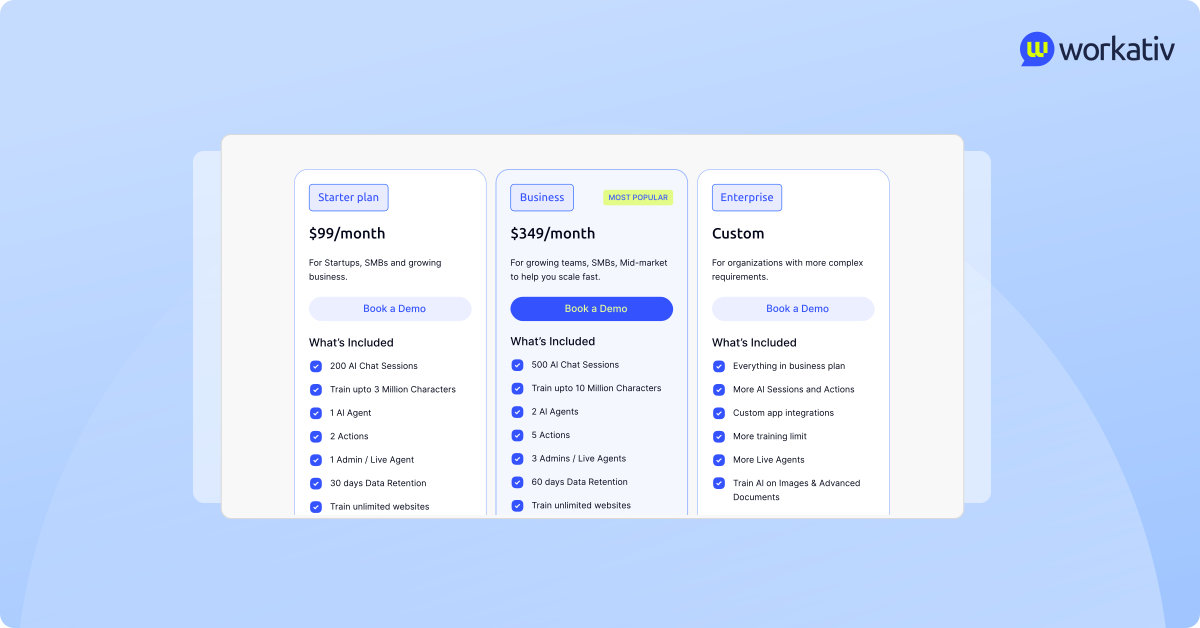
Glean’s per-user pricing scales with headcount. Workativ prices by usage, not seats.
Transparent pricing · No paid POC · Go live in days
See a Quick Demo


'%3e%3cpath%20d='M11.5732%2031.7068L19.2977%2022.7433L11.5732%2011.5366H17.4664L22.6245%2018.942L29.0522%2011.5366H30.7788L23.4029%2020.0985L31.4127%2031.7086H25.4997L20.1231%2023.9069L13.3197%2031.7068H11.5732ZM16.6519%2012.8366H13.9536L26.354%2030.4462H28.9926L28.8265%2030.1576L16.6519%2012.8366Z'%20fill='%230C0C0C'/%3e%3c/g%3e%3cdefs%3e%3cclipPath%20id='clip0_505_14364'%3e%3crect%20width='19.7681'%20height='20.2432'%20fill='white'%20transform='translate(11.573%2011.5365)'/%3e%3c/clipPath%3e%3c/defs%3e%3c/svg%3e)

'%3e%3cpath%20d='M25.2175%2011.7557L26.9132%2011.911V15.0496C26.0135%2015.1444%2024.1746%2014.7452%2023.5821%2015.5947C23.4908%2015.726%2023.3291%2016.1592%2023.3291%2016.3091V19.002H26.7392L26.3346%2022.5281H23.3291V31.5952H19.707V22.5863L19.649%2022.5281H16.6628V19.002H19.707C19.7813%2017.4024%2019.4664%2015.7042%2020.1132%2014.1986C20.6748%2012.8902%2021.7857%2012.0974%2023.1666%2011.8435L23.7151%2011.7557H25.2183H25.2175Z'%20fill='%230C0C0C'/%3e%3c/g%3e%3cdefs%3e%3cclipPath%20id='clip0_505_14375'%3e%3crect%20width='10.2695'%20height='19.8027'%20fill='white'%20transform='translate(16.658%2011.7567)'/%3e%3c/clipPath%3e%3c/defs%3e%3c/svg%3e)
