


Jira AI agent for your IT service desk.
Password resets, access requests, ticket status, and IT policy questions resolved in Slack or Teams from live Jira data. IT operations workflows triggered by Jira Service Management events and coordinated across every connected system.
IT Teams of all sizes trusts Workativ AI to automate IT Operations & Support

Jira runs your IT service desk. Getting AI into it costs more than the Jira licence.

Rovo AI requires Premium $51 per agent per month
JSM's AI self-service starts at Premium pricing. Teams on Standard get rule-based automation, not an AI agent in Slack.

Employees quit Slack to submit a Jira ticket
Every JSM request needs a portal visit. Employees message IT in Slack. Jira has the data to resolve most of them.

Rovo credits run out fast on Standard plans
Rovo credits are included but the Standard pool exhausts in hours. Real AI self-service is a Premium upgrade.
Every IT request resolved in Slack. Jira ticket raised or updated automatically.
Employee asks in Slack. Workativ reads from Jira Service Management, takes action, and replies in the same thread. No portal. No ticket form. No service desk call.
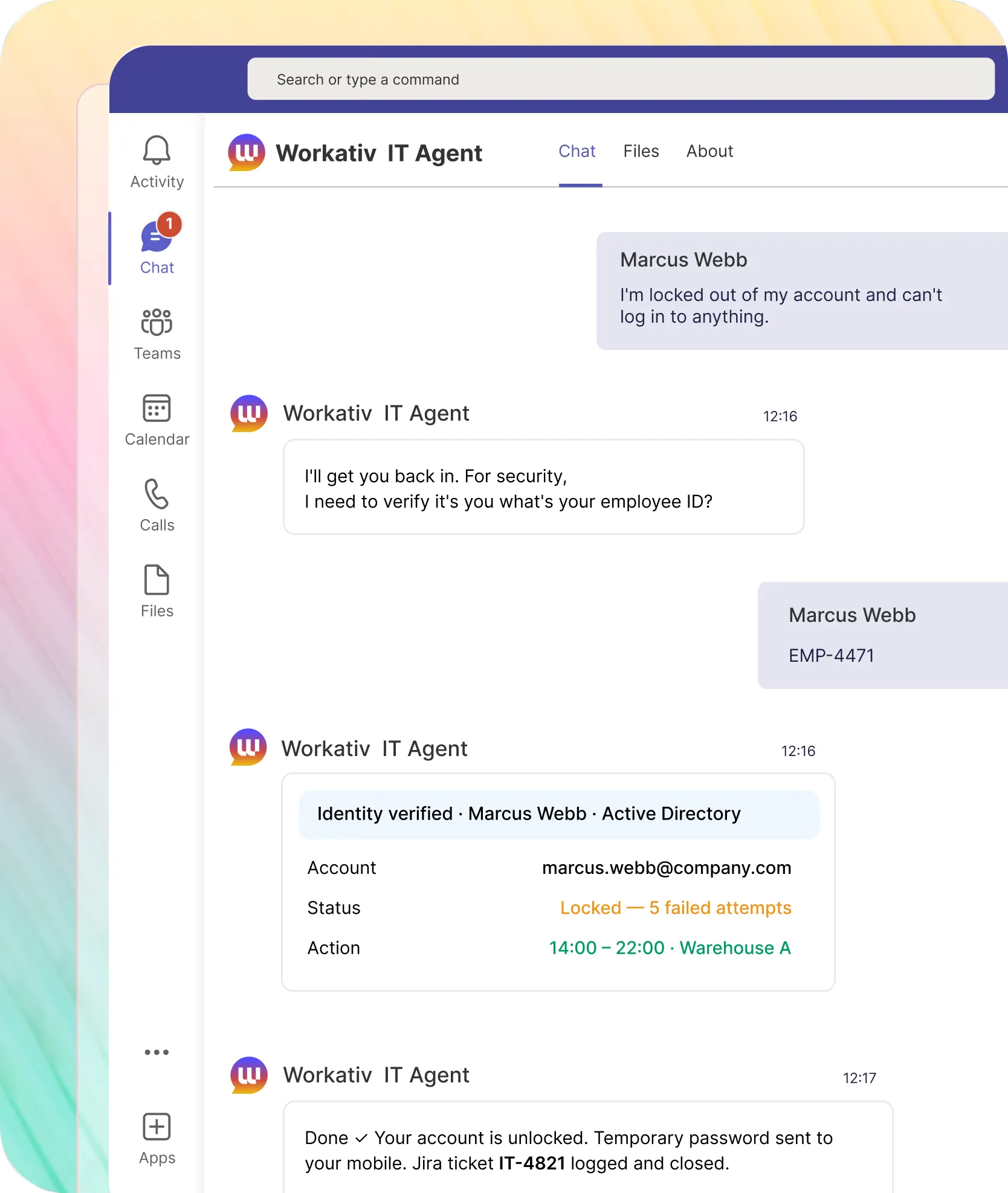
Locked out in Slack. Back in under two minutes. Jira incident logged and closed.

Identity verified before any reset no impersonation risk
Password reset via Active Directory or Okta
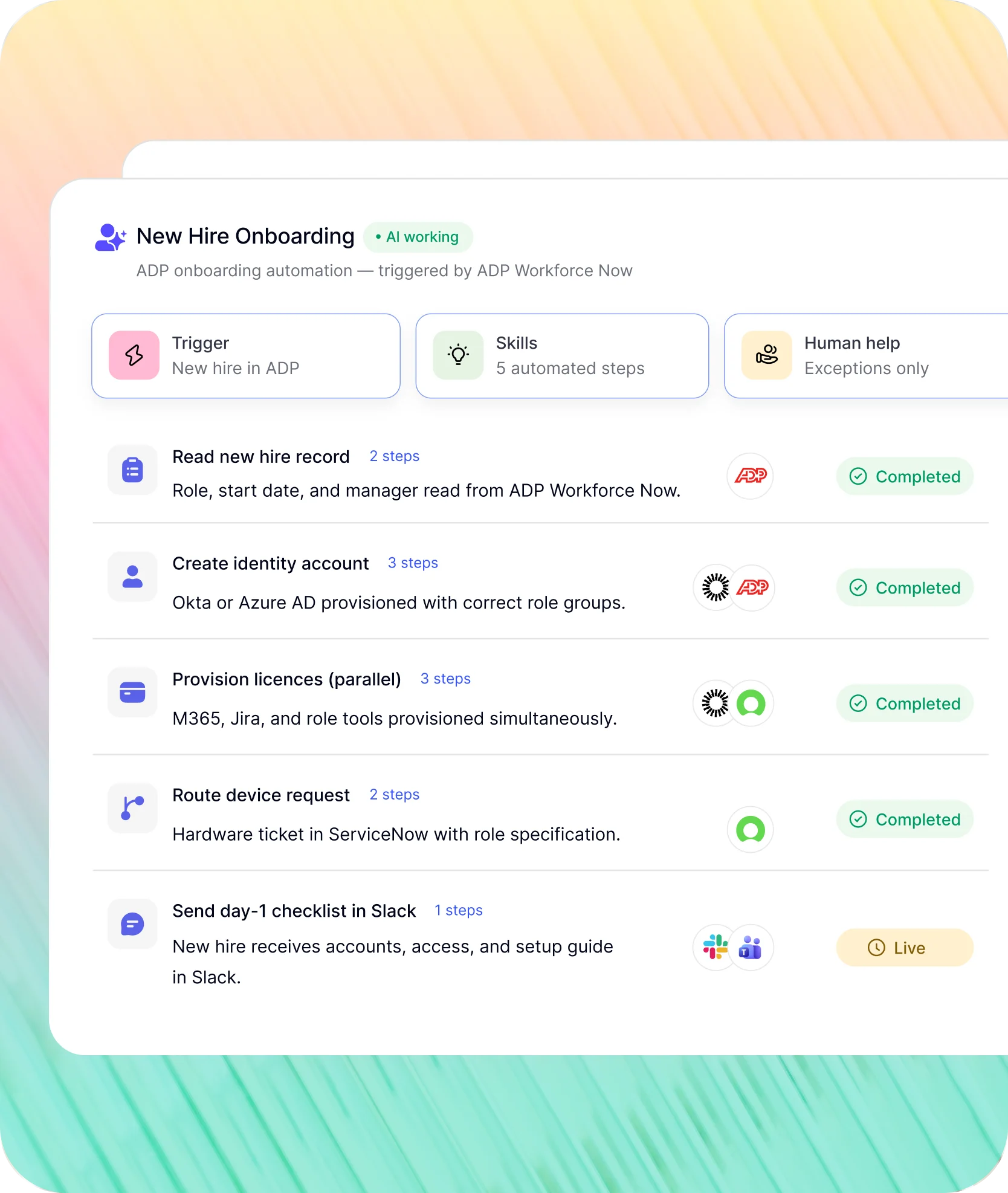
Jira events trigger IT workflows across every connected system. IT coordinates nothing.
Jira fires the event. Workativ coordinates Okta, Azure AD, Workday, ServiceNow, and Slack. IT handles exceptions.
New hire in HRIS. Jira device request raised, Okta provisioned, day-1 checklist in Slack.
Triggered by HRIS new hire event (Workday, ADP, or UKG)
Jira device and access requests created from the hire record
New hire receives day-1 checklist in Slack before they start
How NMDC Group deflected 78% of IT tickets with Jira Service Management connected to Workativ in Slack.
"Workativ has been with us every step of the way. From our first IT support use case to HR, and soon Procurement. The platform grows with us, and so does the team behind it. It's rare to find a solution that's both powerful and genuinely easy to manage."

Imran Abid
IT Operations Leader · NMDC Group

Connect Jira Service Desk to Slack in three steps. No developer. No Atlassian partner.
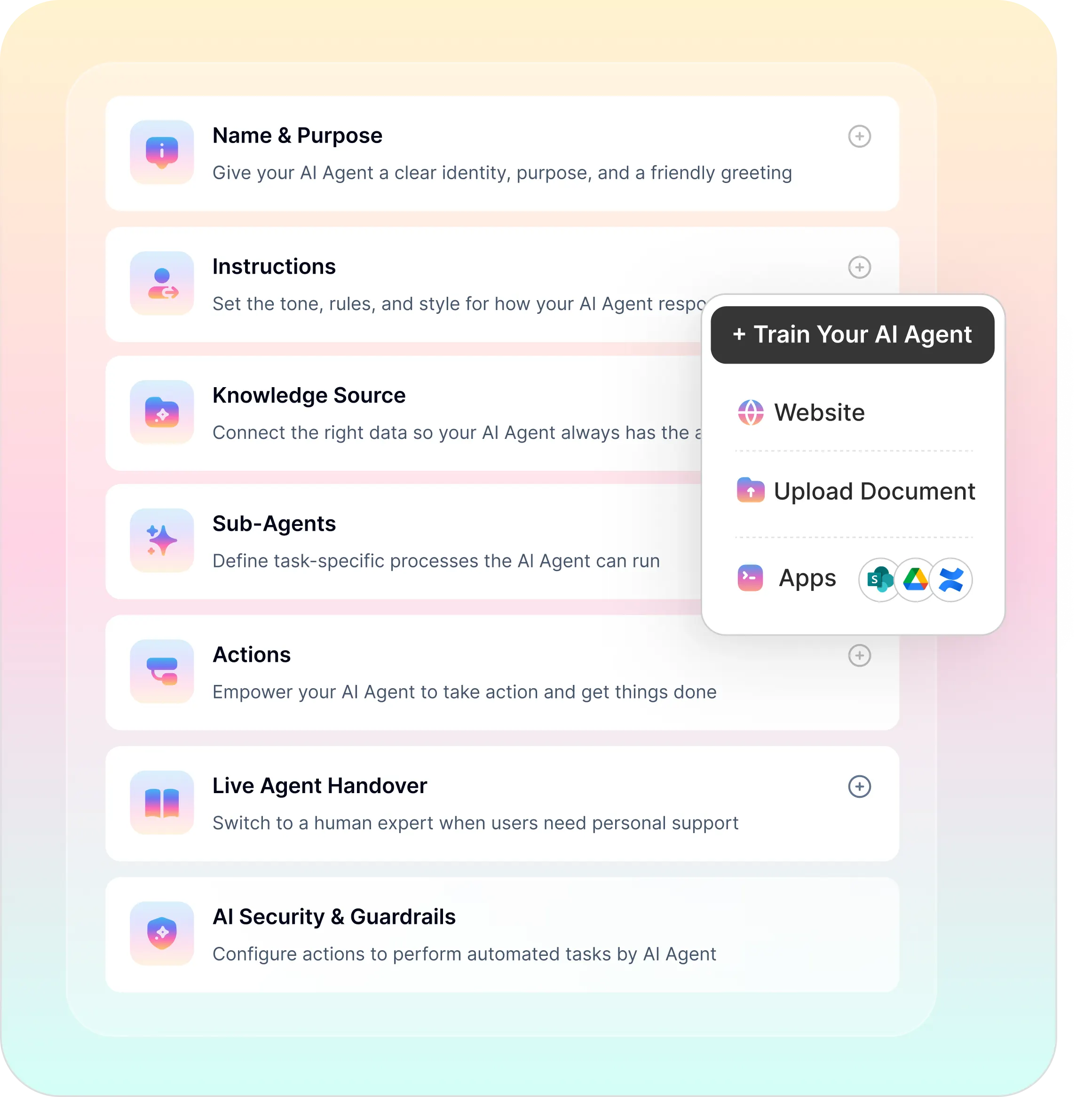
Five platform capabilities. One no-code studio. No Atlassian partner project.
No-code builder, agentic RAG, workflow automation, enterprise security, and analytics in one platform.
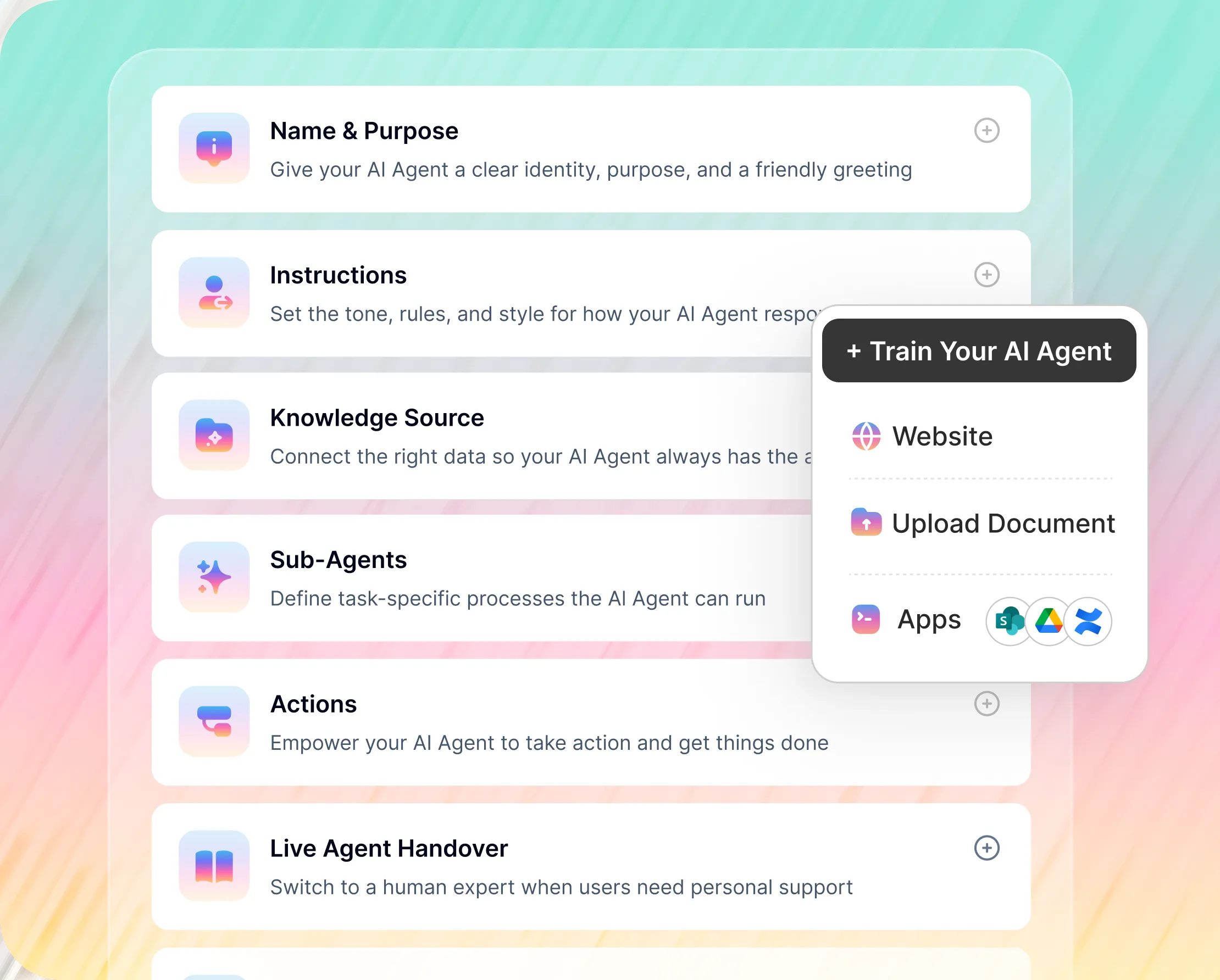
No-Code Jira AI Agent Builder
Connect Jira Service Management, configure actions, set escalation rules. IT sets it up no developer, no Atlassian partner.
Jira ticket creation, access request routing, and password reset all built point-and-click
Jira project and issue type permissions set by IT
Live agent handover to IT service desk when the AI reaches its limit
Jira has native AI. Here is where Workativ sits alongside it.
Rovo and the Virtual Service Agent are built for the Atlassian ecosystem. Workativ sits in Slack and connects Jira to your entire stack. Here is where they differ.
What matters to IT |  |  |  |
|---|---|---|---|
Where employees interact |  | JSM portal + help center (Slack via Atlassian Assist limited) | Slack, Teams, portal |
Jira integration depth | | Native deepest Jira data access | Third-party connector |
Rovo / AI requires Premium | | Rovo AI self-service = Premium ($51.42/agent/mo) | Freddy AI on Growth+ plans |
Cross-system workflows | | Jira Automation (within Atlassian); Rovo Service (limited tools) | Limited cross-system scope |
No-code configuration | | Virtual Service Agent Designer admin-heavy config | |
Time to deploy | | Weeks Virtual Agent config + knowledge setup | 1–2 weeks typical |

When Jira's native AI is enough: Your team lives inside the Atlassian ecosystem, employees already use the JSM portal, and Rovo covers self-service within Confluence and Jira on a Premium plan.
When to add Workativ: Employees live in Slack or Teams not the JSM portal. You need password resets, access requests, and ticket status handled in Slack without a portal visit or a Premium upgrade. You need Jira events to trigger Okta, Workday, and Azure AD workflows in one no-code platform. Workativ and Jira's native AI run alongside each other.
Jira Service Management plus every IT and HR system your employees and IT teams use.
Jira Service Management and Slack in one experience identity, HR, and IT systems coordinated across every request type your service desk handles.


'/%3e%3cpath%20d='M7.53747%209.7499L4.18595%209.72912C3.89511%209.72912%203.66314%209.49022%203.66314%209.20285C3.66314%209.08859%203.70122%208.98126%203.76701%208.89124L8.69389%202.30244C10.2589%203.46925%2010.5809%205.68513%209.41059%207.2501L7.53747%209.7499Z'%20fill='url(%23paint1_linear_217_318)'/%3e%3cdefs%3e%3clinearGradient%20id='paint0_linear_217_318'%20x1='7.3717'%20y1='1.41211'%20x2='9.07645'%20y2='11.0799'%20gradientUnits='userSpaceOnUse'%3e%3cstop%20stop-color='%239DC9FC'/%3e%3cstop%20offset='0.6866'%20stop-color='white'/%3e%3c/linearGradient%3e%3clinearGradient%20id='paint1_linear_217_318'%20x1='9.68512'%20y1='1.62241'%20x2='6.91576'%20y2='7.45173'%20gradientUnits='userSpaceOnUse'%3e%3cstop%20stop-color='%239DC9FC'/%3e%3cstop%20offset='0.7152'%20stop-color='white'/%3e%3c/linearGradient%3e%3c/defs%3e%3c/svg%3e)


%20--%3e%3csvg%20version='1.1'%20id='Layer_1'%20xmlns='http://www.w3.org/2000/svg'%20xmlns:xlink='http://www.w3.org/1999/xlink'%20x='0px'%20y='0px'%20viewBox='0%200%20512%20512'%20style='enable-background:new%200%200%20512%20512;'%20xml:space='preserve'%3e%3cstyle%20type='text/css'%3e%20.st0{fill:%23F7F7F7;}%20.st1{fill:%2328E4C3;}%20.st2{fill:url(%23SVGID_1_);}%20.st3{fill:url(%23SVGID_2_);}%20%3c/style%3e%3ccircle%20class='st0'%20cx='256'%20cy='256'%20r='245.5'/%3e%3cg%3e%3cg%3e%3cpath%20class='st1'%20d='M304.7,405.6'/%3e%3c/g%3e%3c/g%3e%3cg%3e%3cg%3e%3cpath%20class='st1'%20d='M305.8,353'/%3e%3c/g%3e%3c/g%3e%3clinearGradient%20id='SVGID_1_'%20gradientUnits='userSpaceOnUse'%20x1='388.1461'%20y1='99.0534'%20x2='204.4846'%20y2='204.5899'%20gradientTransform='matrix(1%200%200%20-1%200%20514)'%3e%3cstop%20offset='0.18'%20style='stop-color:%230052CC'/%3e%3cstop%20offset='1'%20style='stop-color:%232684FF'/%3e%3c/linearGradient%3e%3cpath%20class='st2'%20d='M119.9,330.3c-3,4.9-6.4,10.7-9.3,15.3c-2.6,4.4-1.2,10,3.1,12.7l60.7,37.4c4.4,2.7,10.1,1.3,12.9-3%20c0,0,0.1-0.1,0.1-0.1c2.4-4.1,5.6-9.3,9-15c24-39.7,48.2-34.8,91.9-14l60.2,28.6c4.7,2.2,10.2,0.2,12.4-4.4c0-0.1,0.1-0.2,0.1-0.3%20l28.9-65.4c2-4.7,0-10.1-4.7-12.2c-12.7-6-38-17.9-60.7-28.9C242.6,241.2,173.1,243.7,119.9,330.3z'/%3e%3clinearGradient%20id='SVGID_2_'%20gradientUnits='userSpaceOnUse'%20x1='613.0198'%20y1='1773.9866'%20x2='429.3116'%20y2='1879.5697'%20gradientTransform='matrix(-1%200%200%201%20736.83%20-1676.71)'%3e%3cstop%20offset='0.18'%20style='stop-color:%230052CC'/%3e%3cstop%20offset='1'%20style='stop-color:%232684FF'/%3e%3c/linearGradient%3e%3cpath%20class='st3'%20d='M392.1,181.9c3-4.9,6.4-10.7,9.3-15.3c2.6-4.4,1.2-10-3.1-12.7l-60.7-37.4c-4.3-2.9-10.1-1.7-13,2.5%20c-0.1,0.2-0.2,0.4-0.3,0.6c-2.4,4.1-5.6,9.3-9,15c-24,39.7-48.2,34.8-91.9,14l-60-28.5c-4.7-2.2-10.2-0.2-12.4,4.4%20c0,0.1-0.1,0.2-0.1,0.3L122,190.2c-2,4.7,0,10.1,4.7,12.2c12.7,6,38,17.9,60.7,28.9C269.4,271,338.9,268.4,392.1,181.9z'/%3e%3c/svg%3e)



%20--%3e%3csvg%20version='1.1'%20id='Layer_1'%20xmlns='http://www.w3.org/2000/svg'%20xmlns:xlink='http://www.w3.org/1999/xlink'%20x='0px'%20y='0px'%20viewBox='0%200%20512%20512'%20style='enable-background:new%200%200%20512%20512;'%20xml:space='preserve'%3e%3cstyle%20type='text/css'%3e%20.st0{fill:%23EB3C00;}%20.st1{fill:%23FFFFFF;}%20%3c/style%3e%3ccircle%20class='st0'%20cx='256'%20cy='256'%20r='245.5'/%3e%3cpath%20class='st1'%20d='M152.2,332.7v-152L286.7,131l73.1,23.4V359l-73.1,22L152.2,332.7l134.4,16.2V171.9L199,192.4v119.8L152.2,332.7%20z'/%3e%3c/svg%3e)

'%3e%3cpath%20d='M1.86774%200H2.41284C2.55325%200.0357914%202.8438%200.0814543%202.96023%200.144319C3.57556%200.476574%204.24389%200.994086%204.78094%201.44029C4.90785%201.49857%205.14031%201.69076%205.26616%201.78501L6.30254%202.56565L9.23874%204.76784L9.98605%205.32579C10.1165%205.42327%2010.3896%205.61784%2010.4874%205.73305C10.5933%205.62723%2010.7819%205.49083%2010.9035%205.39513C11.2293%205.13895%2011.5711%204.89897%2011.9015%204.64888L14.841%202.43616C15.2641%202.11793%2015.808%201.74101%2016.2059%201.4114C16.7548%201.01773%2017.2984%200.503308%2017.8952%200.193124C18.0888%200.0925009%2018.3311%200.0707975%2018.4996%200.00453492L18.511%200H19.1089C19.2716%200.0419345%2019.4446%200.0664859%2019.6017%200.126337C20.3949%200.428494%2020.8251%201.03647%2020.9795%201.84719V4.05546L17.6977%206.51872L16.7256%207.24655C16.6175%207.32813%2016.3229%207.56223%2016.2176%207.62326L16.2116%207.64067C16.0556%207.74125%2015.7554%207.98423%2015.5914%208.10717L14.2347%209.12565C12.9949%2010.0567%2011.7226%2010.9908%2010.4942%2011.9326C10.3311%2011.8196%2010.1521%2011.6753%209.99028%2011.5543L8.91562%2010.7499L6.14505%208.67116C5.6887%208.32244%205.22946%207.97753%204.76737%207.63644L4.76105%207.62385C4.64747%207.54843%204.4662%207.40207%204.35254%207.31617L3.58531%206.74057L0.993507%204.79937C0.666643%204.55579%200.329975%204.28777%200%204.0539V1.89895C0.0211067%201.8406%200.034732%201.7287%200.0477586%201.66355C0.195443%200.924862%200.778193%200.297181%201.50398%200.095359C1.61897%200.0633797%201.74239%200.0411929%201.85419%200.00451034L1.86774%200Z'%20fill='%23EB4337'/%3e%3cpath%20d='M18.5112%200H19.109C19.2718%200.0419345%2019.4448%200.0664859%2019.6018%200.126337C20.395%200.428494%2020.8252%201.03647%2020.9797%201.8472V4.05546L17.6978%206.51872L16.7258%207.24655C16.6176%207.32813%2016.3231%207.56223%2016.2177%207.62326C16.2065%207.10816%2016.2151%206.56484%2016.215%206.04638L16.2148%203.13227L16.2154%201.98927C16.2154%201.85241%2016.2236%201.52684%2016.2061%201.4114C16.755%201.01773%2017.2986%200.503308%2017.8953%200.193124C18.089%200.0925009%2018.3312%200.0707975%2018.4998%200.00453492L18.5112%200Z'%20fill='%23FCBC03'/%3e%3cpath%20d='M1.86774%200H2.41284C2.55325%200.0357914%202.8438%200.0814543%202.96023%200.144319C3.57556%200.476574%204.24389%200.994086%204.78094%201.44029C4.75802%201.55136%204.76536%201.81314%204.76577%201.93571L4.7683%202.76769L4.76727%206.06197L4.76854%207.06889C4.76879%207.22294%204.77708%207.48131%204.76105%207.62385C4.64746%207.54843%204.4662%207.40207%204.35254%207.31617L3.58531%206.74057L0.993506%204.79937C0.666643%204.5558%200.329975%204.28777%200%204.0539V1.89895C0.0211067%201.8406%200.034732%201.7287%200.0477586%201.66355C0.195443%200.924862%200.778193%200.297181%201.50398%200.095359C1.61897%200.0633798%201.74239%200.0411929%201.85419%200.00451034L1.86774%200Z'%20fill='%23C62220'/%3e%3cpath%20d='M0%204.05371C0.329975%204.28758%200.666643%204.5556%200.993507%204.79918L3.58531%206.74038L4.35254%207.31598C4.4662%207.40188%204.64747%207.54824%204.76105%207.62365L4.76737%207.63625C4.79294%207.81891%204.78411%208.19988%204.78406%208.39833L4.78312%209.71796L4.78339%2014.2476C4.7834%2014.4489%204.8101%2015.6601%204.76016%2015.7263C4.75851%2015.7284%204.75656%2015.7304%204.75498%2015.7326C4.75244%2015.7361%204.75024%2015.74%204.74778%2015.7435C4.7463%2015.7457%204.74469%2015.7477%204.74315%2015.7498H1.23433C1.02953%2015.6658%200.870008%2015.6564%200.656526%2015.5145C0.258114%2015.2497%200.102217%2014.9456%200%2014.4978V4.05371Z'%20fill='%234185F5'/%3e%3cpath%20d='M20.9794%204.05566V14.5025C20.828%2015.1172%2020.5387%2015.5356%2019.8875%2015.6981C19.8377%2015.7104%2019.7443%2015.7302%2019.7008%2015.7502H16.235C16.1758%2015.6436%2016.1987%2013.9178%2016.1987%2013.683L16.199%2010.2145L16.1984%208.51668C16.1982%208.31838%2016.1872%207.81396%2016.2115%207.64088L16.2175%207.62347C16.3228%207.56244%2016.6174%207.32834%2016.7255%207.24676L17.6976%206.51892L20.9794%204.05566Z'%20fill='%2333A953'/%3e%3c/g%3e%3cdefs%3e%3cclipPath%20id='clip0_1380_1288'%3e%3crect%20width='20.9795'%20height='15.75'%20fill='white'/%3e%3c/clipPath%3e%3c/defs%3e%3c/svg%3e)
%20--%3e%3csvg%20version='1.1'%20id='Layer_1'%20xmlns='http://www.w3.org/2000/svg'%20xmlns:xlink='http://www.w3.org/1999/xlink'%20x='0px'%20y='0px'%20viewBox='0%200%20512%20512'%20style='enable-background:new%200%200%20512%20512;'%20xml:space='preserve'%3e%3cstyle%20type='text/css'%3e%20.st0{fill:%230062FF;}%20.st1{fill:%23FFFFFF;}%20%3c/style%3e%3ccircle%20class='st0'%20cx='256'%20cy='256'%20r='245.5'/%3e%3cpath%20class='st1'%20d='M256,162.5l-91,58.2l91,58.2l-91,58.2l-91-59.1l91-58.2l-91-57.3l91-58.2L256,162.5z%20M164.1,355.5l91-58.2%20l91,58.2l-91,58.2L164.1,355.5z%20M256,278.1l91-58.2l-91-57.3l91-58.2l91,58.2l-91,58.2l91,58.2l-91,58.2L256,278.1z'/%3e%3c/svg%3e)


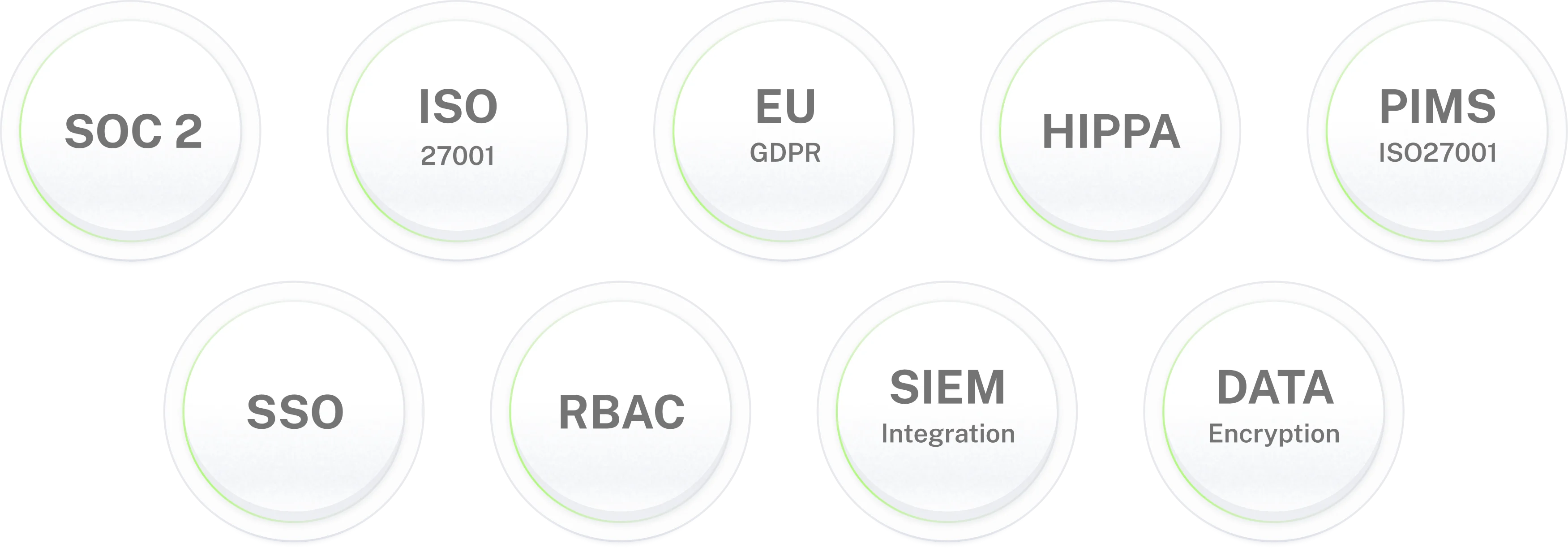
Enterprise-grade security for IT environments where data protection is non-negotiable.
Jira AI agent for
your IT service desk.
78% of IT tickets handled in Slack. Password resets, access requests, and IT workflows running from Jira events. IT focuses on what needs judgment.
Frequently asked questions
Jira AI agent frequently asked questions
What is a Jira AI agent?
A Jira AI agent connects to your Jira Service Management instance and lets employees resolve IT requests in Slack or Microsoft Teams without logging into the JSM portal. It handles password resets, access requests, ticket creation, ticket status checks, and IT policy questions. Workativ's Jira AI agent also runs event-driven IT workflows new hire provisioning triggered by your HRIS, offboarding access revocation, software access lifecycle from Jira approvals, and P1 incident alerts to on-call teams in Slack.
How does Workativ integrate with Jira Service Management?
Workativ connects to Jira Service Management via pre-built no-code connectors using Jira REST APIs, secured with OAuth 2.0 and role-based access controls. Once connected, Workativ reads and writes to JSM creating tickets, updating requests, checking status, and triggering workflows all from conversations in Slack or Microsoft Teams. No developer or Atlassian partner required.
Is Workativ different from Jira Virtual Service Agent and Rovo?
Yes. Jira's Virtual Service Agent operates within the JSM portal and help center. Rovo provides AI search and agents across Atlassian products but there is no full Rovo chatbot natively inside Slack or Teams; employees must leave their chat tool to interact with Rovo. Rovo's AI self-service features also require a Premium plan at $51.42 per agent per month. Workativ sits natively in Slack and Microsoft Teams, connects Jira to your full enterprise stack, and deploys in 3–5 days without a Premium plan upgrade or Atlassian partner project.
Can the Jira AI agent reset passwords in Slack?
Yes. Employee reports being locked out in Slack. Workativ verifies their identity, resets the password via Active Directory or Okta, and logs a closed incident in Jira Service Management automatically. The employee is back in under two minutes. No service desk agent involved.
Can employees check Jira ticket status in Slack?
Yes. Employee asks in Slack, Workativ queries Jira and returns the ticket status issue key, current state, assigned team, and expected resolution. No portal login. No call to the service desk. IT teams stop fielding status calls and focus on resolution.
What IT workflows can Workativ automate with Jira Service Management?
Workativ automates five Jira-connected IT workflows: new hire IT provisioning (HRIS new hire event → Jira device request → Okta identity provision → day-1 Slack checklist), employee offboarding (HRIS termination → Jira access revocation ticket → Okta disable → equipment return), software access lifecycle (employee request in Slack → Jira approval ticket → provision in Okta on approval), P1 incident response (Jira P1 raised → on-call team alerted in Slack → bridge channel created → stakeholders notified), and user provisioning (Jira approval → group membership and licence changes across Okta, Azure AD, and SaaS apps).
Does Workativ work alongside Jira's native AI Virtual Service Agent and Rovo?
Yes. Jira's Virtual Service Agent handles self-service within the JSM portal. Rovo provides AI search and agents across Atlassian products. Workativ is an independent no-code platform that connects Jira to Slack and your full enterprise stack. Workativ complements both: it handles the employee-facing self-service layer in Slack for teams that want Slack-native IT support without a Premium upgrade or Atlassian partner project.
Can the Jira AI agent handle software access requests?
Yes. Employee requests software access in Slack. Workativ creates the Jira Service Management request, routes it to the approver in Slack, and provisions access in Okta or Azure AD when approved. Jira record updated throughout. The employee gets a confirmation in Slack. No portal, no email chain, no service desk call.
Does the Jira AI agent work in both Slack and Microsoft Teams?
Yes. Workativ deploys natively in Slack and Microsoft Teams. Employees in either channel reach the same Jira AI agent same data, same workflows, same approval flows. Jira's Atlassian Assist connector surfaces basic ticket creation in Slack; Workativ delivers full self-service functionality including password resets, access requests, and IT operations workflows in both channels from day one.
Is Jira Service Management data secure with Workativ?
Yes. Workativ connects to Jira using OAuth 2.0 with role-based access controls. The AI agent can only access projects and issue types it has been explicitly permitted. Jira data is never used to train models. PII is masked in all logs. Every action is written to an immutable audit trail. Workativ is SOC 2 Type II, ISO 27001, GDPR, and HIPAA compliant.
How long does Jira AI agent deployment take?
3 to 5 days for standard IT self-service use cases password reset, ticket status, access requests, IT policy Q&A. No Atlassian partner project. No developer required. Workativ's no-code platform connects Jira, configures the AI agent, and deploys to Slack or Microsoft Teams without a Premium plan upgrade.
What is the difference between Jira Automation and a Jira AI agent?
Jira Automation follows explicit triggers and rules deterministic, predictable, best for workflow logic that does not change. A Jira AI agent interprets employee language, retrieves live data, and takes actions across connected systems. The two are complementary: Jira Automation handles defined workflow steps inside Jira; Workativ's Jira AI agent handles the employee conversation, cross-system coordination, and actions that fall outside Jira password resets in Active Directory, access provisioning in Okta, and IT policies from Confluence.