
Microsoft Copilot for IT: Review & Alternatives 2026
See how Microsoft Copilot performs across productivity, AI assistance, integrations, pricing, limitations, and business use cases.


TL;DR
Microsoft Copilot is excellent for IT productivity tasks like ticket summaries, knowledge lookup, and drafting responses inside Microsoft 365.

Its biggest limitation is execution—Copilot assists agents with context and writing, but does not automate workflows or own ticket lifecycles.
Per-user pricing makes ROI difficult to justify for IT teams because costs scale with headcount instead of support outcomes.
Workativ is a stronger fit when the goal is end-to-end IT automation, ticket ownership, and measurable ROI tied to resolution metrics.
Copilot can also assist HR teams with employee questions, recruiter communications, and case summaries, but complete HR workflows may require additional Microsoft tools and configuration.
Microsoft Copilot for IT support is increasingly being evaluated by IT teams in 2026—but often with mixed results.
Originally built as an AI productivity assistant for Microsoft 365, Microsoft Copilot is now being tested for internal IT helpdesk use cases, such as policy lookup, ticket summarization, and response drafting. For Microsoft-first organizations, this feels like a logical step.
However, many teams quickly discover the difference between assisting IT agents and automating IT support end-to-end. Copilot can help write, summarize, and search—but it doesn’t own ticket workflows, execute IT actions, or clearly reduce ticket volume on its own.
This review examines how Microsoft Copilot actually performs for IT support in 2026, where it adds value, where it falls short, and when teams consider purpose-built IT automation platforms like Workativ instead.
While IT support remains the primary focus of this review, we also examine how the same distinction between AI assistance and end-to-end automation applies to HR and broader employee-support processes.
What is Microsoft Copilot?
Microsoft Copilot is best understood as an AI assistant for Microsoft 365 and not a dedicated IT support platform.
For IT teams, Copilot works well when the goal is assistance rather than automation. It can search internal documents, summarize tickets, draft responses, and help agents move faster inside tools like Teams, Outlook, and SharePoint. These capabilities are useful for knowledge-heavy IT environments and day-to-day productivity.
Where Copilot falls short is ownership. It does not run IT workflows, execute actions, or manage tickets end-to-end. Tasks like password resets, access requests, ticket updates, and SLA-driven routing still require ITSM tools and human intervention.
Copilot supports IT agents, but it doesn’t replace an IT helpdesk or reduce ticket volume on its own. That distinction becomes important as teams look to scale IT support without scaling headcount.
How does Microsoft Copilot work?
Microsoft Copilot works by embedding generative AI directly inside Microsoft products like Teams, Outlook, Word, Excel, SharePoint, and Windows.
At a high level, Copilot listens to user prompts and combines:
Large language models
Your organization’s Microsoft 365 data (emails, chats, documents, calendars)
Microsoft Graph for permissions and context
When an IT user or agent asks a question, Copilot retrieves relevant information they already have access to and generates a response such as a summary, draft reply, or explanation inside the app they’re working in.
For IT support scenarios, this means Copilot can:
Look up policies or troubleshooting steps from internal documents
Summarize tickets or long Teams threads
Help draft responses to employees
What Copilot does not do is execute IT actions or run workflows. It doesn’t reset passwords, update tickets, or automate processes on its own. Instead, it assists humans by providing context and suggestions, leaving execution to IT tools and agents.
Microsoft Copilot reviews: What users are saying in 2026
Before we dive into the features and pricing of Microsoft Copilot, let’s review user reviews on G2 and explore anecdotes from their experiences with the platform.
1. Convenient across Microsoft tools, but less powerful than native ChatGPT
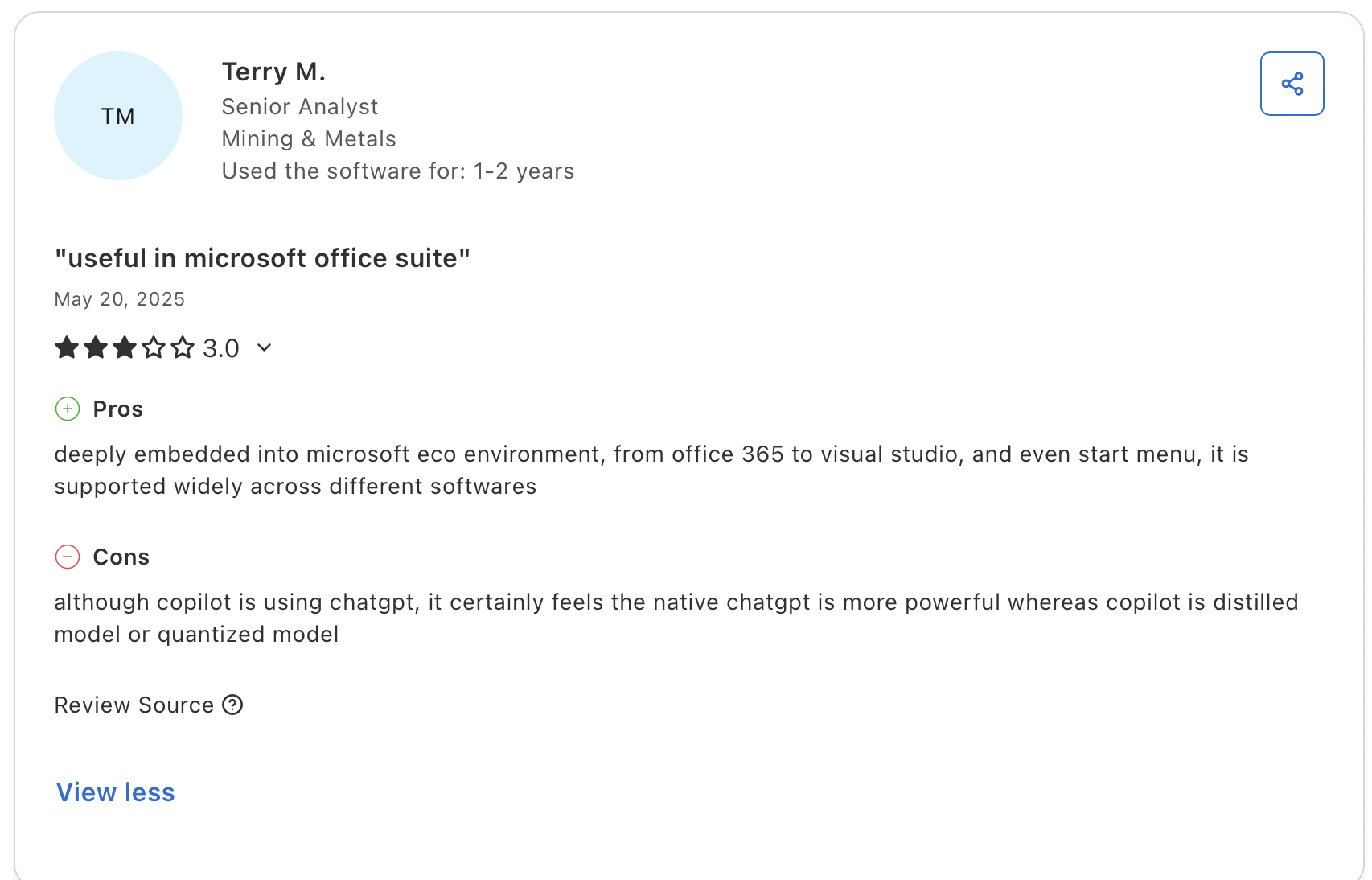
The reviewer valued Microsoft Copilot’s broad integration across Microsoft 365, Visual Studio, and Windows, making AI assistance easy to access within familiar applications. However, they felt that Copilot’s responses were more limited than the native ChatGPT experience. While its ecosystem integration adds convenience, the reviewer questioned whether it offers the same depth and capability as using ChatGPT directly.
2. User-friendly and proactive, but the interface and reliability need improvement
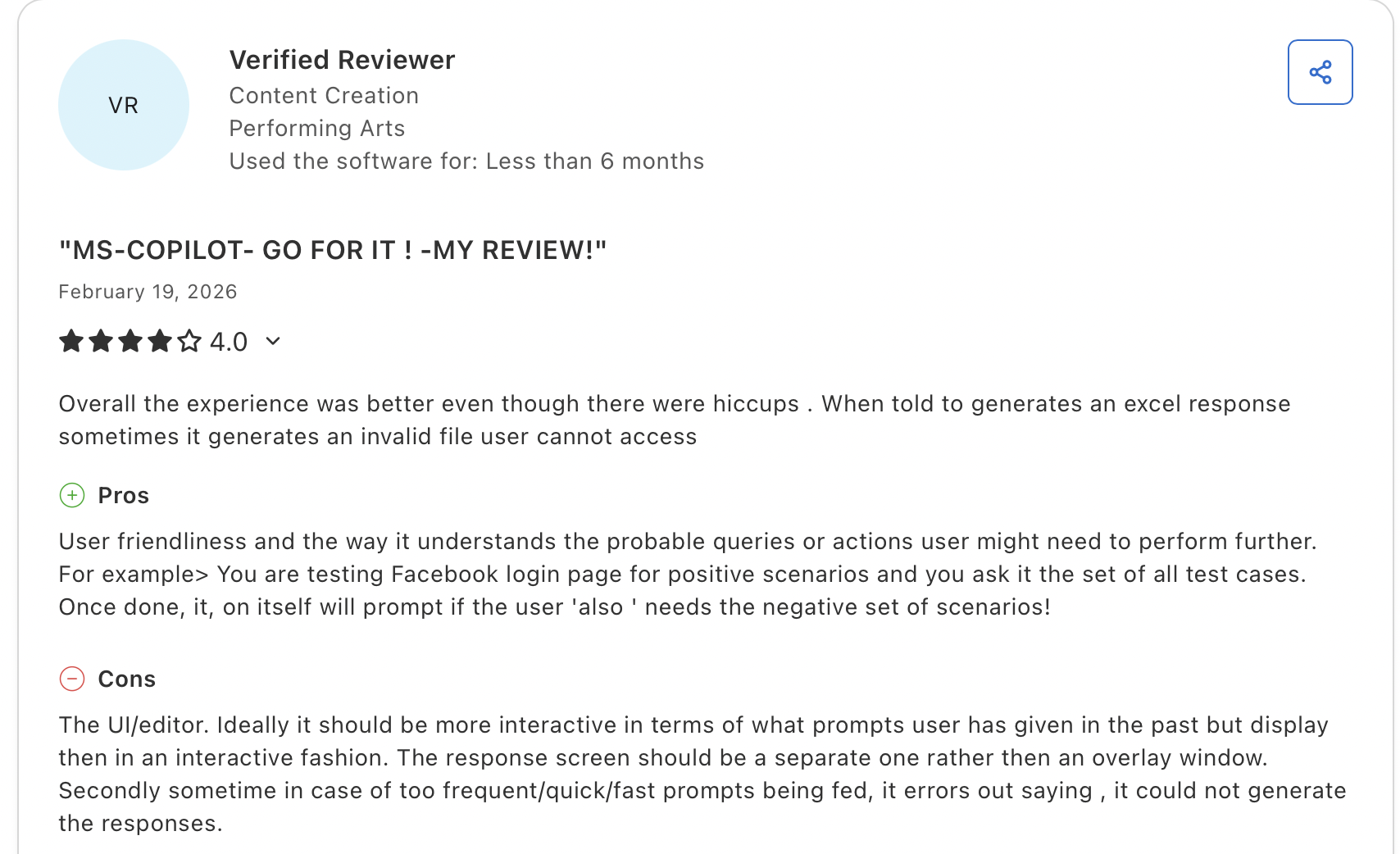
The reviewer found Microsoft Copilot easy to use and appreciated how it anticipates related tasks, such as suggesting additional test scenarios after completing an initial request. However, they also experienced reliability issues, including inaccessible Excel files and errors when prompts were submitted too quickly. The reviewer felt the interface could be more interactive, with better access to previous prompts and a dedicated response screen instead of an overlay.
3. Seamless Microsoft 365 integration, but outputs still need careful review
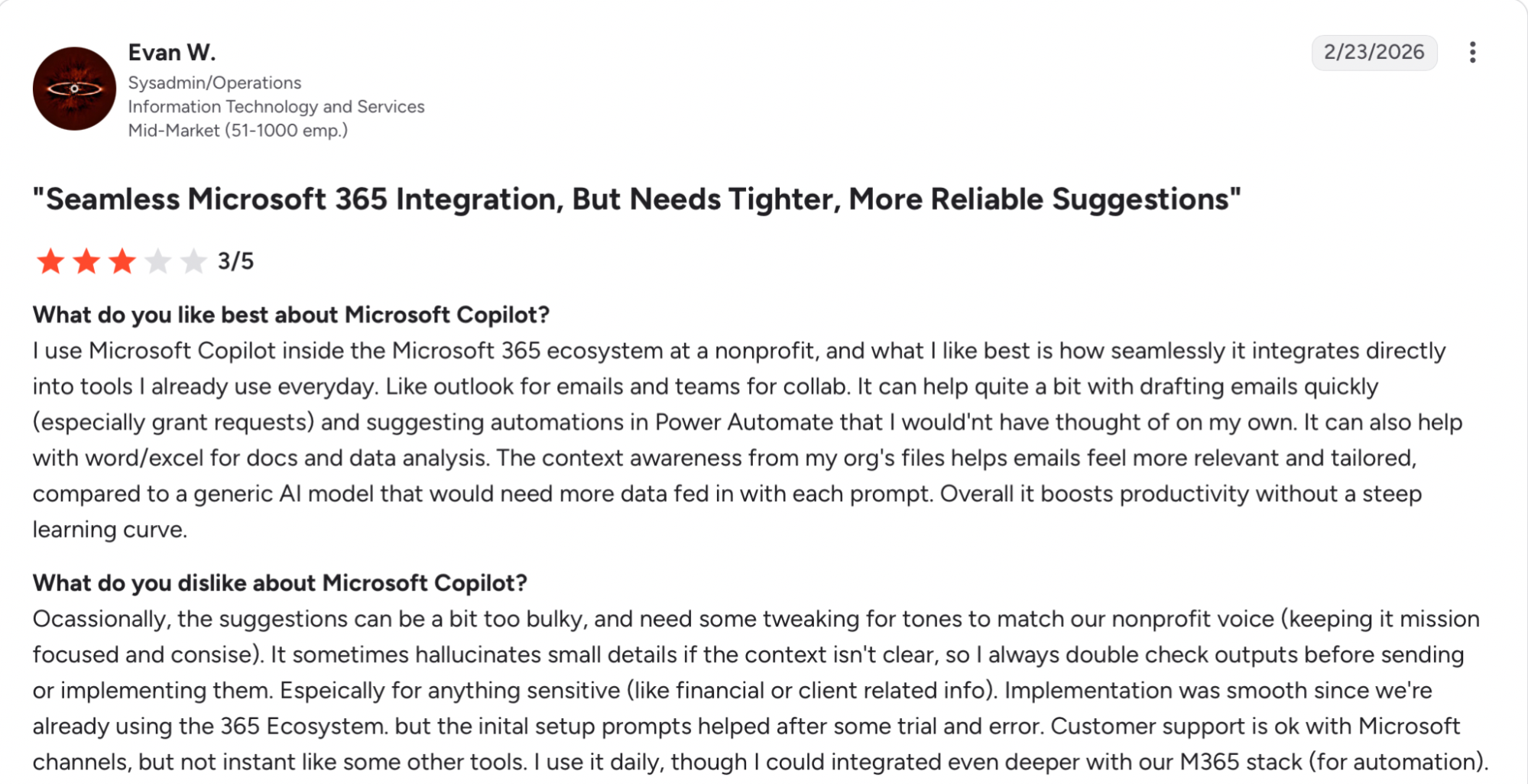
The reviewer valued how naturally Microsoft Copilot works across Outlook, Teams, Word, Excel, and Power Automate. Its access to organizational files made email drafts and suggestions feel more relevant, while its familiar interface helped improve productivity without a steep learning curve. However, the reviewer found that some responses were too lengthy, did not always match the organization’s tone, and occasionally included inaccurate details when context was unclear. Sensitive outputs still required double-checking, and deeper automation capabilities and faster support would improve the overall experience.
4. Reliable for everyday tasks, but responses still need human review
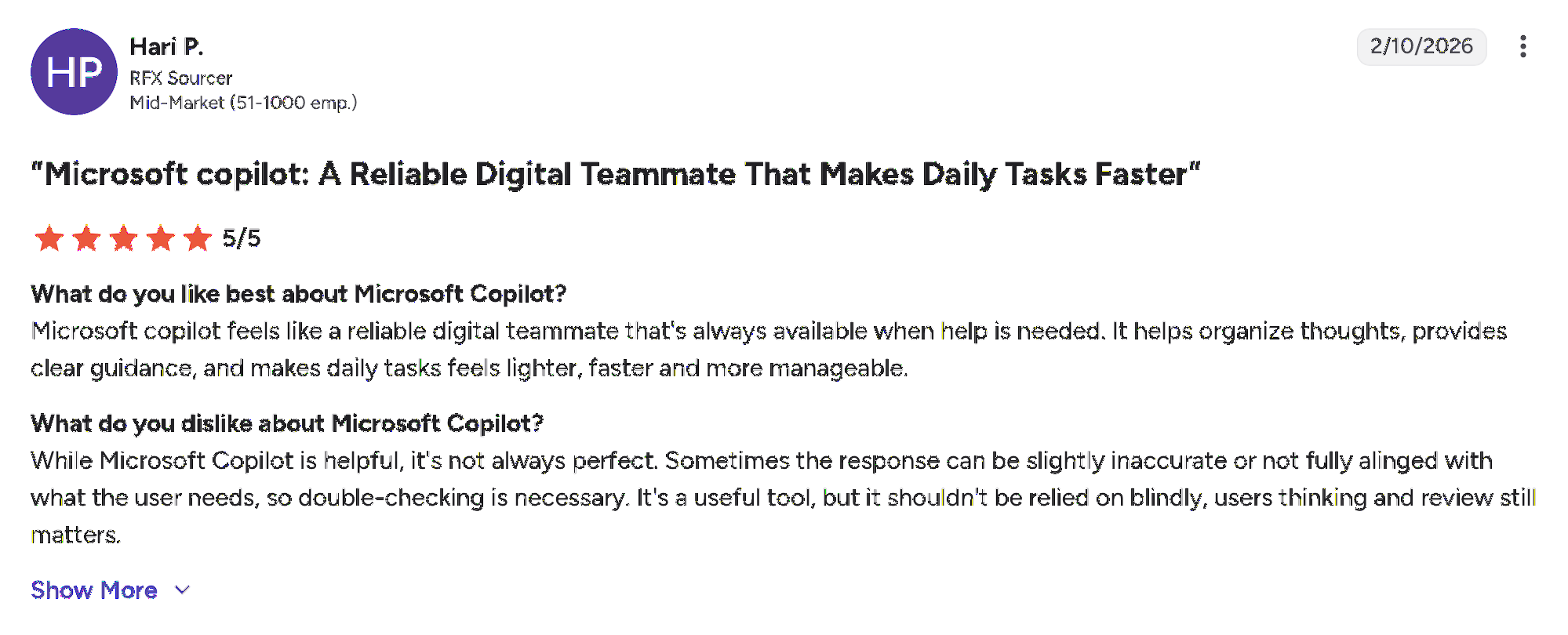
The reviewer described Microsoft Copilot as a dependable digital teammate that helps organize ideas, provides clear guidance, and makes daily work feel faster and more manageable. However, they also noted that its responses are not always fully accurate or aligned with the user’s intent. While Copilot is useful for reducing workload, important outputs should still be reviewed and verified rather than accepted without question.
ASSISTS YOUR AGENTS. DOESN'T REPLACE YOUR HELPDESK.
Copilot drafts and summarises. Someone still creates the ticket, resets the password, closes the request.
No-code · Deep integrations · Deploy in minutes
See a Quick Demo
Key features that define Microsoft Copilot
Microsoft Copilot is designed to improve productivity inside the Microsoft ecosystem by assisting users with context, content, and summaries—not by running workflows.
Native Microsoft 365 integration: Built directly into Teams, Outlook, Word, Excel, PowerPoint, SharePoint, and the Microsoft admin center, allowing users to access AI without switching tools.
Context-aware summaries and recaps: Quickly summarize meetings, chats, emails, and documents to surface decisions, action items, and key takeaways.
AI-assisted writing and content creation: Helps draft emails, documents, and presentations, adjusting tone and structure based on prompts and surrounding context.
Knowledge discovery using Microsoft Graph: Surfaces relevant internal information from files, emails, chats, and calendars that users already have permission to access.
In-app assistance, not workflow automation: Provides suggestions and insights inside Microsoft apps, but does not execute IT actions, automate processes, or manage workflows end to end.
Strengths and limitations of Microsoft Copilot
Microsoft Copilot is powerful within its intended role, but its value depends heavily on what teams expect from it assistance versus automation.
Pros:
Seamless Microsoft 365 integration: Copilot works directly inside Teams, Outlook, Word, Excel, and other Microsoft tools, reducing friction and keeping users in their existing workflows.
Strong at summarization and context compression: It excels at turning long emails, chats, and meetings into concise summaries with clear highlights and action items.
Helpful for drafting and rewriting content: Copilot speeds up writing tasks by generating emails, documents, and presentations in a consistent tone that users can quickly refine.
Low learning curve for end users: Because it’s embedded in familiar Microsoft apps, adoption is relatively easy for employees without additional training.
Limitations:
Assistive, not execution-ready: Copilot suggests and summarizes but does not execute IT actions, automate workflows, or manage tickets end to end.
Inconsistent output quality: Results can vary by prompt, data quality, and app, requiring frequent review and reducing trust for high-stakes tasks.
Limited value outside the Microsoft ecosystem: Its effectiveness drops in mixed IT environments that rely on non-Microsoft tools or custom systems.
ROI is hard to measure for IT support: Per-user pricing and assistive use cases make it difficult to tie spend to outcomes like ticket deflection or resolution time.
Microsoft Copilot is a strong productivity assistant, but not a replacement for purpose-built IT support or automation platforms.
Popular use cases of Microsoft Copilot
Here are the most popular use cases of Microsoft Copilot, based on its features and positioning as an AI assistant.
Knowledge assistance and policy lookup – Searches internal docs, emails, and SharePoint, but accuracy depends on content quality.
Ticket drafting and response suggestions – Helps agents write replies faster, but humans still execute every action.
Incident summarization and handover notes – Compresses long threads into summaries, without progressing or resolving incidents.
Meeting and change recap for IT teams – Summarizes IT meetings, change discussions, and decisions for quick alignment.
Troubleshooting guidance lookup – Surfaces past fixes and documentation, but lacks step-by-step execution or validation.
Status update and communication drafts – Generates outage or maintenance updates that agents still need to send manually.
Where teams hit friction – No ticket ownership, no deterministic workflows, and limited escalation or SLA control.
Microsoft Copilot pricing and plans 2026: what you need to know before you buy
Pricing is one of the first friction points IT leaders encounter when evaluating Microsoft Copilot for internal support. While Copilot is easy to pilot, its pricing model often becomes harder to justify as usage expands beyond individual productivity and into IT operations.
Per-user pricing creates budget drift
Microsoft Copilot follows a per-user pricing model, causing costs to rise with employee headcount rather than IT support usage. As adoption grows across the organization, spend increases even if ticket volume, automation, or resolution rates do not improve.
Costs scale with headcount, not support outcomes
Copilot pricing is not tied to IT metrics like tickets deflected, incidents resolved, or time saved. Whether Copilot meaningfully reduces workload or simply assists agents, the cost remains the same, making outcome-based justification difficult.
Hidden costs emerge beyond the license fee
In real deployments, Copilot often introduces additional costs that aren’t obvious upfront. IT teams still need ITSM tools, workflow automation platforms, and human agents to execute requests, along with an ongoing effort to maintain clean and accurate knowledge sources.
Real cost drivers buyers underestimate
The true cost of Copilot for IT support is driven by organization-wide licensing, continuous human oversight, and parallel investments in tools that actually perform IT actions. Over time, total spend grows faster than expected while automation gains remain limited.
ROI is hard for finance and IT ops to defend
Because Copilot operates as an assistive layer, it’s difficult to map spend to outcomes like cost per resolved request or mean time to resolution. Finance teams often struggle to defend ROI when savings are indirect, and execution still depends on people.
Microsoft Copilot pricing supports productivity enablement, but many IT teams find it misaligned with support economics and automation-driven ROI.
PRICED BY USAGE, NOT HEADCOUNT.
Workativ automates IT requests end-to-end - no per-user fees, no ITSM dependency, no manual steps.
No-code · Deep integrations · Deploy in minutes
See Workativ AI in actionBest alternative to Microsoft Copilot: How Workativ compares
Microsoft Copilot is effective at assisting IT teams with summaries and drafts—but it stops short when execution and automation are required. This is where Workativ is purpose-built to operate.
For teams evaluating a wider range of platforms, our guide to the best Microsoft Copilot alternatives for IT and HR teams in 2026 compares the leading options based on IT support, HR support, workflow automation, pricing, and overall business fit.
End-to-end IT issue resolution : Workativ is designed to handle the full IT support lifecycle—from user intent to action, ticket creation, execution, and closure without relying on manual follow-ups or separate tools.
Built for IT workflows, not document assistance : Unlike Copilot’s assistive model, Workativ natively supports real IT workflows, such as password resets, access requests, ticket creation and updates, and status checks, directly in chat channels like Slack or Teams.
Extends automation across HR and employee support: Workativ can also automate employee onboarding, offboarding, leave management, payroll inquiries, document collection, employee data updates, and other HR processes. It connects HR, IT, identity, payroll, and collaboration systems so that approvals, updates, notifications, and follow-ups can be managed as one coordinated workflow.
Pricing aligned to outcomes : Workativ uses usage-based pricing rather than per-employee licensing. Costs scale with actual support interactions, making spending easier to forecast as adoption grows and automation increases. Workativ offers the following tiered pricing plans, which are billed monthly or annually.
Starter plan ($99) – Includes a generous number of sessions with core employee support capabilities, ideal for pilots and early adoption.
Business plan ($349/month) – Comes with higher session limits, advanced integrations, analytics, and automation features needed for production use.
Enterprise plan (custom) – Designed for large organizations requiring compliance, RBAC, SSO, and tailored deployment, without forcing unnecessary long-term lock-ins.
Faster time to value : Workativ deployments typically take weeks, not months. Teams can go live quickly without heavy services, complex customization, or long dependency chains, allowing IT leaders to see measurable impact faster.
When IT teams need automation, execution, and ROI clarity, not just assistance, Workativ is often the more practical alternative to Microsoft Copilot for IT support.
Head-to-head comparison: Microsoft Copilot vs Workativ
Below is a clear, buyer-friendly comparison of Microsoft Copilot and Workativ across the dimensions that matter most when evaluating employee support and automation platforms.
Category | Microsoft Copilot | Workativ |
Core role | AI productivity assistant | Employee support and workflow automation platform |
Primary focus | Writing, summaries, knowledge lookup | End-to-end IT and HR process automation |
IT workflow execution | Not supported | Native (password reset, access, tickets) |
HR workflow execution | Requires Copilot Studio, Power Automate, connectors, and configuration | Native multi-step workflows across HRIS, payroll, ITSM, identity, and collaboration tools |
Employee onboarding and offboarding | Assists with content, summaries, and information retrieval | Coordinates approvals, system updates, provisioning, notifications, and completion |
Selecting the right AI platform for employee support and beyond
Microsoft Copilot brings clear value as a productivity assistant, especially for teams deeply embedded in the Microsoft 365 ecosystem. It helps IT agents move faster with summaries, drafting, and context—but it remains an assistive layer rather than an IT support solution.
For IT leaders focused on reducing ticket volume, automating repetitive requests, and gaining measurable ROI, the limitations become clear. Copilot does not execute workflows, own ticket lifecycles, or tie costs to support outcomes.
The same distinction applies to HR. Copilot can help HR teams answer questions, summarize cases, and draft communications, but complete processes such as onboarding, offboarding, leave management, payroll support, and employee data updates require workflow execution across multiple systems.
This is where Workativ stands out.
That creates a natural IT → HR → Workativ transition.
If your goal is productivity, Copilot may be sufficient. If your goal is automation, resolution, and predictable ROI, Workativ is often the better long-term fit.
Book a demo with Workativ and explore how you can launch AI-powered employee support in weeks—not months—without enterprise friction or unpredictable costs.
Ready to Skip the Complexity?
Copilot assists your IT team. Workativ automates it. Tickets, resets, access requests - resolved in chat.
Microsoft Copilot for HR: useful assistance, but not complete process automation
Microsoft Copilot is not limited to IT productivity. HR teams can also use Copilot and Copilot Studio to improve employee support, recruiting communication, and HR case management.
Microsoft’s own HR pilot demonstrated several practical applications:
AskHR virtual agent: Provides conversational self-service for common employee questions and HR information.
Candidate engagement: Helps recruiters draft candidate communications and supports sourcing activities.
HR-assisted support: Generates case summaries and helps HR agents find relevant knowledge more quickly.
HR content creation: Assists with policy communications, onboarding messages, job descriptions, and internal announcements.
These capabilities can reduce the time HR employees spend searching for information, summarizing cases, and preparing communications. However, they mainly improve individual tasks rather than automate an entire HR process.
For example, employee onboarding may require HR to create an employee record, collect documents, initiate payroll and benefits enrollment, request equipment, provision application access, assign training, notify the hiring manager, and track completion across several systems. Microsoft Copilot can help draft communications and surface information, but completing this process may require Copilot Studio, Power Automate, external connectors, and custom workflow configuration.
Workativ takes a more workflow-focused approach. It can coordinate onboarding, offboarding, leave requests, payroll inquiries, employee data updates, and HR helpdesk processes across HRIS, ITSM, identity, payroll, and collaboration applications.
The practical difference is that Microsoft Copilot helps HR teams complete individual activities, while Workativ is designed to execute and coordinate the complete HR process across systems.
FAQs
Is Microsoft Copilot good for IT support?
Microsoft Copilot is useful for knowledge lookup, summaries, and drafting IT responses, but it is not designed to automate IT support or resolve tickets end-to-end.
Can Microsoft Copilot replace an IT helpdesk?
No. Copilot assists IT agents but does not own ticket lifecycles, execute workflows, or manage escalations. ITSM tools and human intervention are still required.
Does Microsoft Copilot automate IT tickets?
Copilot can help draft responses and summarize tickets, but it cannot create, update, route, or close tickets on its own.
Why do IT teams look for alternatives to Microsoft Copilot?
Teams typically look for alternatives when they need workflow execution, ticket automation, clearer ROI, and pricing that scales with usage rather than headcount.
What is the best alternative to Microsoft Copilot for IT support?
For teams focused on end-to-end IT automation, Workativ is often evaluated because it executes IT actions, owns the ticket lifecycle, and aligns pricing with outcomes.
When should a team choose Workativ over Microsoft Copilot?
Teams usually choose Workativ when their priority is reducing ticket volume, automating repetitive IT requests, and measuring ROI through resolution speed and cost per outcome.
Is Microsoft Copilot enough for enterprise IT service desks?
Copilot is strong for agent productivity and knowledge assistance, especially in Microsoft-first environments. However, enterprises still need ITSM and automation platforms for deterministic workflows, ticket routing, and end-to-end issue resolution.
How should IT leaders measure Copilot’s value realistically?
The most realistic way is through agent productivity gains such as reduced drafting time, faster context gathering, and shorter handover cycles. It is harder to tie Copilot directly to ticket deflection or automated resolution outcomes.
What IT use cases are best suited for Microsoft Copilot?
The best-fit use cases include incident summaries, meeting recaps, knowledge lookup, outage communication drafts, and internal documentation search. These are assistive scenarios where execution is still handled by IT teams.
How does Copilot perform in hybrid IT environments?
Its value drops in environments heavily dependent on non-Microsoft tools, custom systems, or mixed collaboration platforms. This is because its strongest contextual advantage comes from Microsoft Graph and Microsoft 365 data.
Can Microsoft Copilot automate HR processes end to end?
Microsoft Copilot can help HR teams answer employee questions, summarize cases, draft communications, and retrieve information. However, end-to-end processes such as onboarding or offboarding generally require Copilot Studio, Power Automate, external connectors, and additional configuration. Workativ is designed to coordinate these multi-step processes across HR, IT, payroll, identity, and collaboration systems.
'%3e%3cpath%20d='M11.5732%2031.7068L19.2977%2022.7433L11.5732%2011.5366H17.4664L22.6245%2018.942L29.0522%2011.5366H30.7788L23.4029%2020.0985L31.4127%2031.7086H25.4997L20.1231%2023.9069L13.3197%2031.7068H11.5732ZM16.6519%2012.8366H13.9536L26.354%2030.4462H28.9926L28.8265%2030.1576L16.6519%2012.8366Z'%20fill='%230C0C0C'/%3e%3c/g%3e%3cdefs%3e%3cclipPath%20id='clip0_505_14364'%3e%3crect%20width='19.7681'%20height='20.2432'%20fill='white'%20transform='translate(11.573%2011.5365)'/%3e%3c/clipPath%3e%3c/defs%3e%3c/svg%3e)

'%3e%3cpath%20d='M25.2175%2011.7557L26.9132%2011.911V15.0496C26.0135%2015.1444%2024.1746%2014.7452%2023.5821%2015.5947C23.4908%2015.726%2023.3291%2016.1592%2023.3291%2016.3091V19.002H26.7392L26.3346%2022.5281H23.3291V31.5952H19.707V22.5863L19.649%2022.5281H16.6628V19.002H19.707C19.7813%2017.4024%2019.4664%2015.7042%2020.1132%2014.1986C20.6748%2012.8902%2021.7857%2012.0974%2023.1666%2011.8435L23.7151%2011.7557H25.2183H25.2175Z'%20fill='%230C0C0C'/%3e%3c/g%3e%3cdefs%3e%3cclipPath%20id='clip0_505_14375'%3e%3crect%20width='10.2695'%20height='19.8027'%20fill='white'%20transform='translate(16.658%2011.7567)'/%3e%3c/clipPath%3e%3c/defs%3e%3c/svg%3e)
About the Author
Deepa Majumder

Senior content writer
Deepa Majumder is a writer who nails the art of crafting bespoke thought leadership articles to help business leaders tap into rich insights in their journey of organization-wide digital transformation. Over the years, she has dedicatedly engaged herself in the process of continuous learning and development across business continuity management and organizational resilience.
Her pieces intricately highlight the best ways to transform employee and customer experience. When not writing, she spends time on leisure activities.
Auto-resolve 60% of Your Employee
Queries With AI Agents & Automation
- No credit card required
- Setup in minutes
- Cancel Anytime