

The process starts the moment a new hire record is created in the HR system — the HRMS becomes the single source of truth that triggers everything downstream.
How to Automate Employee Onboarding : Step-by-Step Guide
Discover how to automate employee onboarding across HR and IT with connected workflows, AI agents, integrations, approvals, and real use cases.

Deepa Majumder
Senior content writer
17 Jul 2026

Learning how to automate employee onboarding starts with connecting the entire employee journey. A hiring event—such as an accepted offer or a new employee record—can trigger coordinated workflows across HR, IT, identity management, payroll, compliance, and employee-support systems.
BambooHR notes that onboarding should continue for at least three months. When such an extended process depends on spreadsheets, repeated data entry, emails, and manual handoffs, it becomes a serious cost burden. HR lacks a single view of progress, new hires wait for documents, equipment, access, and answers, while small errors can delay day-one readiness or create compliance risks.
This guide explains how automated onboarding works, which tasks to automate, how to implement the workflow step by step, which applications to connect, how Workativ supports real onboarding use cases, and what to evaluate in employee onboarding automation software.
How do you automate employee onboarding?
Define the workflow scope.
Map the current onboarding process.
Identify systems, data, and owners.
Separate repeatable tasks from human decisions.
Remove process and data inefficiencies.
Connect HR and IT applications.
Configure triggers, rules, actions, and approvals.
Add employee communication and self-service.
Test standard and exception scenarios.
Monitor results and improve continuously.
What is employee onboarding automation?
Employee onboarding automation uses connected software, predefined workflows, integrations, and AI agents to coordinate repeatable onboarding activities with less manual intervention from HR, IT, managers, payroll, compliance, and other internal teams.
Instead of relying on emails, spreadsheets, and manual follow-ups, an automated onboarding process uses hiring events, rules, approvals, and system integrations to move each new hire through the correct steps. It can validate employee information, assign tasks, provision accounts, send reminders, monitor completion, and escalate exceptions to the right person.
Automation can support the full employee journey, including:
Signed-offer processing
Candidate clearance
Pre-hire administration
Account, application, and equipment setup
First-day preparation
Training and policy completion
30-, 60-, and 90-day check-ins
The goal is not to remove human involvement. It is to automate predictable coordination work so HR, managers, and IT teams can focus on decisions, support, and the personal interactions that help new hires succeed.
Much of this coordination overlaps with broader HR helpdesk automation, where the same AI agents that support new hires also handle ongoing HR questions after their first 90 days.
Manual vs. automated onboarding
Manual onboarding relies on HR staff, hiring managers, and IT manually tracking tasks across email, spreadsheets, and standalone systems, which introduces delays and inconsistency as headcount grows. Automated onboarding replaces that manual tracking with triggers and workflows that route tasks, update statuses, and notify the right team automatically. The table below compares both approaches across the factors that matter most to HR and IT teams evaluating a switch.
Factor | Manual onboarding | Automated onboarding |
|---|---|---|
Time to full productivity | Often 2-4 weeks, depending on how quickly HR/IT complete handoffs | Reduced by days; Hitachi cut its onboarding timeline by four days after automating |
Error rate | Higher — manual data entry across multiple systems increases the risk of missed or mismatched fields | Lower — data flows once from source system and populates downstream tasks automatically |
Consistency across hires | Varies by which HR rep or manager handles the process | Standardized — every hire follows the same triggered workflow regardless of who's involved |
HR hours per hire | Can run 15-20+ hours across compliance, coordination, and follow-ups | Meaningfully reduced; Hitachi brought HR involvement down from 20 hours to 12 per hire |
System access provisioning | Manual requests often take 15-20 minutes or longer per system | Automated provisioning can bring this under a minute, as seen at Texans Credit Union |
Employee experience | Inconsistent — dependent on staff availability and manual follow-through | Consistent self-service access via 24/7 AI agents, with real-time status visibility |
Manual onboarding isn't inherently broken at small scale — a company hiring a handful of people a quarter can manage it with a spreadsheet and some diligence. The problems compound as hiring volume increases, headcount spans multiple locations, or the number of systems a new hire needs access to grows past what one HR rep can reliably track by hand.
Why automate employee onboarding?
Employee onboarding involves many connected tasks across HR, IT, Payroll, Facilities, Security, and hiring managers. Automating the repeatable parts helps these teams complete work in the right sequence, reduce delays, and give new hires a more consistent experience.
1. Reduce manual coordination
Automation assigns tasks, sends reminders, and tracks dependencies across departments. HR no longer needs to follow up manually with every process owner.
2. Improve day-one readiness
Accounts, applications, equipment, documents, and workplace access can be prepared before the employee starts. This reduces the risk of new hires spending their first day waiting for essential tools.
3. Prevent missed onboarding tasks
Standardized workflows ensure that required steps are not overlooked when hiring volumes increase or responsibilities move between teams.
4. Accelerate access provisioning
Once the hire is approved, automation can initiate identity creation, application access, ITSM requests, and approval workflows through connected systems.
5. Deliver consistent employee communication
New hires and managers can automatically receive welcome messages, document requests, reminders, task instructions, and progress updates at the appropriate time. Many of those touchpoints can be built once from business document templates and reused for every new hire.
6. Strengthen compliance and auditability
Automated workflows create a record of completed documents, approvals, system updates, and outstanding exceptions. Sensitive decisions or compliance issues can still be routed for human review.
7. Reduce onboarding support requests
Providing employees with approved answers, task guidance, and status updates through Microsoft Teams, Slack, or a self-service interface reduces repetitive questions to HR and IT.
8. Measure and improve the process
Automation gives teams visibility into completion times, delayed tasks, failed actions, approval bottlenecks, and recurring exceptions. These insights help improve future onboarding workflows.
Employee onboarding automation does not remove HR or manager involvement. It removes repetitive administration so they can focus on welcoming the employee, clarifying expectations, and supporting a successful start.
How automated employee onboarding works
Automated employee onboarding works as a sequence of connected triggers: once a new hire is added to the HR system, that single event pulls their details, provisions access, and notifies the right teams automatically, without anyone manually repeating the same information across systems.
Here's how that sequence typically runs, step by step.
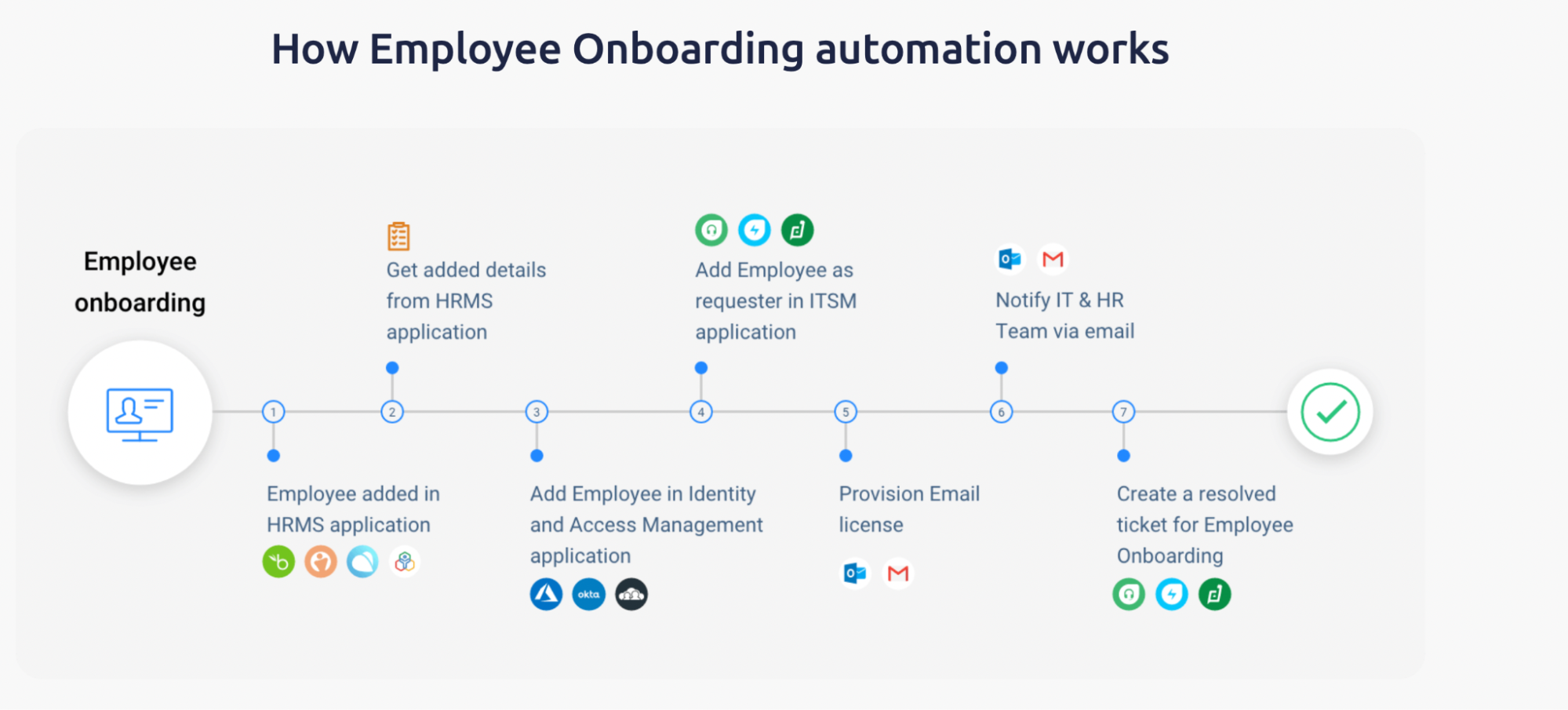
1. Employee added in HRMS
2. Onboarding workflow pulls added details from the HRMS
The automation retrieves the new hire's role, department, location, and start date directly from the HRMS record, so no one has to re-enter that information manually in a second system.
3. Employee is added to the Identity and Access Management application
Using the pulled details, the workflow creates the employee's identity in tools like Okta or Azure AD, setting up the access permissions tied to their specific role from day one.
4. Employee is added as a requester in the ITSM application
The new hire is registered in the IT service management system so they can raise and track requests — hardware, software access, troubleshooting — as soon as they start.
5. Email license is provisioned
The workflow triggers email account creation in Outlook or Gmail, so credentials are ready before the employee's first login rather than something IT sets up reactively.
6. IT and HR teams are notified via email
Once the core provisioning steps complete, the relevant teams get an automatic notification confirming the new hire's accounts and access are ready, closing the coordination gap that manual handoffs usually create.
7. A resolved ticket is created for employee onboarding
The workflow closes the loop by generating a ticket marked resolved in the ITSM system, giving HR and IT a clean audit trail confirming employee onboarding is complete.
This entire sequence runs from a single trigger — the new hire being added to the HRMS — rather than requiring HR or IT to manually initiate each step. Workativ's employee onboarding automation connects these systems so the handoffs between HR, IT, and access management happen automatically.
Automated employee onboarding workflow at a glance
Stage | Workflow action | Result |
|---|---|---|
Employee created | HR adds the employee to the HRMS | The onboarding workflow begins |
Data retrieved | Employee information is validated | Reliable data is available for downstream systems |
Identity created | The user is added to the IAM platform | A digital identity and access profile are created |
ITSM profile created | The employee is added as a requester | The employee can access IT support services |
Email provisioned | The required license is assigned | Email and collaboration access are prepared |
HR and IT notified | Workflow updates are sent | Stakeholders can see progress and exceptions |
The same workflow can extend beyond account provisioning. Additional steps may include background-check monitoring, health requirements, location-specific compliance forms, laptop requests, payroll setup, manager approvals, training assignments, welcome communications, and employee-file storage. A well-designed workflow coordinates these activities across different applications while pausing for human review whenever a decision, exception, or sensitive case requires it.
Why automate employee onboarding?
Employee onboarding involves many connected tasks across HR, IT, Payroll, Facilities, Security, and hiring managers. Automating the repeatable parts helps these teams complete work in the right sequence, reduce delays, and give new hires a more consistent experience
1. Reduce manual coordination
Automation assigns tasks, sends reminders, and tracks dependencies across departments. HR no longer needs to follow up manually with every process owner.
2. Improve day-one readiness
Accounts, applications, equipment, documents, and workplace access can be prepared before the employee starts. This reduces the risk of new hires spending their first day waiting for essential tools.
3. Prevent missed onboarding tasks
Standardized workflows ensure that required steps are not overlooked when hiring volumes increase or responsibilities move between teams.
4. Accelerate access provisioning
Once the hire is approved, automation can initiate identity creation, application access, ITSM requests, and approval workflows through connected systems.
5. Deliver consistent employee communication
New hires and managers can automatically receive welcome messages, document requests, reminders, task instructions, and progress updates at the appropriate time.
6. Strengthen compliance and auditability
Automated workflows create a record of completed documents, approvals, system updates, and outstanding exceptions. Sensitive decisions or compliance issues can still be routed for human review.
7. Reduce onboarding support requests
Providing employees with approved answers, task guidance, and status updates through Microsoft Teams, Slack, or a self-service interface reduces repetitive questions to HR and IT.
8. Measure and improve the process
Automation gives teams visibility into completion times, delayed tasks, failed actions, approval bottlenecks, and recurring exceptions. These insights help improve future onboarding workflows.
Employee onboarding automation does not remove HR or manager involvement. It removes repetitive administration so they can focus on welcoming the employee, clarifying expectations, and supporting a successful start.
Key components of good onboarding automation
Good onboarding automation works across three layers: an intelligence layer that decides what happens next, an access layer that lets people interact with the process, and a trust layer that keeps it secure and connected.
1. Intelligence layer
AI agentic triggers
Agentic triggers let an AI agent evaluate each new hire's role, location, and department, then decide which workflow to kick off. A remote engineer and an office-based sales hire can trigger different downstream actions automatically, without HR building separate processes for each.
Routing
Routing sends each task to the right owner the moment it's triggered — background checks to compliance, access requests to IT, location paperwork to the right regional HR contact — instead of tasks sitting in a shared inbox until someone notices.
Status updates
Real-time status updates give HR, IT, and the new hire visibility into where onboarding stands without anyone asking. No more emailing to check if a background check cleared or access has been provisioned.
User personalization
Personalization adapts the onboarding path automatically based on role and location — remote hires see shipping and setup instructions, office hires see parking and desk details — without HR maintaining separate manual workflows for each case.
2. Access layer
24/7 AI agents for self-service
A 24/7 AI agent answers common onboarding questions — policies, benefits, IT issues — anytime, so new hires aren't stuck waiting on HR's business hours during the week they have the most questions.
Multi-channel team inbox
A multi-channel inbox consolidates onboarding requests from email, Slack, Teams, and chat into one view, reducing the chance a request gets missed because it came through a channel no one was watching.
Team collaboration
Shared visibility lets HR, IT, and managers coordinate on a single record instead of passing information back and forth manually — the fix for IT not knowing a hire started because systems never synced.
3. Trust layer
Seamless integrations with multiple systems
Automation is only as good as its integrations. Connecting HRMS, identity management, ITSM, and email lets data flow automatically instead of being re-entered by hand at each stage.
Industry-ready templates
Pre-built templates for common roles and departments let HR launch workflows without designing every process from scratch, and keep onboarding consistent across teams.
Multi-layer security
Onboarding automation handles sensitive data — compliance documents, background checks, identity information — so encryption, role-based access, and audit trails are baseline requirements, not add-ons.
How to automate employee onboarding step by step
Learning how to automate employee onboarding begins with understanding the complete journey, not simply digitizing forms or creating a few IT tickets. A reliable onboarding workflow connects employee data, systems, approvals, tasks, communications, and human decisions from the initial hiring event through day-one readiness and longer-term onboarding milestones.
The following 13 steps help HR and IT teams build an automated onboarding process that is structured, measurable, and easier to scale.
Step 1. Define where the onboarding workflow starts and ends
Start by deciding which part of the employee journey you want to automate. Without a clear scope, onboarding workflows can become too large, difficult to test, and hard to manage.
Possible scopes include:
Signed offer to cleared new hire
Cleared new hire to active employee
Active employee to day-one readiness
First day through 90-day onboarding
IT provisioning only
Full HR and IT onboarding
Set a specific completion outcome for the workflow.
For example:
The employee has completed all mandatory checks, has an active employee record, has received the required accounts and licenses, and is ready to begin work.
A measurable outcome makes it easier to determine whether the workflow succeeded, failed, or completed with unresolved issues.
Step 2. Map the current onboarding workflow across teams
Document the process as it operates today before choosing tools or configuring automation.
Include every team involved in onboarding:
Recruiting
HR
IT
Payroll
Compliance
Hiring managers
Facilities
Learning and development
For every activity, record the following information:
Field | What to document |
|---|---|
Task | What must be completed? |
Owner | Which person or team is responsible? |
System | Where is the task performed? |
Input | What information is required? |
Trigger | What starts the task? |
Dependency | What must happen first? |
The map should reveal where employee data is re-entered, which teams rely on email handoffs, where approvals become delayed, and which tasks have no clear owner.
Step 3. Identify the system of record and required employee data
Choose the system that owns the authoritative employee record. In many organizations, the HRMS or HCM platform becomes the primary source, while the ATS owns candidate data before the employee is hired. The quality of that candidate data depends heavily on how it was evaluated before the offer stage. Recruiting teams that use automated candidate screening to score CVs and LinkedIn profiles against real job requirements, rather than relying on keyword matching, tend to hand off cleaner, better-documented candidate records to HR, since every score already carries a plain-English explanation of skills, experience, and knockout criteria that HR and compliance can reference later.
Determine:
Which system creates the initial hiring event
Which system owns employee data after hiring
Which fields downstream applications require
Who can create or update employee information
How duplicate records are identified and prevented
How changes to role, manager, location, or start date are handled
Which data can be shared with each connected system
Common required fields include:
Legal and preferred name
Personal and work email address
Department and job title
Reporting manager
Employment type
Work location
Start date
Cost centre
Access requirements
Clear data ownership prevents conflicting information from being distributed across HR, payroll, identity, and IT systems.
Step 4. Identify manual tasks that can be removed
Prioritize activities that are repetitive, predictable, and easy to verify.
Strong automation candidates are usually:
Rules-based
High-volume
Time-sensitive
Dependent on structured data
Repeated for most employees
Supported by connected applications
Easy to confirm as complete
Typical examples include:
Copying employee information between systems
Creating standard HR or IT tickets
Assigning onboarding forms
Sending reminders
Checking task status
Creating user accounts
Assigning standard licenses
Sending completion notifications
Scheduling orientation sessions
Moving documents to employee folders
Do not automate a task only because it is repetitive. Confirm that the process has stable rules and a reliable way to verify the outcome.
Step 5. Identify human decisions and approval points
Some onboarding activities should remain human-led or require explicit approval.
Keep people involved in:
Compensation discrepancies
Adverse background-check decisions
Accommodation requests
New or unsupported work-location decisions
Legal and policy exceptions
High-risk access approvals
Sensitive employee conversations
Unusual employment arrangements
Final clearance decisions where required
For each human checkpoint, define:
Who must review the case
What information they need
How they receive the request
How long they have to respond
What happens after approval or rejection
Who receives the escalation if the request is delayed
The purpose of automation is to reduce administrative coordination, not remove judgment, accountability, or empathy.
Step 6. Remove process inefficiencies and data discrepancies
Fix the underlying workflow before automating it. Automation can move errors faster if the process already contains inconsistent data, unclear ownership, or redundant approvals.
Resolve issues such as:
Duplicate employee records
Missing mandatory fields
Conflicting job or compensation data
Unclear task ownership
Redundant approval stages
Inconsistent naming conventions
Unnecessary email handoffs
Outdated forms and policies
Tasks completed in multiple systems
Steps with no defined completion result
For example, if different teams use separate department names for the same function, identity and application-access rules may assign the wrong permissions. Standardizing the data first reduces downstream failures.
Step 7. Select the required integrations
Identify every system the onboarding workflow must read from, update, or monitor.
System category | Example purpose |
|---|---|
HRMS or HCM | Employee record, job information, and onboarding status |
ATS | Candidate, recruiter, and offer information |
Identity platform | User creation, group membership, and role assignment |
ITSM | Requests, tasks, status tracking, and audit records |
Background-check platform | Screening initiation and result monitoring |
Health platform | Appointment and requirement tracking |
For each integration, confirm:
Whether the platform can read and write data
Which authentication method it uses
Which permissions are required
Whether a test environment is available
How failures and rate limits are handled
Whether the result of an action can be verified
An integration that only creates a request may not automate the full process. In many cases, the workflow must also monitor the request and confirm completion.
Step 8. Configure triggers, conditions, actions, and results
Build every step around a consistent workflow structure.
Trigger: What starts the step?
Condition: Which rules determine whether it should run?
Action: What should the system do?
Expected result: What proves the action succeeded?
Failure path: What happens when the result is not achieved?
Owner: Who handles the exception?
Timeout: How long should the workflow wait?
For example:
When a candidate receives final clearance, check the employee’s department, location, and employment type. Create the correct identity profile, assign the approved email license, and verify both actions. If provisioning fails, create an IT task, notify the assigned owner, and pause dependent steps.
Conditions can personalize the workflow based on:
Role
Department
Work location
Employment type
Seniority
Remote or office-based status
Required applications
Compliance obligations
Every critical action should have a verifiable outcome. Starting an action is not the same as completing it successfully.
Step 9. Add approvals, human help, and escalation paths
Design explicit paths for activities that cannot continue automatically.
Common scenarios include:
Manager approvals
HR reviews
IT fulfilment tasks
Compliance decisions
Missing employee information
Rejected requests
Failed integrations
Delayed background checks
Unavailable licenses
Start-date changes
Candidate withdrawals
A well-designed escalation should include:
The reason the workflow stopped
Employee and request context
Actions already completed
The decision or task required
A due date
Reminder rules
The next step after resolution
Dependent activities should pause when a mandatory check or approval is incomplete. For example, final account activation may need to wait until the employee receives formal clearance.
Step 10. Deploy employee support in Teams, Slack, or web chat
Give new hires access to onboarding support through the channels they already use.
Employees should be able to:
Ask onboarding questions
Check the status of tasks
Submit missing information
Initiate approved requests
Receive reminders and updates
Find policies and documents
Escalate a question to HR or IT
The conversational experience should connect to the underlying onboarding workflow rather than acting as a standalone FAQ bot.
For example, when an employee asks, “Has my laptop been ordered?”, the AI agent should be able to retrieve the request status, provide an accurate update, and escalate the issue if delivery is delayed.
Answers should come from approved company knowledge and use relevant employee context such as role, location, start date, and onboarding stage.
Step 11. Test the onboarding workflow
Test both the normal path and realistic exception scenarios before launch.
Recommended test cases include:
All required employee information is complete
Manager information is missing
Work location is unsupported
A duplicate employee record already exists
The background check is delayed
A health appointment is missed
The user account already exists
The required license is unavailable
An approval is rejected
The employee’s start date changes
The candidate withdraws
An integration fails midway
A notification cannot be delivered
A document transfer fails
A dependent task runs before its prerequisite is complete
For each test, verify:
The correct workflow path was selected
Actions ran in the correct order
Results were recorded
Failures were visible
Notifications reached the right person
Dependent steps paused when required
The workflow did not create duplicate records or actions
Testing only the successful path leaves HR and IT unprepared for the situations that create the most operational work.
Step 12. Train teams and launch a controlled pilot
Before a wider rollout, explain how the automated process changes the responsibilities of HR, IT, managers, and support teams.
Training should cover:
What the workflow automates
What remains human-led
How approvals are completed
How exceptions are assigned
How failed actions are retried
Where workflow history can be viewed
How employee questions are escalated
Who owns ongoing workflow changes
Start with a limited pilot, such as:
One department
One location
One employment type
One onboarding workflow
A small number of new hires
A controlled launch makes it easier to identify gaps without disrupting every onboarding case.
Step 13. Monitor, optimize, and repeat
Employee onboarding automation should improve as more workflows are completed.
Review:
Delayed tasks
Repeated system failures
Manual interventions
Common employee questions
Incorrect routing
Unnecessary approvals
Completion time
Data-quality problems
Employee and manager feedback
HR and IT workload
Useful performance measures include:
Time from accepted offer to clearance
Day-one readiness rate
Manual touchpoints per employee
On-time task completion
Provisioning success rate
Average exception-resolution time
Employee self-service rate
New-hire satisfaction
Use the findings to simplify steps, improve routing, update employee knowledge, and remove avoidable exceptions. Expand to additional departments, locations, or onboarding stages only after the initial workflow is reliable.
A successful automated onboarding process does not depend on eliminating every human action. It connects predictable work across systems, verifies that each step is complete, and brings the right person in whenever judgment or intervention is needed.
A 30-60-90 day onboarding automation roadmap
A phased rollout gives HR, IT, hiring managers, and other stakeholders time to validate the process before expanding automation across the organization. The goal is to begin with one clearly defined workflow, test it with a controlled group, and improve it using real execution data and employee feedback.
First 30 days: Discover and design
Begin by documenting how employee onboarding works today, from the initial hiring trigger to the completion of day-one and post-joining tasks.
Map the current process: Record every step, handoff, approval, communication, and system update.
Identify stakeholders: Include HR, IT, Payroll, Facilities, Security, hiring managers, and process owners where relevant.
Document systems and data: List the HRIS, identity platform, ITSM system, document repositories, communication channels, and other applications involved.
Select one workflow: Start with a contained process, such as creating employee records, provisioning standard access, or sending pre-joining communications.
Define success metrics: Establish baseline measures such as completion time, manual effort, missed tasks, support tickets, and new-hire satisfaction.
Identify exceptions and human decisions: Document cases involving missing information, compliance concerns, compensation differences, special access, or policy exceptions.
By the end of the first 30 days, the team should have an agreed process map, automation scope, system requirements, ownership model, and success criteria.
Days 31–60: Configure and test
Use the approved process design to configure the workflow and validate how it behaves across standard and exceptional scenarios.
Connect applications: Integrate the HRIS, ITSM, identity management, knowledge, and communication systems required by the workflow.
Configure triggers and actions: Define what starts the process and which tasks should happen automatically.
Add approvals: Include manager, HR, IT, Payroll, or Security approvals wherever authorization is required.
Build employee communications: Prepare welcome messages, task reminders, status notifications, and instructions for new hires and managers.
Test standard and exception scenarios: Validate normal hires as well as missing data, duplicate records, delayed approvals, failed actions, and changed joining dates.
Train process owners: Ensure each owner knows how to review exceptions, approve requests, resume failed workflows, and interpret execution logs.
By day 60, the workflow should be connected, tested, documented, and ready for a controlled pilot.
Days 61–90: Pilot and improve
Launch the workflow with a limited group before using it for every new hire.
Launch with a controlled employee group: Select one department, location, employment type, or hiring cohort.
Monitor failures and delays: Review incomplete actions, integration errors, approval bottlenecks, and tasks that still require manual follow-up.
Collect HR and new-hire feedback: Ask whether instructions were clear, communications arrived at the right time, and the experience felt coordinated.
Adjust rules and routing: Refine conditions, task ownership, reminders, approvals, and escalation paths using pilot findings.
Measure outcomes: Compare completion time, manual effort, missed tasks, onboarding tickets, and employee feedback with the original baseline.
Plan the next workflow: Once the first process is stable, expand into areas such as equipment readiness, application provisioning, compliance tracking, benefits enrollment, or 30-60-90 day follow-ups.
At the end of 90 days, the organization should have one proven onboarding workflow, measurable results, documented exception handling, and a repeatable approach for expanding automation.
What manual onboarding actually looks like
Here is what a real manual onboarding workflow looks like before automation — the kind of process HR and IT teams are often still running by hand across a stack of disconnected systems.
Manual onboarding workflow: candidate transition from signed offer to cleared new hire
Ticket and offer validation — Review the onboarding ticket against the offer letter, and manually update recruiter and compensation details. Systems: PeopleHub, document storage
Onboarding setup — Review the onboarding record for job, compensation, and location details, then manually select the correct onboarding workflow. Systems: UKG Onboarding Portal
Work location and compliance — Validate the work location, coordinate any new-location setup, and complete state-specific compliance forms by hand. Systems: UKG Onboarding, Outlook
Background check monitoring — Track background check status and manually review results as they come in. Systems: Victig, PeopleHub, Outlook
Health requirements (TB screening) — Monitor appointment scheduling and results for required health screenings. Systems: Mobile Health, PeopleHub
Onboarding completion tracking — Manually monitor overall onboarding status and follow up on any outstanding items. Systems: UKG Onboarding, PeopleHub
Final clearance — Confirm every requirement is complete before the new hire is cleared. Systems: UKG Onboarding, PeopleHub, Outlook
Pre-hire administration — Assign an I-9 reviewer and manually submit the form for processing. Systems: UKG Onboarding, Teams
File management — Move the recruiting file into the employee's permanent file and close out the ticket. Systems: SharePoint, PeopleHub
Nine steps, six different systems, and no single point where status updates automatically — every handoff between offer validation, background checks, compliance, and file closure depends on someone manually checking, updating, and notifying the next person in line. This is the exact workflow automated employee onboarding is designed to replace: the same steps still happen, but triggers and integrations handle the checking and notifying instead of a person doing it by hand across six systems.
What should remain human during employee onboarding?
Not every onboarding activity should be automated. Routine coordination, validation, reminders, and system updates are good candidates for automation, while decisions involving judgment, sensitivity, risk, or employee relationships should remain human-led or human-approved.
Suitable for automation | Keep human-led or human-approved |
|---|---|
Standard employee-data validation | Compensation discrepancies and exceptions |
Routine document requests | Sensitive background-check decisions |
Task creation and routing | Accommodation discussions |
Standard account provisioning | High-risk access approvals |
Reminders and status checks | Legal and policy interpretation |
Approved policy answers | Employee-relations matters |
AI agents do not replace HR teams during onboarding. They reduce repetitive administrative work, surface exceptions, and give employees faster access to approved information. HR, managers, legal teams, and compliance specialists retain responsibility for sensitive decisions, personal support, and final accountability.
The right balance allows companies to automate onboarding without making it impersonal: systems handle predictable coordination, while people focus on judgment, empathy, feedback, and relationship-building.
How Workativ helps automate employee onboarding
Workativ acts as an orchestration and employee-support layer connecting approved knowledge, business applications, automated actions, and human teams. HR and IT can use it to guide new hires, coordinate onboarding workflows across systems, and manage exceptions without relying on disconnected portals or repeated manual follow-ups.
Build onboarding AI agents without coding
Teams can configure no-code AI agents to support employees throughout onboarding. The agent can:
Answer common onboarding questions
Retrieve relevant employee context
Start approved HR or IT workflows
Route requests to the correct team
Provide task and provisioning updates
Escalate sensitive or unresolved cases
HR teams can automate predictable requests while retaining control over decisions that require human judgment.
Workativ has a nice video on how to build an AI agent for your employee support. You can watch that to easily have a sense of creating your onboarding AI agents without writing a single line of code.
Connect employee knowledge with actions
Workativ combines approved company knowledge with connected workflows using Knowledge AI that ensures LLM-grounded knowledge with external proprietary data at its highest accuracy level. When an employee asks a question, the AI agent can:
Understand the request and employee context
Retrieve the relevant policy or process information
Identify the appropriate next step
Trigger an approved action
Check whether the action succeeded
Bring in HR or IT when intervention is required
For example, the agent can explain an equipment policy, check the status of a laptop request, and route a delayed delivery to IT from the same conversation.
Connect HR and IT applications
Workativ can coordinate onboarding activities across the applications used by different teams, including:
HRMS and HCM platforms
Identity and access-management systems
ITSM and service-desk platforms
Background-screening and health platforms
Document repositories
Email applications
Microsoft Teams and Slack
Connected workflows reduce duplicate data entry and allow onboarding tasks to move between HR, IT, compliance, and support systems with fewer manual handoffs.
Support new hires inside familiar channels
Employees can ask questions, receive reminders, check workflow status, and initiate requests through Microsoft Teams, Slack, or other supported channels.
New hires no longer need to search multiple portals to understand what is pending. Support is available inside the tools they already use, with answers personalized according to their role, location, start date, and onboarding stage.
Route exceptions to HR or IT
Not every onboarding case follows the standard path. Missing employee data, failed provisioning, delayed checks, rejected approvals, or sensitive questions can be routed to the appropriate team with the full context.
HR and IT can see:
What the employee requested
Which actions have already run
Where the workflow stopped
What decision or task is required
Which deadlines or dependencies are affected
The workflow can resume after the exception is resolved instead of restarting the entire process.
Maintain security and workflow control
Workativ helps organizations govern onboarding automation through controls such as:
Answers grounded in approved knowledge
Restricted and permission-aware actions
Role-based access
Workflow and interaction history
AI guardrails
Human approval for sensitive steps
Protection of personally identifiable information
These controls allow HR and IT to automate routine onboarding work while keeping sensitive employee data, high-risk actions, and final decisions under appropriate human oversight.
Employee onboarding use cases Workativ can automate across different tools
Workativ can coordinate onboarding across HR, IT, compliance, identity, communication, and document systems. Each workflow can trigger actions, monitor progress, notify stakeholders, and route exceptions to the appropriate team.
Use case | Workativ workflow | Integrated tools | Human checkpoint and outcome |
|---|---|---|---|
1. Validate offer and onboarding details | Retrieve the ticket and offer, compare candidate and compensation data, and flag discrepancies. | PeopleHub, document storage, Teams or email | Recruiters review exceptions before accurate data moves forward. |
2. Create the onboarding record | Create or update the candidate record, select the correct workflow, and assign required tasks. | PeopleHub, UKG Onboarding | HR reviews unsupported roles or employment arrangements. |
3. Assign location-based requirements | Validate the work location, assign relevant forms, and track outstanding compliance tasks. | UKG Onboarding, PeopleHub, Outlook | HR or compliance reviews new or exceptional locations. |
4. Monitor background checks | Check screening status, record updates, send reminders, and pause clearance when requirements are incomplete. | Victig, PeopleHub, Outlook | Authorized HR staff review sensitive results and exceptions. |
5. Track health and TB requirements | Monitor appointments and results, remind candidates, and escalate delays. | Mobile Health, PeopleHub, Outlook or Teams | HR handles medical exceptions and unresolved requirements. |
6. Track onboarding completion | Monitor forms, approvals, and tasks while sending reminders and progress updates. | UKG Onboarding, PeopleHub, Outlook, Teams | HR sees completed, pending, overdue, and blocked activities. |
These workflows show how Workativ can connect employee data, onboarding applications, screening providers, identity platforms, service desks, and communication channels. Routine actions continue automatically, while sensitive decisions and failed steps remain under human control.
Common employee onboarding automation mistakes
Employee onboarding automation can reduce manual effort, but poorly designed workflows may create faster failures rather than better outcomes. Avoid these common mistakes when building the process.
1. Automating an inefficient process
Clarify task ownership, dependencies, approvals, and expected outcomes before introducing automation. A confusing manual process will remain confusing after it is automated.
2. Using inconsistent employee data
Establish a trusted system of record and define mandatory fields for job, manager, location, employment type, and start date. Inconsistent data can lead to incorrect workflows, duplicate accounts, and access errors.
3. Ignoring exception scenarios
Create clear paths for missing information, rejected approvals, delayed checks, failed actions, and unusual employee cases. Every exception should have an owner and escalation process.
4. Allowing workflows to continue after critical failures
Mandatory requirements should block dependent steps when incomplete. For example, final clearance or account activation should not continue after a failed compliance check.
5. Giving integrations excessive permissions
Apply least-privilege access to every connected application. Each integration should only read or update the information required for its assigned workflow actions.
6. Removing meaningful human interaction
Automate coordination, not connection. Manager introductions, team welcomes, coaching, feedback, accommodations, and sensitive conversations should remain human-led.
7. Testing only the successful path
Test duplicate records, rejected approvals, missing managers, unavailable licenses, delayed screenings, and integration failures—not just the ideal workflow.
8. Closing tasks without verifying results
Starting an action does not confirm completion. The workflow should verify that accounts were created, licenses assigned, files transferred, and notifications delivered before marking onboarding tasks as complete.
How to measure employee onboarding automation success
Employee onboarding automation should be measured by outcomes, not simply by the number of tasks automated. The most useful metrics show whether employees are ready sooner, whether HR spends less time on administration, and whether errors and exceptions are decreasing.
KPI | What it measures |
|---|---|
Onboarding cycle time | Time from signed offer to final clearance or employee readiness |
Day-one readiness rate | Percentage of employees with the required accounts, access, equipment, and information before joining |
On-time completion rate | Percentage of onboarding tasks completed before their deadlines |
Manual touchpoints per hire | Number of activities that still require HR, IT, or manager intervention |
Data-error rate | Frequency of missing, incorrect, conflicting, or duplicate employee information |
Exception rate | Percentage of onboarding cases that require human review or intervention |
Track these metrics before and after automation to establish a reliable baseline. Improvements in day-one readiness, cycle time, self-service resolution, and manual effort provide a clearer view of whether the onboarding workflow is delivering real value.
How to choose the best employee onboarding automation tool
The best employee onboarding automation tool should support the full process, not just isolated tasks such as sending forms or creating tickets. Evaluate how well the platform connects systems, manages long-running workflows, supports human intervention, and protects employee data.
Selection criterion | What to evaluate | Questions to ask |
|---|---|---|
Workflow depth | Branches, dependencies, waits, conditions, and multi-stage processes | Can it automate the complete onboarding journey? |
App integrations | HR, IT, identity, payroll, screening, document, and collaboration systems | Can it read from and update our existing applications? |
Trigger options | App events, forms, schedules, webhooks, and employee conversations | Can the workflow start from a reliable hiring event? |
Routing and personalization | Rules based on role, location, department, and employment type | Can different employees follow different onboarding paths? |
Status monitoring | Scheduled checks, reminders, timeouts, and escalations | Can it monitor background checks, approvals, and other long-running tasks? |
Human approvals | Reviews, approvals, assigned tasks, and exception handling | Can people intervene without losing workflow context? |
Choose a platform based on workflow reliability and integration depth rather than feature count alone. The right tool should automate routine actions, verify results, pause when critical steps fail, and bring HR or IT into the process whenever human judgment is required.
If you are interested in choosing one for your organization, a closer comparison of onboarding automation platforms shows where these differences matter most in practice and help you make an informed decision.
Turn employee onboarding into a connected, scalable process
Employee onboarding automation is not simply about replacing forms with digital checklists. A reliable process connects employee data, HR and IT systems, approvals, tasks, communications, and status updates across the entire onboarding journey.
AI agents can guide new hires, answer routine questions, trigger approved actions, and keep workflows moving. Sensitive decisions, coaching, manager introductions, and meaningful employee conversations should remain human-led.
The best approach is to begin with one predictable, high-friction process—such as account provisioning, document collection, or clearance tracking—prove that it works reliably, and then expand automation across the wider onboarding journey.
Ready to replace onboarding spreadsheets, portal checks, and follow-up emails with connected workflows? See how Workativ helps HR and IT teams automate employee onboarding across HRMS, identity, ITSM, compliance, document, and collaboration systems while keeping people in control of approvals and exceptions.
FAQs
1. What is employee onboarding automation?
Employee onboarding automation uses connected workflows, integrations, rules, and AI agents to coordinate repeatable onboarding activities. It can validate employee data, assign tasks, provision accounts, send reminders, monitor completion, and route exceptions to HR or IT.
2. How do you automate employee onboarding?
Start by mapping the existing process, identifying systems and task owners, separating repeatable work from human decisions, and fixing data inconsistencies. Then connect the required applications, configure triggers and actions, add approvals and escalation paths, test different scenarios, and improve the workflow using performance data.
3. How does automated employee onboarding work?
A hiring event, such as an accepted offer or a new HRMS record, triggers the workflow. Employee information is validated and then used to create accounts, assign licenses, initiate checks, route approvals, send updates, and record completion across connected systems.
4. Which employee onboarding activities can be automated?
Common activities include:
Offer and employee-data validation
Document collection and e-signatures
Background-check monitoring
Account and email provisioning
Application-access requests
Equipment requests
Training assignments
Reminders and status updates
Policy acknowledgements
30-, 60-, and 90-day follow-ups
5. Which onboarding tasks should remain human-led?
Sensitive decisions and relationship-based activities should remain human-led or human-approved. Examples include compensation exceptions, adverse background-check decisions, accommodation discussions, legal interpretation, high-risk access approvals, coaching, feedback, and manager introductions.
6. How can AI agents improve employee onboarding?
AI agents can answer new-hire questions, retrieve approved policies, personalize guidance, check onboarding status, initiate workflows, and route unresolved cases to the appropriate team. They help employees receive faster support without removing human oversight.
7. Can employee onboarding be automated through Microsoft Teams or Slack?
Yes. Employees can use Teams or Slack to ask questions, receive reminders, check task status, submit information, and initiate approved requests. The conversational experience should connect to the underlying onboarding workflow rather than operate only as an FAQ chatbot.
8. What integrations are needed for onboarding automation?
The required integrations depend on the workflow, but commonly include:
ATS
HRMS or HCM
Identity and access management
ITSM
Payroll
Background-screening platforms
Document repositories
Learning systems
Email
Microsoft Teams or Slack
9. How does Workativ automate employee onboarding?
Workativ connects approved employee knowledge, AI agents, business applications, automated actions, and human teams. It can coordinate workflows across HRMS, identity, ITSM, compliance, document, email, and collaboration systems while providing employee self-service and routing exceptions to HR or IT.
'%3e%3cpath%20d='M11.5732%2031.7068L19.2977%2022.7433L11.5732%2011.5366H17.4664L22.6245%2018.942L29.0522%2011.5366H30.7788L23.4029%2020.0985L31.4127%2031.7086H25.4997L20.1231%2023.9069L13.3197%2031.7068H11.5732ZM16.6519%2012.8366H13.9536L26.354%2030.4462H28.9926L28.8265%2030.1576L16.6519%2012.8366Z'%20fill='%230C0C0C'/%3e%3c/g%3e%3cdefs%3e%3cclipPath%20id='clip0_505_14364'%3e%3crect%20width='19.7681'%20height='20.2432'%20fill='white'%20transform='translate(11.573%2011.5365)'/%3e%3c/clipPath%3e%3c/defs%3e%3c/svg%3e)

'%3e%3cpath%20d='M25.2175%2011.7557L26.9132%2011.911V15.0496C26.0135%2015.1444%2024.1746%2014.7452%2023.5821%2015.5947C23.4908%2015.726%2023.3291%2016.1592%2023.3291%2016.3091V19.002H26.7392L26.3346%2022.5281H23.3291V31.5952H19.707V22.5863L19.649%2022.5281H16.6628V19.002H19.707C19.7813%2017.4024%2019.4664%2015.7042%2020.1132%2014.1986C20.6748%2012.8902%2021.7857%2012.0974%2023.1666%2011.8435L23.7151%2011.7557H25.2183H25.2175Z'%20fill='%230C0C0C'/%3e%3c/g%3e%3cdefs%3e%3cclipPath%20id='clip0_505_14375'%3e%3crect%20width='10.2695'%20height='19.8027'%20fill='white'%20transform='translate(16.658%2011.7567)'/%3e%3c/clipPath%3e%3c/defs%3e%3c/svg%3e)
About the Author
Deepa Majumder

Senior content writer
Deepa Majumder is a writer who nails the art of crafting bespoke thought leadership articles to help business leaders tap into rich insights in their journey of organization-wide digital transformation. Over the years, she has dedicatedly engaged herself in the process of continuous learning and development across business continuity management and organizational resilience.
Her pieces intricately highlight the best ways to transform employee and customer experience. When not writing, she spends time on leisure activities.
Auto-resolve 60% of Your Employee
Queries With AI Agents & Automation
- No credit card required
- Setup in minutes
- Cancel Anytime
