

Employees can ask questions, reset passwords, check ticket status, and request application access directly through Microsoft Teams or Slack without navigating multiple ITSM portals.
Integrating generative AI with existing ITSM tools for seamless support operations: implementation strategies, integration patterns & transformation best practices.


An employee needs to reset their password and asks for help in Microsoft Teams. Instead of navigating an ITSM portal or waiting for support, an AI agent can verify their identity, trigger an approved password reset workflow, and confirm when the issue is resolved.
This is how generative AI integration with ITSM is evolving. While generative AI helps service desks answer questions, summarize tickets, and retrieve information through Knowledge AI, modern AI agents go further by executing IT support workflows across connected systems.
By integrating AI with existing ITSM platforms such as ServiceNow, Jira Service Management, or Freshservice, organizations can automate repetitive requests, accelerate incident resolution, and deliver employee self-service without replacing their current tools.
In this guide, we'll explore how generative and agentic AI work together to improve IT service management, automate everyday support tasks, and help IT teams focus on more complex issues.
Generative AI improves IT support by answering employee questions, summarizing tickets, and retrieving relevant information from enterprise knowledge bases.
Agentic AI goes beyond answering questions by executing IT workflows such as password resets, account unlocks, ticket creation, and access requests with appropriate authorization.
Integration with existing ITSM tools like ServiceNow, Jira Service Management, and Freshservice enables AI agents to automate support tasks across connected systems.
No ITSM replacement required: Organizations can extend their existing ITSM investments with AI-powered conversational support, reducing repetitive workloads and improving employee self-service.
Generative AI integration in IT Service Management (ITSM) means connecting AI-powered capabilities with existing ITSM platforms to automate employee support, improve knowledge retrieval, and streamline service desk operations.
Unlike traditional rule-based chatbots that follow predefined responses, generative AI uses large language models (LLMs) to understand employee requests, retrieve relevant information, summarize incidents, and generate contextual answers. When combined with Knowledge AI, it can provide responses grounded in an organization's IT documentation and support knowledge.
With the emergence of agentic AI, these capabilities extend beyond conversations. AI agents can interact with connected ITSM tools, execute approved workflows, update tickets, and coordinate tasks across enterprise applications.
Generative AI and agentic AI complement each other. Generative AI focuses on understanding and producing information, while agentic AI uses reasoning, connected tools, and workflow automation to complete IT support tasks.
Capability | Generative AI | Agentic AI |
|---|---|---|
Knowledge answers | Retrieves and generates contextual responses | Uses knowledge to guide actions and troubleshoot issues |
Ticket summaries | Summarizes incidents and conversations | Summarizes, updates, and routes tickets |
Tool execution | Requires additional automation or tool integrations | Can invoke authorized tools and workflows |
Approvals | Explains approval requirements | Can initiate approval workflows and act on approved outcomes |
Together, they enable IT teams to move from answering support questions to resolving requests through AI-powered IT support automation.
Modern ITSM platforms like ServiceNow, Jira Service Management, and Freshservice already offer ticketing, workflow automation, and AI-powered capabilities. However, IT support often extends beyond a single platform, making it difficult to deliver a connected, seamless employee experience.
Integrating generative and agentic AI with existing ITSM tools helps bridge several operational gaps:
Fragmented IT knowledge: Troubleshooting guides, policies, and resolution histories are often scattered across SharePoint, Confluence, and internal knowledge bases. AI-powered knowledge retrieval helps employees find relevant answers without searching multiple systems.
Disconnected workflows: Resolving requests such as account unlocks, software access, or employee onboarding often requires actions across ITSM, identity management, and other enterprise applications. AI agents can coordinate these workflows through approved integrations.
Limited access to support: Employees may prefer requesting IT assistance through Microsoft Teams or Slack rather than navigating multiple service portals. Conversational AI makes IT support accessible within familiar workplace channels.
Implementation costs and complexity: Extending existing systems with AI can reduce the need for platform migration, although integration, licensing, and maintenance costs still require evaluation.
Security and authorization: AI-driven workflows must respect employee permissions, enforce approval requirements, and maintain audit trails before executing sensitive IT actions.
The goal isn't to replace existing ITSM investments, but to connect knowledge, systems, and workflows so IT teams can deliver faster, more consistent support.
Generative AI integrates with ITSM platforms through APIs, enterprise knowledge sources, and workflow automation, enabling AI agents to understand employee requests and complete authorized IT tasks without replacing existing systems.
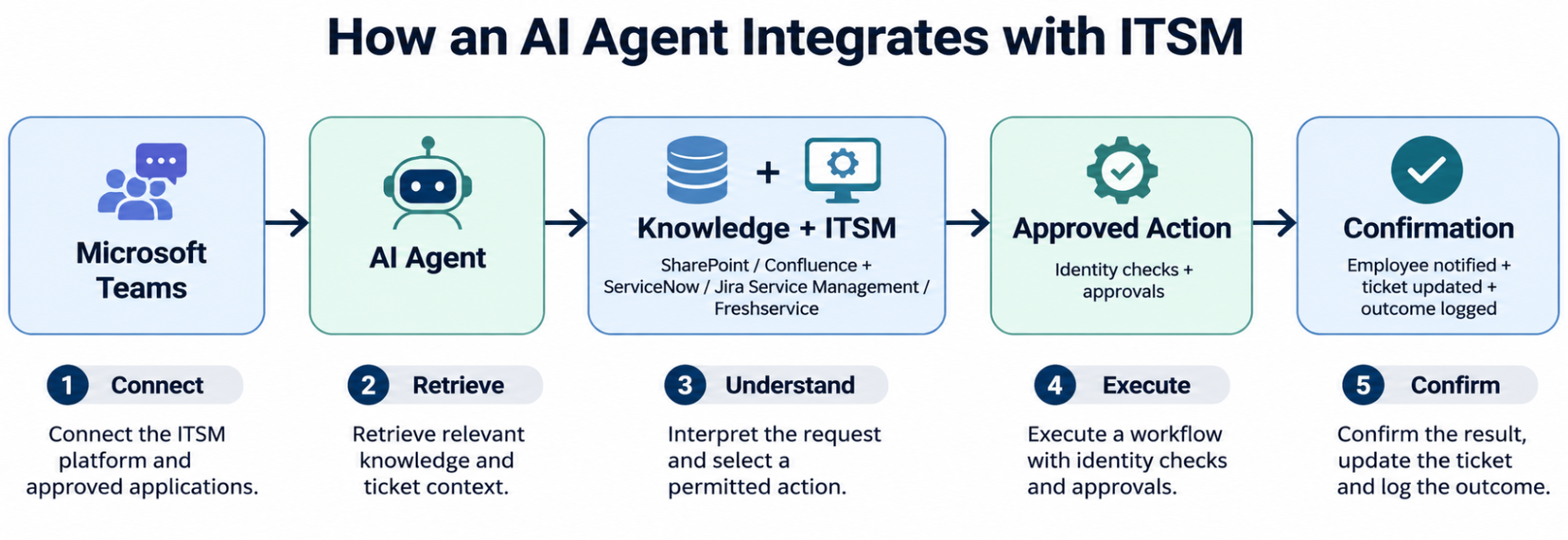
Here's how the integration works in five steps:
1. Connect existing ITSM tools and applications
Connect platforms such as ServiceNow, Jira Service Management, or Freshservice with identity management systems, knowledge bases, and employee communication channels. Available integration capabilities depend on each platform's APIs and configuration.
2. Retrieve relevant knowledge and ticket context
The AI agent retrieves approved information from sources such as SharePoint, Confluence, and existing IT tickets to understand the issue and provide contextually relevant responses.
3. Understand requests and identify actions
Using natural language understanding and AI reasoning, the agent identifies employee intent, gathers missing details, and selects an appropriate action from its permitted workflows.
4. Execute workflows with security controls
Through IT helpdesk automation, AI agents can initiate password resets, account unlocks, access requests, or ticket updates while enforcing identity verification, permissions, and required approvals.
5. Confirm resolution and update records
Once the action succeeds, the agent confirms the outcome, updates the relevant ITSM record when required, and logs the execution. Unresolved issues are escalated to IT support with the conversation context.
This approach connects conversational AI with existing ITSM processes, helping organizations automate repetitive requests while retaining their current service management investments.
Generative AI and agentic AI are transforming IT service management by helping IT teams move beyond ticket creation and basic troubleshooting. When integrated with existing ITSM platforms, AI agents can understand requests, retrieve information, execute authorized workflows, and escalate complex issues.
Here are six practical use cases for AI-powered ITSM automation.
AI agents analyze incoming requests to identify the issue, extract relevant details, and recommend ticket categories, urgency, and priority. Using configured routing rules, they can create and assign tickets in ServiceNow, Jira Service Management, or Freshservice, helping IT teams reduce manual triage and unnecessary back-and-forth.
Password-related requests are among the most repeatable IT support tasks. AI agents can verify employee identity, initiate approved password resets or account unlocks through Microsoft Entra ID, Active Directory, or Okta, and confirm the result.
This enables IT helpdesk automation while maintaining identity verification and security controls.
Employees frequently need assistance with VPN connections, Wi-Fi issues, software errors, and device setup. Generative AI uses retrieval-augmented generation (RAG) to find relevant troubleshooting instructions from approved enterprise knowledge sources.
With Knowledge AI best practices, organizations can improve answer relevance, provide source references, and reduce dependence on repetitive support tickets.
AI agents can collect access requirements, check eligibility, initiate manager approvals, and execute permitted provisioning actions across connected applications.
For example, an employee requesting software access through Microsoft Teams can receive approval and provisioning updates without manually following up with the IT service desk.
When an issue requires specialist intervention, generative AI can summarize symptoms, previous troubleshooting steps, and relevant ticket history.
Agentic workflows can then route the incident to the appropriate IT team, preserving context so employees don't need to repeat their problems.
Generative AI can turn resolved incidents, troubleshooting notes, and support conversations into draft knowledge articles.
IT experts can review these drafts for accuracy, security, and completeness before publication, helping organizations maintain useful knowledge bases and improve future self-service resolution.
Together, these use cases demonstrate how AI integration can connect knowledge, ticket management, workflow execution, and human expertise to deliver more effective IT support.
Integrating generative and agentic AI with existing ITSM platforms helps organizations improve service delivery, reduce manual effort, and provide more accessible employee support. The greatest value comes from connecting AI-powered assistance with actual IT workflows.
Here are four key benefits:
1. Faster IT issue resolution
AI agents retrieve relevant troubleshooting information, summarize incidents, and execute approved workflows, helping reduce the time employees spend waiting for IT support.
2. Higher employee self-service completion
Employees can resolve routine requests through Microsoft Teams, Slack, or other supported channels without navigating multiple ITSM portals or contacting a service desk agent.
3. Reduced repetitive workload
Automating ticket classification, account unlocks, status updates, and common support requests allows IT teams to spend more time on complex incidents and higher-value activities.
4. Improved IT service visibility
AI-powered reporting and ITSM automation can provide better visibility into recurring issues, resolution performance, escalations, and opportunities for continuous improvement.
Business benefit | Key performance indicator (KPI) |
|---|---|
Faster issue resolution | Mean Time to Resolution (MTTR) |
Higher self-service completion | Self-service resolution rate |
Reduced repetitive workload | Automatically resolved requests |
Improved service visibility | SLA attainment and escalation rate |
Tracking these metrics helps IT leaders evaluate whether AI integration is delivering measurable improvements rather than simply generating faster responses.
Implementing AI in IT service management doesn't require replacing ServiceNow, Jira Service Management, or Freshservice. Organizations can extend their existing ITSM systems with AI agents, enterprise integrations, and workflow automation.
Here's a practical approach to getting started:
1. Prioritize high-impact ITSM use cases
Identify repetitive, high-volume requests such as password resets, account unlocks, and ticket-status inquiries. Prioritize workflows based on ticket volume, complexity, automation feasibility, and potential time savings.
2. Assess integration readiness
Review available APIs, connectors, and permissions across your ITSM platform, identity management tools, and employee communication channels. Identify integration gaps before configuring workflows.
3. Prepare your IT knowledge base
Review troubleshooting guides, IT policies, and historical resolutions for accuracy. Follow Knowledge AI best practicesto improve retrieval quality and provide reliable, source-grounded answers.
4. Establish identity and authorization controls
Configure employee authentication, role-based access, approval requirements, and audit logging. Sensitive actions must follow established security policies rather than relying on AI-generated decisions.
5. Launch a controlled pilot
Start with two workflows: password resets and ticket-status retrieval. Allow employees to submit requests through Microsoft Teams, verify authorization, execute permitted actions, and confirm outcomes. Measure resolution rates, failures, and escalations.
6. Expand based on results
Review pilot performance, improve knowledge accuracy, and define human escalation paths for unresolved requests. Gradually introduce additional workflows, such as software provisioning and access management.
This phased approach helps IT teams evaluate AI-powered ITSM automation while protecting existing technology investments.
Integrating AI agents with ITSM platforms introduces security considerations, particularly when AI can access employee information, modify tickets, or execute IT workflows. Organizations need clear controls to ensure automation remains secure, accurate, and accountable.
Key security practices include:
Least-privilege access: Restrict AI agents to the systems, data, and actions required for their assigned tasks using role-based permissions.
Sensitive-data protection: Protect employee credentials, personal information, and confidential IT records through encryption, access controls, and appropriate data-handling policies.
Approval and authorization controls: Verify employee identity, check access permissions, and obtain required approvals before executing sensitive actions such as software provisioning or access changes.
Hallucination prevention: Ground AI responses in verified enterprise knowledge and validate workflow inputs to reduce inaccurate answers and unintended actions.
Audit logging: Record workflow execution, approvals, system changes, and escalations for accountability and compliance.
Safe escalation: Route uncertain, unauthorized, or unsuccessful requests to qualified IT personnel with relevant context.
With these safeguards in place, IT teams can automate routine support requests while maintaining control over sensitive operations, employee data, and access permissions.
The success of generative AI integration in ITSM goes beyond faster chatbot responses. IT teams need to measure whether AI agents actually resolve employee issues, reduce manual workloads, and improve service delivery.
Here are seven key performance indicators (KPIs) to track:
KPI | What it measures |
|---|---|
Automated resolution rate | Percentage of IT requests fully resolved by AI without human intervention |
Mean time to resolution (MTTR) | Average time taken to resolve IT issues |
Ticket deflection rate | Percentage of support requests resolved through self-service without ticket creation |
Escalation rate | Percentage of AI interactions transferred to human IT agents |
Answer accuracy | Percentage of AI responses verified as correct and relevant |
SLA attainment | Percentage of IT requests resolved within agreed service-level targets |
A chatbot answering a question doesn't necessarily mean an IT issue is resolved. For example, providing password reset instructions differs from successfully completing the reset.
Tracking completed workflows, confirmed outcomes, and employee feedback helps IT leaders evaluate the actual impact of AI-powered ITSM automation.
Workativ helps organizations extend existing ITSM platforms such as ServiceNow, Jira Service Management, and Freshservice with AI agents that go beyond answering questions to resolving IT requests. Instead of replacing existing systems, Workativ connects employee conversations, enterprise knowledge, and IT workflows in one support experience.
Employees can ask questions, reset passwords, check ticket status, and request application access directly through Microsoft Teams or Slack without navigating multiple ITSM portals.
Workativ's Knowledge AI retrieves relevant information from approved sources such as SharePoint, Confluence, and internal knowledge bases, helping employees troubleshoot issues using reliable, organization-specific information.
Through AI agents for IT support, organizations can automate ticket creation, account unlocks, access requests, and other IT workflows across connected applications, with identity checks and approvals where required.
When requests require specialist intervention, Workativ can transfer conversations to human agents or create ITSM tickets with relevant context, reducing repeated explanations and manual triage.
In its published customer case study, Workativ reports that NMDC Group automated 78% of approximately 6,000 monthly IT support tickets, allowing employees to resolve routine requests without engineer involvement.
Want to extend your existing ITSM platform with AI agents? Book a Workativ demo to explore automation opportunities for your IT service desk.
Modern IT service management is moving beyond ticket management toward faster, AI-powered issue resolution. By integrating generative and agentic AI with existing ITSM platforms, organizations can automate repetitive requests, improve employee self-service, and reduce manual workloads without replacing their current systems.
The real value lies in connecting AI agents with enterprise knowledge, IT workflows, and human expertise to deliver secure, efficient support.
Ready to make your existing ITSM platform more effective? Book a Workativ demo to explore how AI agents can transform your IT support operations.
Integrating Generative AI into existing ITSM platforms may pose challenges like data quality issues, algorithm biases, and user acceptance. To mitigate these risks, organizations should conduct thorough data audits, implement bias detection algorithms, and provide comprehensive user training.
Integrating Generative AI with existing ITSM platforms enhances the overall user experience by providing faster responses, more accurate solutions, and increased self-service capabilities. To ensure a smooth transition and adoption process, organizations should provide comprehensive training, communicate the benefits of the integration, and actively solicit user feedback to address any concerns or issues.
Generative AI integration with existing ITSM platforms offers flexibility to adapt to diverse organizational structures and workflows. For example, in large enterprises with complex IT environments, the integration can automate ticket routing based on departmental priorities, while in smaller organizations, it can streamline IT support processes through self-service capabilities tailored to specific user needs.
Yes. Generative AI can integrate with ITSM platforms such as ServiceNow, Jira Service Management, and Freshservice through APIs, connectors, and workflow automation. This allows organizations to introduce AI-powered support, ticket management, and employee self-service without replacing their existing ITSM infrastructure.
Generative AI primarily understands requests, generates responses, retrieves knowledge, and summarizes incidents. Agentic AI extends these capabilities by interacting with connected applications, executing authorized workflows, and coordinating multi-step IT tasks. Together, they support both conversational assistance and IT issue resolution.
Yes. AI agents can automatically resolve eligible IT requests such as password resets, account unlocks, and common troubleshooting issues when integrated with the necessary systems. Complex incidents, unauthorized requests, and actions requiring human judgment are escalated to IT support teams.
The cost depends on the AI platform, licensing model, number of users or interactions, required integrations, and workflow complexity. Organizations should also consider implementation, security, maintenance, and ongoing AI usage costs. Starting with a small pilot helps evaluate potential ROI before expanding automation.
Implementation timelines vary depending on integration complexity, knowledge readiness, security requirements, and the number of workflows. Simple use cases such as ticket-status retrieval may be deployed faster than multi-system automation requiring identity verification, approvals, and extensive testing. A phased implementation helps reduce operational risk.


Senior content writer
Deepa Majumder is a writer who nails the art of crafting bespoke thought leadership articles to help business leaders tap into rich insights in their journey of organization-wide digital transformation. Over the years, she has dedicatedly engaged herself in the process of continuous learning and development across business continuity management and organizational resilience.
Her pieces intricately highlight the best ways to transform employee and customer experience. When not writing, she spends time on leisure activities.